ShortCam LiteUser Guide
2、Equipment Instructions
1, Unpack the ShortCam Lite, and count the components according to the packing list (the
components mainly include the host device and Type-C cable);
2、Prop up the base of the ShortCam Lite main unit to stabilize it on a flat surface, and
stretch the stand upward to the desired height;
3、Use the Type-C cable to connect the computer and ShortCam Lite, the blue light of the
power indicator flashes, the indicator stabilizes to a constant state in about 25s, and the image
can be displayed normally on the ShortCam Lite software.
4, According to the different heights, you can turn the focus ring for clarity adjustment, if you
need to use with a microscope, you can directly remove the thermal imaging camera, use the
Type-C cable power supply can be used on the microscope.
5, The product supports WIFI connection, cell phones or computers can be used at the same
time through the WIFI connection, WIFI hotspot name ShortCam Lite_XXXXX, where
XXXXX for the product serial number after 5, such as the product serial number for the
8000E22040485288, the WIFI hotspot name is ShortCam_Lite_85288, and the WIFI
password is 12345678.
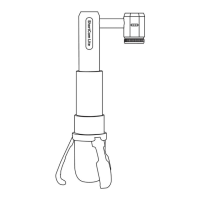
The product schematic is as follows:
Power switch and indicator


 To Next Page