ENGLISH
BEFORE YOU OPERATE THE MONITOR 5
HOW TO USE THE STAND
Install the Stand on a stable surface. The monitor may cause injury or damage if
it falls or is dropped.
Do not give a strong impact to the monitor. It may cause damage.
Unplug the monitor before installation to avoid electric shock or damage.
The monitor is shipped with the stand detached. Be sure to attach the stand before operating the
display and remove if it is necessary to re-box.
HOW TO USE THE STAND
CAUTION
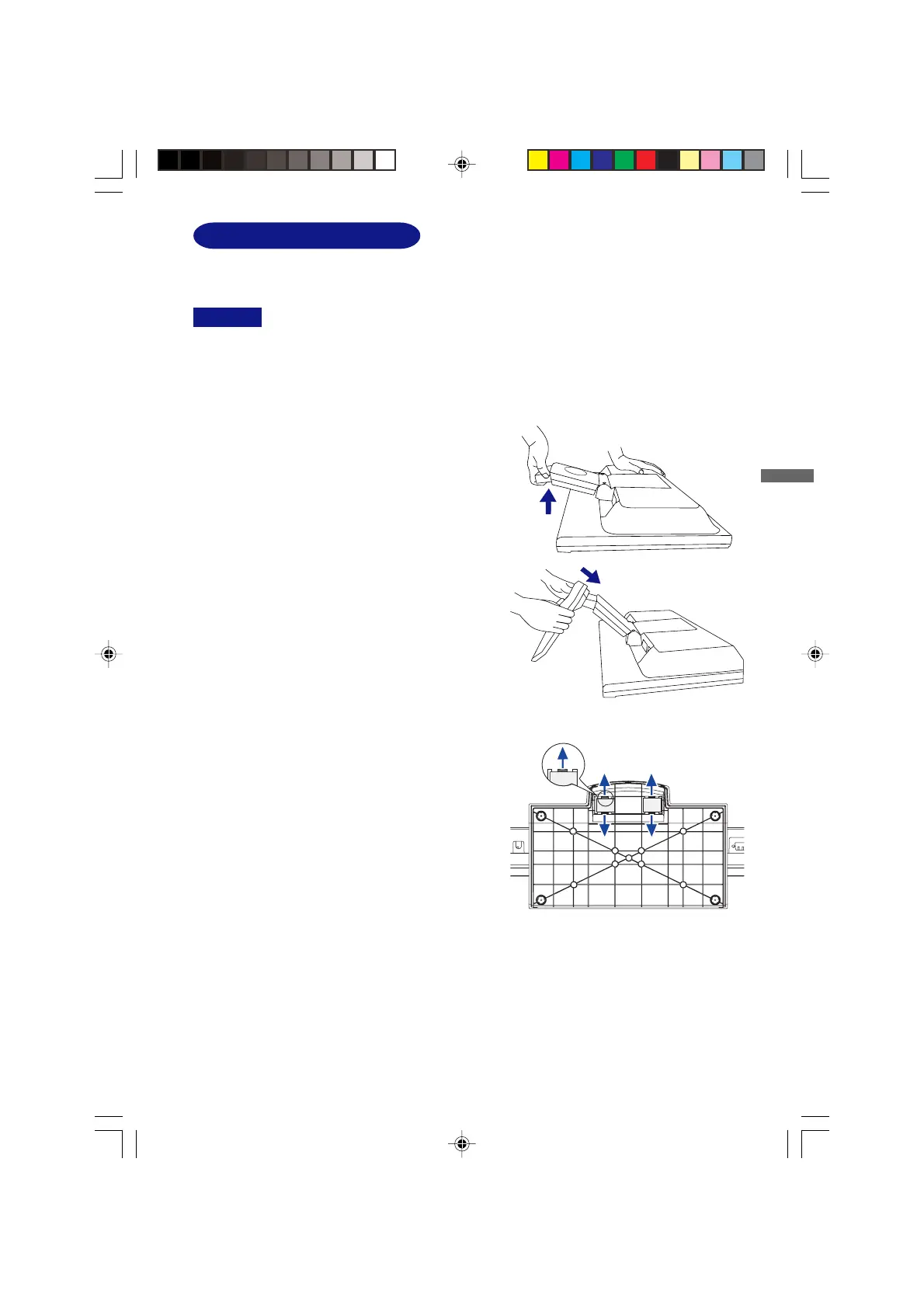
<Installation>
1. Put a piece of soft cloth on the table
beforehand to prevent the monitor from being
scratched. Lay the monitor flat on a table with
front face down.
2. The Stand-Bottom is pulled up as shown in
the figure.
3. Install the Stand-Base to the Stand-Bottom.
<Remove>
1. Put a piece of soft cloth on the table
beforehand to prevent the monitor from being
scratched. Lay the monitor flat on a table with
front face down.
2. Hold down the hooks outside and pull the
Stand-Base away from the Stand-Bottom.
PLE2200WS-e-M015A01.P65 9/7/2006, 8:56 PM9









 To Next Page