ENGLISH
6 BEFORE YOU OPERATE THE MONITOR
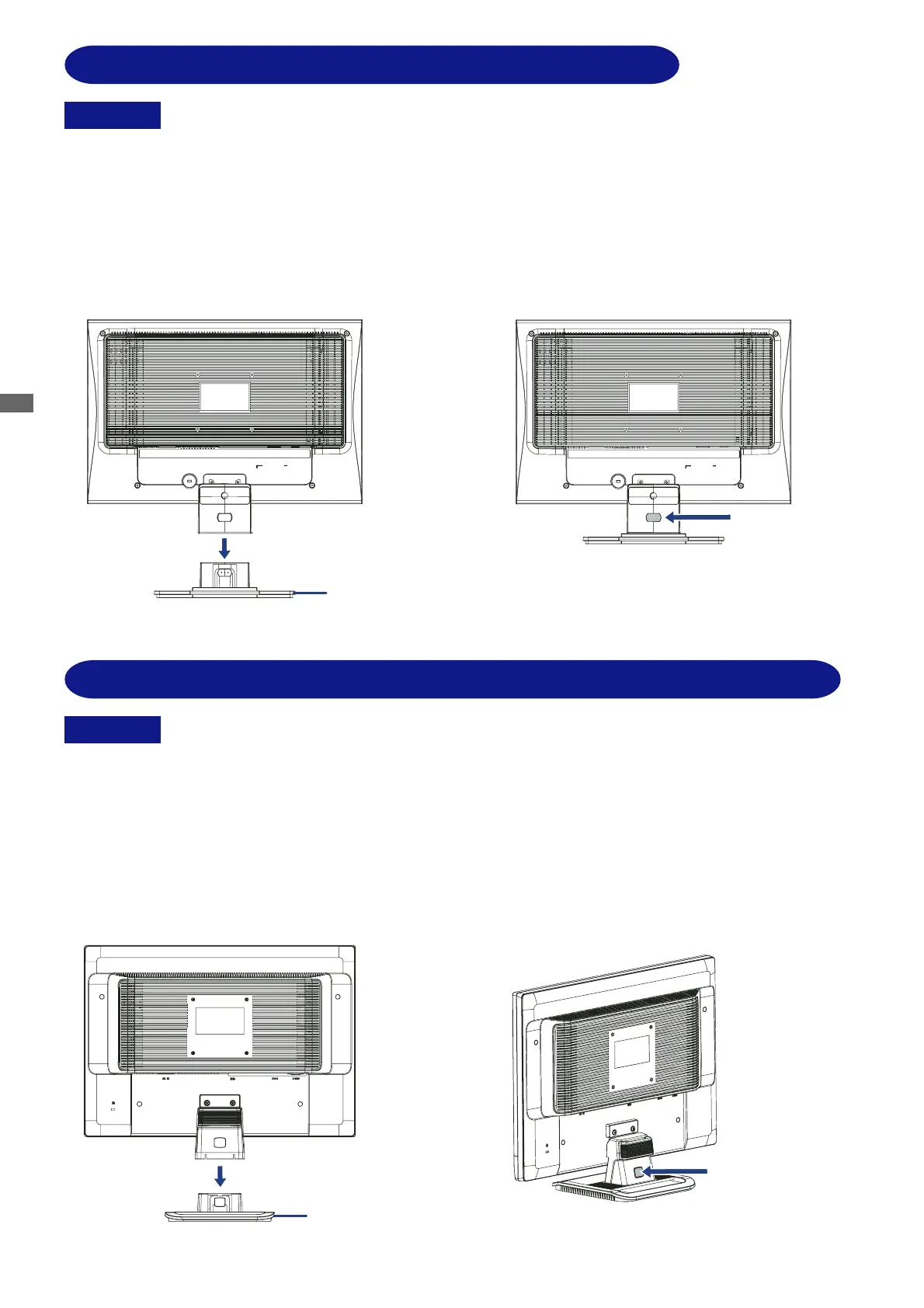
FITTING AND REMOVAL OF BASE : ProLite E2202WS / E2202WSV
Install the stand on a stable surface. The monitor may cause injury or damage if it
falls or is dropped.
CAUTION
Do not give a strong impact to the monitor. It may cause damage.
Unplug the monitor before installation to avoid electric shock or damage.
<Install>
<Remove>
Hold the monitor and push the post down
into the stand.
Press the stopper at the back of the stand
and remove the stand from the post.
Stand
Press the stopper
Install the stand on a stable surface. The monitor may cause injury or damage if it
falls or is dropped.
CAUTION
Do not give a strong impact to the monitor. It may cause damage.
Unplug the monitor before installation to avoid electric shock or damage.
<Install>
Hold the monitor and push the post down
into the stand.
<Remove>
Press the stopper at the back of the stand
and remove the stand from the post.
Stand
Press the stopper
FITTING AND REMOVAL OF BASE : ProLite E2201W






 To Next Page