ENGLISH
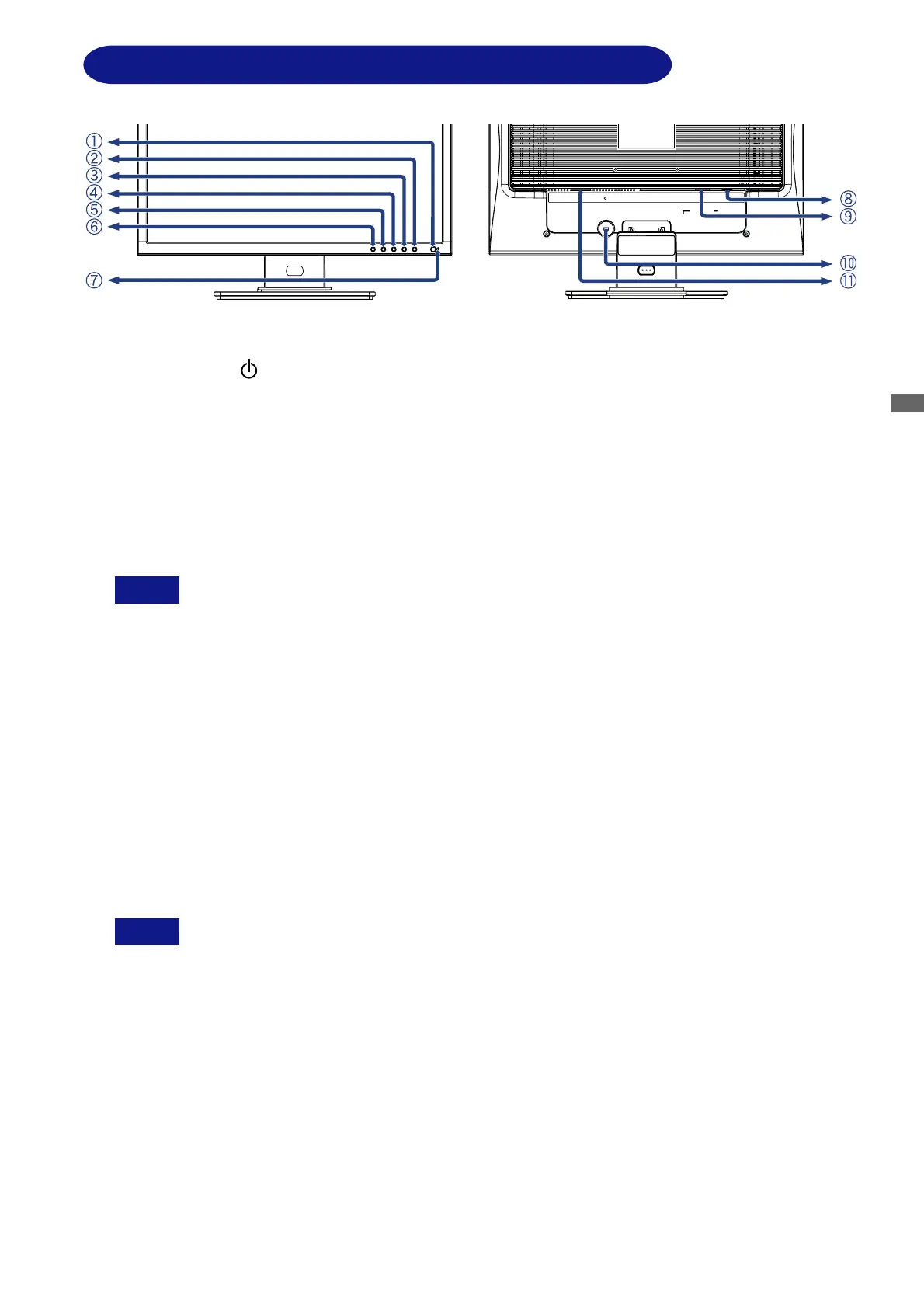
CONTROLS AND CONNECTORS : ProLite E2201W
<Front> <Back>
A
Power Switch ( )
B
Menu Button (MENU)
C
+ Button ( + )
D
– Button ( – )
E
Auto Button (AUTO)
F
Input Button (SOURCE)
G
Power Indicator
Blue: Normal operation
Orange: Power Management
Auto (Signal Select)
When no signal is received from the system, the display enters into its
Power Management Mode reducing power consumption to < than 2W.
Analog / Digital (Signal Select)
The monitor enters into power management mode which reduces the power
consumption to less than 2W when receiving no horizontal and/or vertical
sync signal.
H
D-sub mini 15pin Connector (D-SUB)
I
DVI-D 24pin Connector (DVI-D)
J
Keyhole for Security Lock
You can fasten a security lock and cable to prevent the monitor from being removed
without your permission.
K AC Connector (AC IN)
NOTE
NOTE
BEFORE YOU OPERATE THE MONITOR 7






 To Next Page