English
10
Troubleshooting
Sound is distorted.
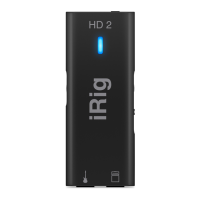
Check that the input gain on iRig HD 2 has been set properly. If the LED is red when you play your instrument,
decrease the input gain as described in this guide.
I don’t get any sound.
In order for iRig HD 2 to turn on, a Core Audio-compatible audio app must first be launched on your iOS device
or Mac.
• iOS: be sure you are using an app that works with audio input from the Lightning dock connector.
• Mac: be sure you have set “iRig HD 2” as the audio input device on the audio app you are using.
Specifications
• Conversion: 32-bit A/D, 32-bit D/A
• Sampling Rate: 32.0kHz, 44.1kHz, 48kHz, 88.2kHz and 96kHz
• Maximum Level: from 307 mVpp to 8.36 Vpp
• Gain Control Range: 28.7 dB
• Noise: -103dBA, -97dB RMS
• Distortion (THD): 0.007%
• Frequency Response: 20Hz-20kHz +/- 0.9 dB
• Maximum Level: 1.60 Vpp
• Noise: -99dBA, -94dB RMS
• Distortion (THD): 0.007%
• Frequency Response: 20Hz-20kHz +/- 0.1 dB
Warranty
Please visit:
www.ikmultimedia.com/warranty
for the complete warranty policy.
Support and more info
www.ikmultimedia.com/support
www.irighd2.com


 To Next Page