
 Need help?
Do you have a question about the IK UNO Synth Pro and is the answer not in the manual?
Lists the items included with the UNO Synth Pro.
Provides instructions and benefits for registering the product.
Details important safety warnings regarding location, power, and interference.
Guidelines for safe handling, cleaning, and maintenance of the unit.
Information on keeping the manual, avoiding foreign matter, and specification changes.
Explains all input and output connections on the UNO Synth Pro.
Describes the process of turning the unit on and its auto-calibration sequence.
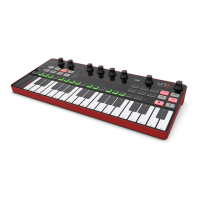
Highlights the synth's main characteristics like sound, filters, flexibility, and controls.
Details advanced connectivity options and the product's tabletop and keyboard design.
Describes the main display and the sound editing matrix layout.
Details controls for Oscillators, Mixer, Filters, LFOs, and Envelopes.
Explains the Modulation Matrix and the various digital effects available.
Provides shortcuts for advanced sound design and parameter access.
Covers storing, recalling, renaming, and initializing presets.
Explains system settings like tuning, MIDI, sync, and keyboard options.
Details how to create songs and use the built-in arpeggiator.
Describes sequencer operation and alternative editing functions.
Explains how to select and customize voice modes like Legato, Mono, and Paraphonic.
Addresses frequent problems with ARP, Sequencer, power, and interference.
Provides links to FAQs, support forms, warranty, and contact information.
 General
| Type | Analog/Digital Hybrid |
|---|---|
| Oscillators | 3 |
| LFOs | 2 |
| Waveforms | Saw, Triangle, Pulse, Sine, Noise |
| Keyboard | 37-key with aftertouch |
| Effects | Delay, Reverb, Chorus |
| Modulation Matrix | 16 slots |
| Sequencer | 64-step sequencer |
| Arpeggiator | Yes |
| Connectivity | MIDI In/Out, USB, Audio In/Out, CV/Gate |
| Envelopes | 2 ADSR envelopes |

 To Next Page