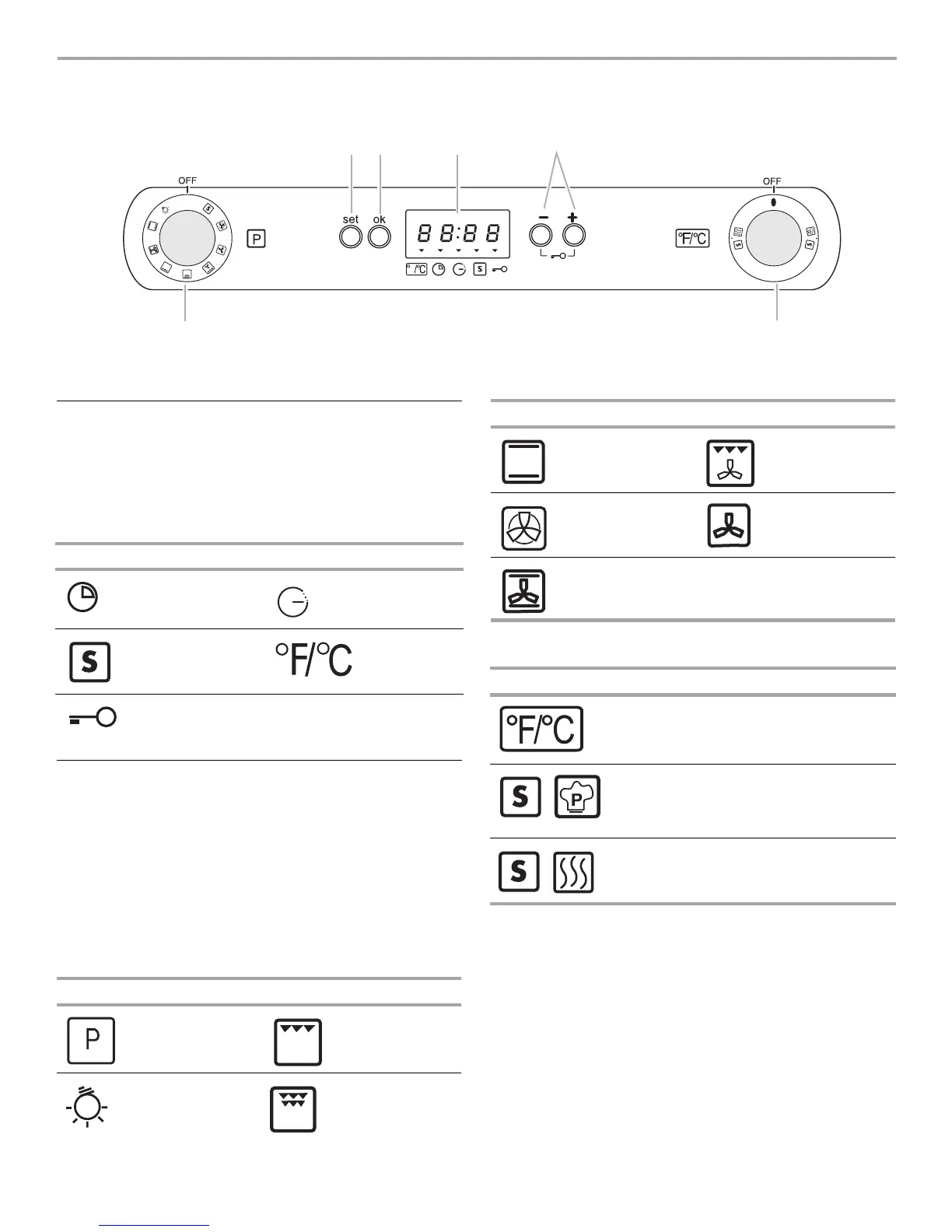
5
ELECTRONIC OVEN CONTROL
Display
When power is first supplied to the appliance, “12:00” will appear
on the display. If “12:00” appears at any other time, a power
failure has occurred. To set the time on the clock, follow the clock
setting instructions in the “Clock Time and Temperature Mode”
section.
Oven Display Symbols
Oven and Temperature Control Knobs
All cooking functions are set with the Oven control knob.
Once a cycle is complete, turn the Oven control knob to the OFF
position to select a new function.
All temperature adjustments are set with the temperature control
knob. Temperatures can be set from 175°F (80°C) to
500°F (250°C).
IMPORTANT: If no temperature appears on the oven display, the
oven will turn off. Set Temperature control knob to 175°F (80°C)
or higher to operate oven.
Oven Control Knob Symbols
Temperature Control Knob Symbols
To set or cancel a cooking function:
1. Turn the Oven control knob to the desired oven function.
2. Turn the Temperature control knob to the desired oven
temperature.
3. Press OK; the oven will turn on.
■ To change the temperature, turn the Temperature control
knob to select the desired temperature.
■ To cancel any selection, turn the Oven control knob to “0”
or
Press SET to turn off the oven, while maintaining the
previously selected functions on control knobs the next time
the oven is used.
A. Oven control knob
B. Set button
C. Confirmation button
D. Electronic oven display
E. Set time “up” or “down” buttons
F. Temperature control knob
A
B
C
D
E
F
O
F
AM
PM
Symbol Function Symbol Function
Cooking time
Minute Minder
End of
cooking time
Special
functions
Temperature
indicator
Oven control
lock
Symbol Function Symbol Function
Program Low Broil
Oven Light High Broil
Bake/Roast Convection
Broil
True Convect Fan Only
Convection
Bake/Roast
Symbol Function
Fahrenheit/Celsius
Special function - Pizza
Special function - Keep Warm
Symbol Function Symbol Function





 To Next Page