EasyManua.ls Logo

IKEA SMAKLIG - User Manual

IKEA SMAKLIG
24 pages
Print Icon
To Next Page IconTo Next Page
Loading...
SMAKLIG
GB

Other manuals for IKEA SMAKLIG

Questions and Answers

  • A
    Ashley DiazSep 23, 2025
    Why is the residual heat indicator not displaying on my IKEA SMAKLIG Hob?
    • L
      Lisa GrahamSep 23, 2025
      If the residual heat indicator on your IKEA Hob isn't showing, it could be that the cooking zone was only on for a short period and hasn't gotten hot enough to trigger the indicator. If you believe the cooking zone should be hot, it's recommended to contact After Sales Service.
  • R
    Russell McdanielAug 23, 2025
    Why my IKEA SMAKLIG is not working?
    • J
      Jennifer ReyesAug 25, 2025
      If your IKEA Hob isn't turning on or working, first, verify it's properly connected to the power supply. If it is connected correctly, try reactivating the appliance. Also, check if the Child Safety Device or Lock is enabled and deactivate it. Avoid touching multiple symbols simultaneously; touch only one at a time.
  • C
    Courtney WilsonAug 25, 2025
    Why is my IKEA SMAKLIG not turning on?
    • J
      Jacqueline KrauseAug 26, 2025
      If your IKEA Hob isn't turning on, there might be a few reasons. First, ensure the hob is properly connected to the electrical supply. It's also possible that the Child Safety Device or the Lock is activated; you may need to deactivate it. If more than 10 seconds have passed since you tried to activate the hob, try activating it again. Also, make sure you are only touching one symbol at a time.
  • M
    Maria TaylorAug 27, 2025
    What to do if my cookware is not compatible with IKEA SMAKLIG Hob?
    • K
      Kristina JohnsonAug 27, 2025
      If the cookware is detected but not compatible, it may not be well-positioned on the cooking zone or compatible with the zone itself. Press the On/Off button twice to remove the F0E1 code and restore the functionality of the cooking zone. Then, try using the cookware with a different cooking zone, or use different cookware.
  • B
    brownjaimeAug 27, 2025
    How to fix no signal when touching IKEA SMAKLIG Hob panel?
    • S
      Sean BurnsAug 27, 2025
      If your IKEA Hob doesn't respond when you touch the panel symbols, the signals might be deactivated. Try to activate the signals.
  • L
    Leslie StephensSep 15, 2025
    Why does a symbol and number appear on my IKEA SMAKLIG Hob timer display?
    • H
      hortonbobbySep 15, 2025
      If you see a symbol plus a number on the timer display of your IKEA Hob, it indicates an electronic component error. Disconnect the hob from the power supply for a few minutes by removing the fuse, waiting one minute, and then reinserting it.
  • N
    nsalinasSep 12, 2025
    What to do if lights up on the timer display of my IKEA Hob?
    • D
      Dr. Brandi RodriguezSep 13, 2025
      If you see that the timer display lights up on your IKEA Hob, it indicates that the overheating protection for the cooking zone is active. Turn off the hob and remove the hot cookware. After about 30 seconds, switch the cooking zone back on. Let the cookware cool down.
  • M
    Michael LongSep 14, 2025
    What to do if my IKEA SMAKLIG Hob beeps and deactivates?
    • N
      ngallagherSep 14, 2025
      If your IKEA Hob makes a sound and turns off, it could be because one or more symbols have been covered for more than 10 seconds. Make sure symbols are uncovered.
  • M
    Mr. Christopher CoffeySep 5, 2025
    What to do if my IKEA Hob display does not react to touch?
    • T
      Timothy RothSep 5, 2025
      If the display does not react to the touch, it could be that part of the display is covered, or the pots are placed too near to the display. Remove any objects covering the display and move the pots away from it. If the problem continues, wait 10 seconds.
  • M
    Michelle ThomasSep 2, 2025
    What to do if IKEA Cookers acoustic signal sounds and appliance switches off?
    • S
      Sheryl SandersSep 2, 2025
      If your IKEA Cookers appliance is sounding an acoustic signal and switching off, it could be that one or more of the sensor fields have been covered for more than 10 seconds. Make sure that you uncover the sensor field.

Summary

Safety Information

Children and Vulnerable People Safety

Guidance on safe use of the appliance by children and vulnerable individuals.

General Safety Precautions

Appliance Operation Warnings

Crucial warnings regarding hot surfaces, unattended cooking, and fire hazards.

Installation and Electrical Connection

Installation Guidelines

Steps and precautions for installing the appliance safely and correctly.

Electrical Connection Procedures

Requirements and procedures for connecting the appliance to the electrical supply.

Appliance Usage and Safety

Safe Appliance Operation

Instructions for safe use, including handling wet hands and pacemaker users.

Electrical Connection Details

Connection Requirements and Diagrams

Specifications for voltage, power rating, wiring, and connection diagrams.

Appliance Operation and Indicators

Daily Appliance Use

Advanced Functions and Safety Features

Care, Cleaning, and Troubleshooting

Troubleshooting Common Problems

Initial steps for diagnosing and resolving common appliance issues.

Troubleshooting Appliance Issues

Appliance Operation Problems

Solutions for issues like the appliance not activating or operating.

Display and Signal Troubleshooting

Resolving issues with display errors, signal problems, and cookware detection.

Error Codes and Technical Data

Energy Efficiency and Saving

Getting Service Assistance from IKEA

Overview

This document is a user manual for the IKEA SMAKLIG induction hob, providing comprehensive instructions for its installation, safe operation, maintenance, and troubleshooting. The manual emphasizes safety information for both general users and vulnerable individuals, including children.

Function Description:

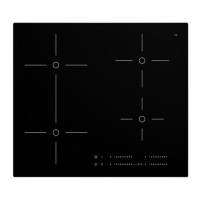
The SMAKLIG induction hob is designed for domestic cooking purposes. It features multiple cooking zones that operate independently or can be bridged to function as one larger zone. The hob utilizes induction heating technology, which directly heats the bottom of cookware, making it energy-efficient. Each cooking zone has a power setting display, allowing users to select desired heat levels from 1 to 9, with an additional Booster function (P) for increased power. The appliance includes a Timer function, which can be set for individual cooking zones, and an Automatic Switch Off feature that deactivates the hob under certain conditions, such as prolonged inactivity or overheating. A STOP+GO function allows all active cooking zones to be set to the lowest power setting simultaneously. The hob also incorporates a Lock function to prevent accidental changes to power settings and a Child Safety Device to prevent unintended operation.

Usage Features:

To activate the hob, users press the power symbol for one second. Power settings are adjusted by touching the power selector. The Booster function (P) provides additional power for up to 10 minutes, after which the zone automatically returns to level 9. The Bridge function allows two cooking zones to be linked and controlled as a single unit. The Timer function can be set for individual cooking zones, with indicators flashing to show active timers. An acoustic signal sounds when a set time has elapsed, and the cooking zone deactivates. The STOP+GO function is activated by touching the || symbol, setting all active zones to the lowest power. The Lock function is activated by touching the symbol for 4 seconds, preventing accidental changes to settings. The Child Safety Device is activated by touching the symbol for 4 seconds after activating the appliance, and it can be temporarily overridden for a single cooking time. The hob also features a residual heat indicator (H) to warn users when a cooking zone is still hot. The manual provides guidance on suitable cookware for induction hobs, recommending cast iron, steel, enamelled steel, and stainless steel with a thick, flat bottom. It also advises on cookware sizes, noting that induction zones adapt automatically but require a minimum diameter. Energy-saving tips are included, such as using lids, placing cookware on zones before activation, and utilizing residual heat.

Maintenance Features:

Regular cleaning is essential to prevent deterioration of the hob's surface material. The appliance should be deactivated and allowed to cool down before cleaning. Users are advised to disconnect the appliance from the electrical supply before maintenance. The manual strictly prohibits the use of steam blasters, high-pressure cleaners, sharp objects, or abrasive cleaning agents, as these can damage the appliance. Instead, it recommends cleaning with a moist soft cloth and neutral detergents, removing residues with water and washing-up liquid after each use. For stubborn residues like sugar, plastics, or tin foil, a scraper is recommended, followed by wiping with a damp cloth and washing-up liquid. Limescale rings, water rings, fat splashes, and metallic discolorations should be removed with a cleaner for glass ceramic or stainless steel after the appliance has cooled. Scratches or dark stains on the glass ceramic that cannot be removed do not affect the appliance's functionality. The OffSound Control feature allows users to deactivate and activate the hob's sounds. In case of malfunctions, the manual provides a troubleshooting guide, suggesting remedies such as checking electrical connections, deactivating safety features, or uncovering symbols. If an error persists, users are advised to contact the IKEA store call centre or an authorized installer.

IKEA SMAKLIG Specifications

General IconGeneral
TypeInduction
Control typeTouch
Power levels9
TimerYes
Child lockYes
Voltage220-240 V
Frequency50-60 Hz
Safety featuresOverheating protection

Related product manuals