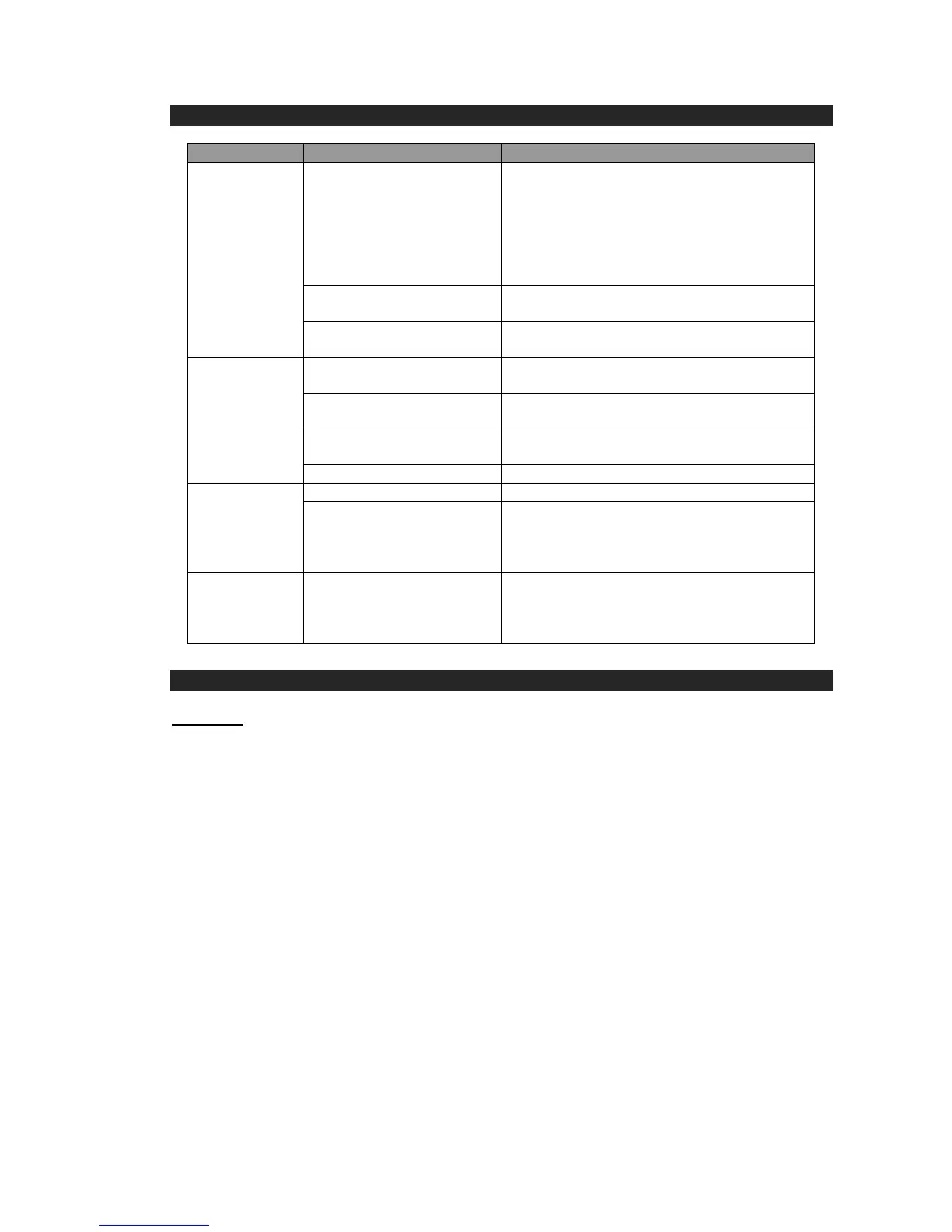
The USB power adaptor
(not included) is not
plugged into a wall outlet or
the USB cable (included) is
not plugged into the micro
USB jack on the bottom of
the speaker.
Plug the USB power adaptor (not included)
into a wall outlet and plug the USB cable
(included) into the micro USB jack on the
speaker.
Wall outlet is not
functioning.
Plug another device into the same outlet to
confirm the outlet is working.
Computer USB port is not
functioning.
Make sure your computer power is turned on
and try another USB port.
The Speaker battery is
dead.
Recharge the speaker battery.
The Speaker is not linked
with your mobile device.
See above “Speaker Operations” process to
link/pair your device
The speaker is out of range.
Relocate the speaker within Bluetooth
operating range 10 meters (33 feet).
Increase the volume of your device.
Volume level is set too high.
Decrease the volume of your device.
Sound source is distorted.
If the source sound file is of poor quality,
distortion and noise are easily noticeable at
high volume level. Try a better sound quality
music file again.
Unit gets warm
after extended
play at high
volume.
Turn the unit off for a period of time or lower
the volume.
SPECIFICATIONS
Power Requirement
Main unit Built-in DC 3.7V 900mAH rechargeable Lithium Battery
At Maxell, environmental and social responsibility is a core value of our business.
We are dedicated to continuous implementation of responsible initiatives with an
aim to conserve and maintain the environment through responsible recycling.
The Bluetooth
®
word mark and logos are registered trademarks owned by Bluetooth
SIG, Inc. and any use of such marks by Hitachi Maxell Global Ltd. is under license.
Other trademarks and trade names are those of their respective owners.


 To Previous Page
 Loading...