EasyManua.ls Logo

iLive IBP301B - Remote Control Operation; Remote Control Buttons

iLive IBP301B
12 pages
Print Icon
To Next Page IconTo Next Page
To Previous Page IconTo Previous Page
Loading...
Customer Support: 1-888-999-4215 7
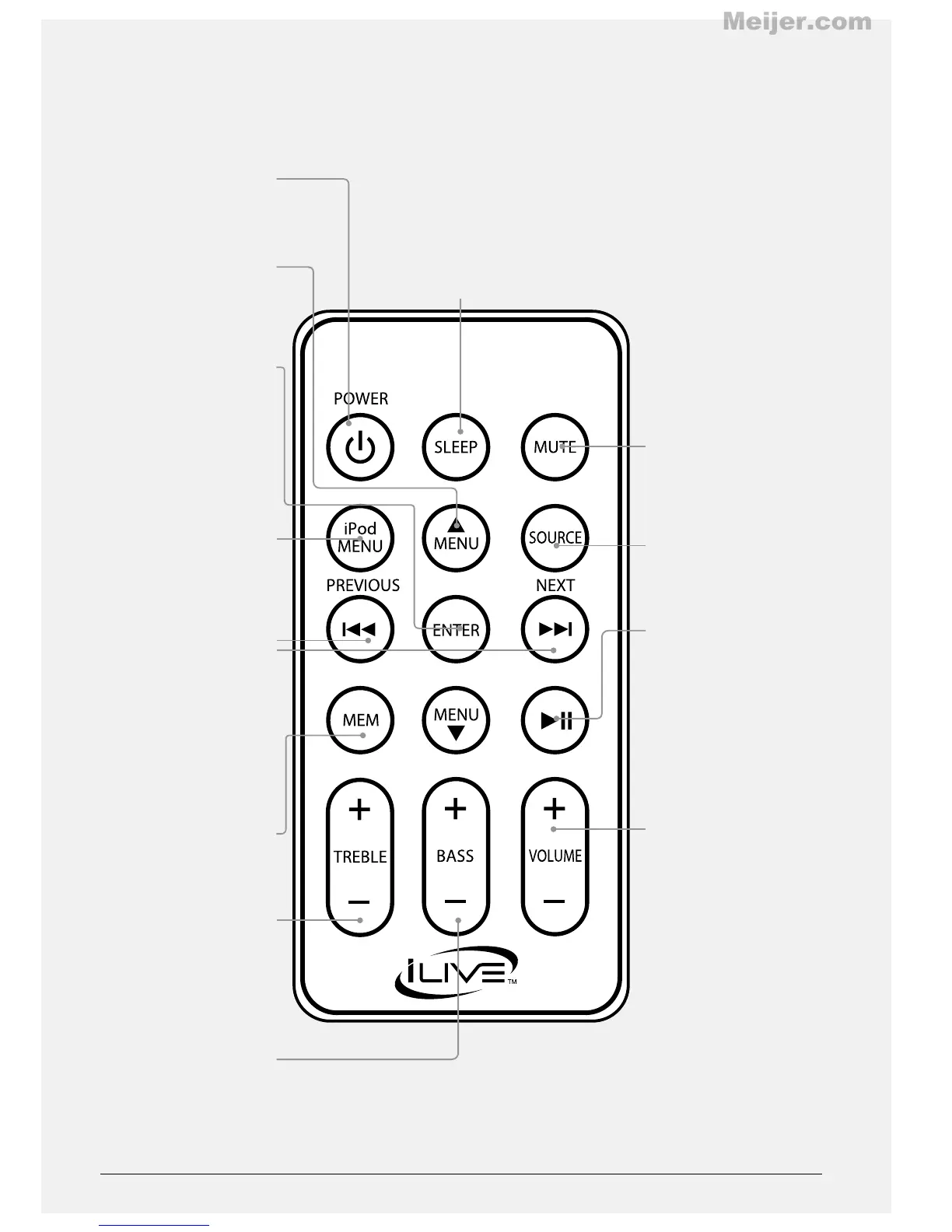
POWER
Press to power the
boombox o or on.
MENU
Press to navigate the
current menu on a
docked iPod or iPhone.
ENTER
Press to make selections
on a docked iPod or
iPhone.
iPod MENU
Press to cycle through
the menus on a docked
iPod or iPhone.
SKIP/SEARCH/TUNE ±
Press to skip between
tracks on a docked iPod
or iPhone. Press and
hold to search through
an individual track on a
docked iPod or iPhone.
Press to tune the FM
radio in radio mode.
MEM
Press to save the current
radio station as a preset.
TREBLE
Press to adjust the
treble.
BASS
Press to adjust the bass.
MUTE
Press to mute the
volume.
SOURCE
Press to adjust the
boombox’s current
source.
PLAY/PAUSE
Press to play or pause a
docked iPod or iPhone.
VOLUME
Press to adjust the
volume.
SLEEP
Press repeatedly to set
the sleep timer. When
the set time expires,
the boombox will
automatically power o.
Meijer.com

Related product manuals