6
Introduction
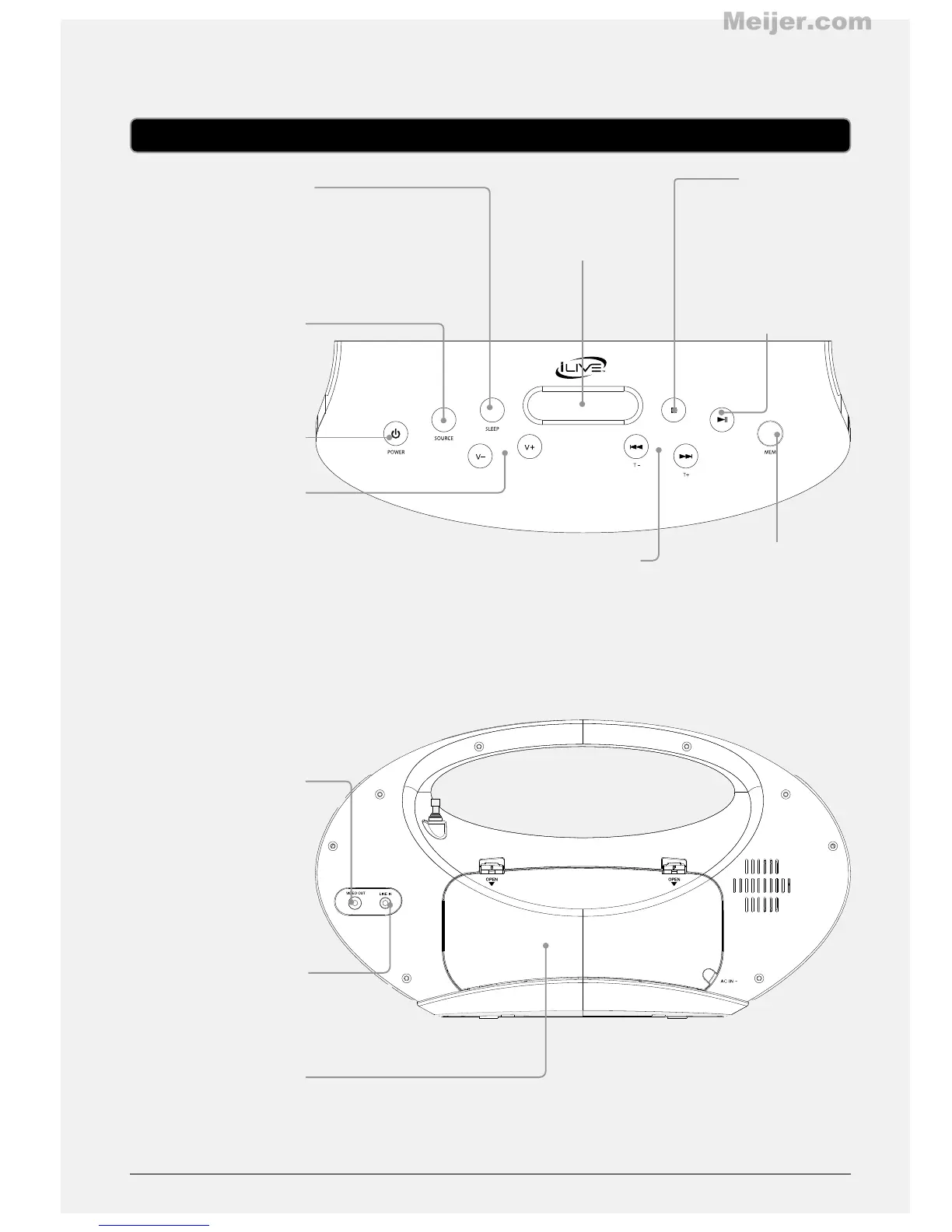
SLEEP
Press repeatedly to set
the sleep timer. When
the set time expires,
the boombox will
automatically power o.
SOURCE
Press to adjust the
boombox’s current
source.
POWER
Press to power the
boombox o or on.
VOLUME
Press to adjust the
volume.
COMPOSITE VIDEO
OUTPUT
3.5MM AUDIO INPUT
BATTERY
COMPARTMENT
Requires 4, C size,
batteries (not included)
MEM
Press to save the current
radio station as a preset.
STOP
Press to stop a docked
iPod or iPhone during
play.
PLAY/PAUSE
Press to play or pause a
docked iPod or iPhone.
DISPLAY
SKIP/SEARCH/TUNE ±
Press to skip between tracks on a docked
iPod or iPhone. Press and hold to search
through an individual track on a docked iPod
or iPhone. Press to tune the FM radio in radio
mode.


 To Next Page