EasyManua.ls Logo

iLive IJMB485B - Orientation; Front Features & Controls

iLive IJMB485B
12 pages
Print Icon
To Next Page IconTo Next Page
To Previous Page IconTo Previous Page
Loading...
6
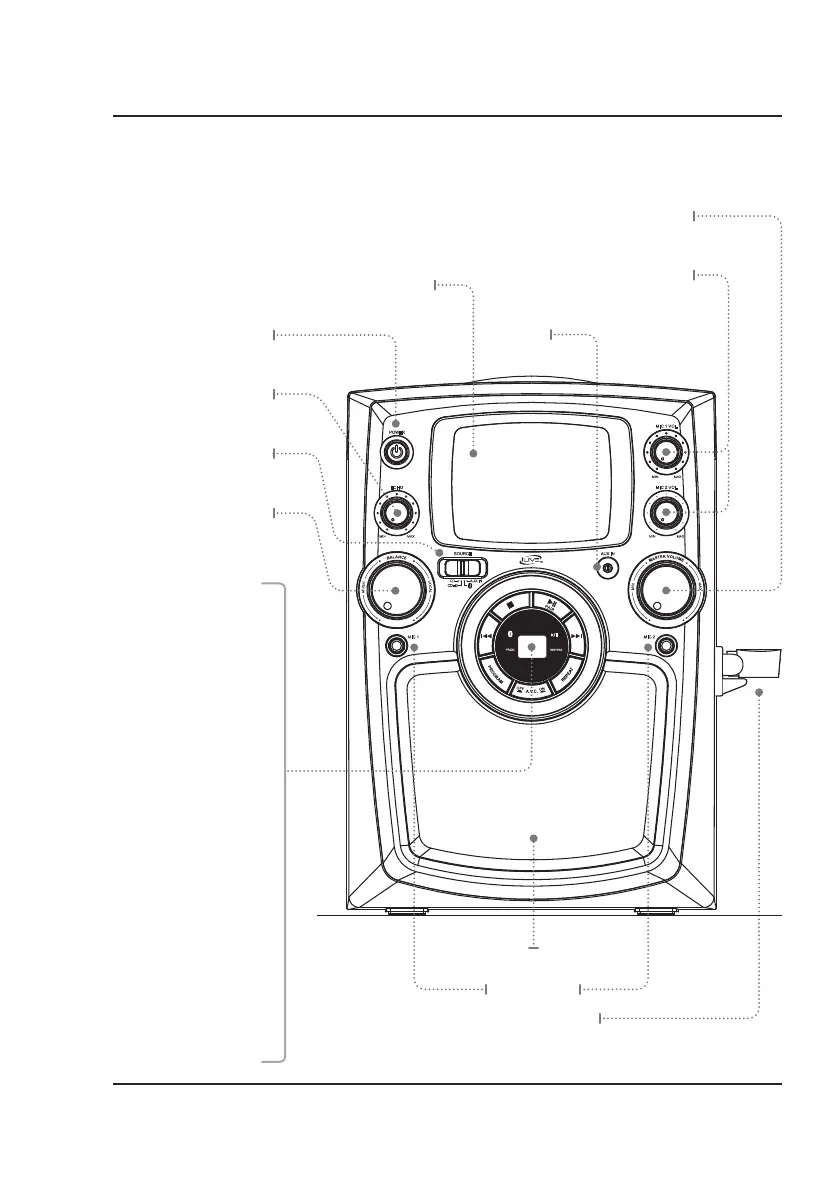
Mic Volume 1, 2
Press to adjust the mic
volume up or down.
O
N
O
F
F
P
A
I
R
POWER
EECCHHOO MIC 2 V OL
MIC 1 V OL
MIC 1 MIC 2
SOURCE
AUX IN
CD+G
CD
AUX IN
Front Features & Controls
Orientation
Power
Press to power
the unit on or off.
Main Speaker & Lights
Mic Input 1, 2
Screen
Echo
Turn to adjust
the echo up or down.
Microphone Mount
Master Volume
Turn to adjust the
volume up or down.
Aux In
Balance
Turn to adjust the
balance between
Music and Vocal.
Source Selector
Slide to switch between
different sources.
Stop
Press to stop
the current track.
Play/Pause/Pair
Press to play or pause the
current track. In Bluetooth
mode, press and hold to
begin pairing to a device.
Skip/Search
Press to skip between
tracks on a loaded disc.
Press and hold to
fast-forward or rewind
the current track
on a loaded CD.
Note: Fast forward/rewind
does not work with CD+G.
Program
Press to program a CD.
Auto Voice Control
Press to activate or
deactivate voice control.
Repeat
Press to repeat
the current track.

Related product manuals