5
iPod Only
QUICKSTART
█ POWERTHEBARSPEAKER
1. Connect the bar speaker to AC power source using the attached AC Power Cord.
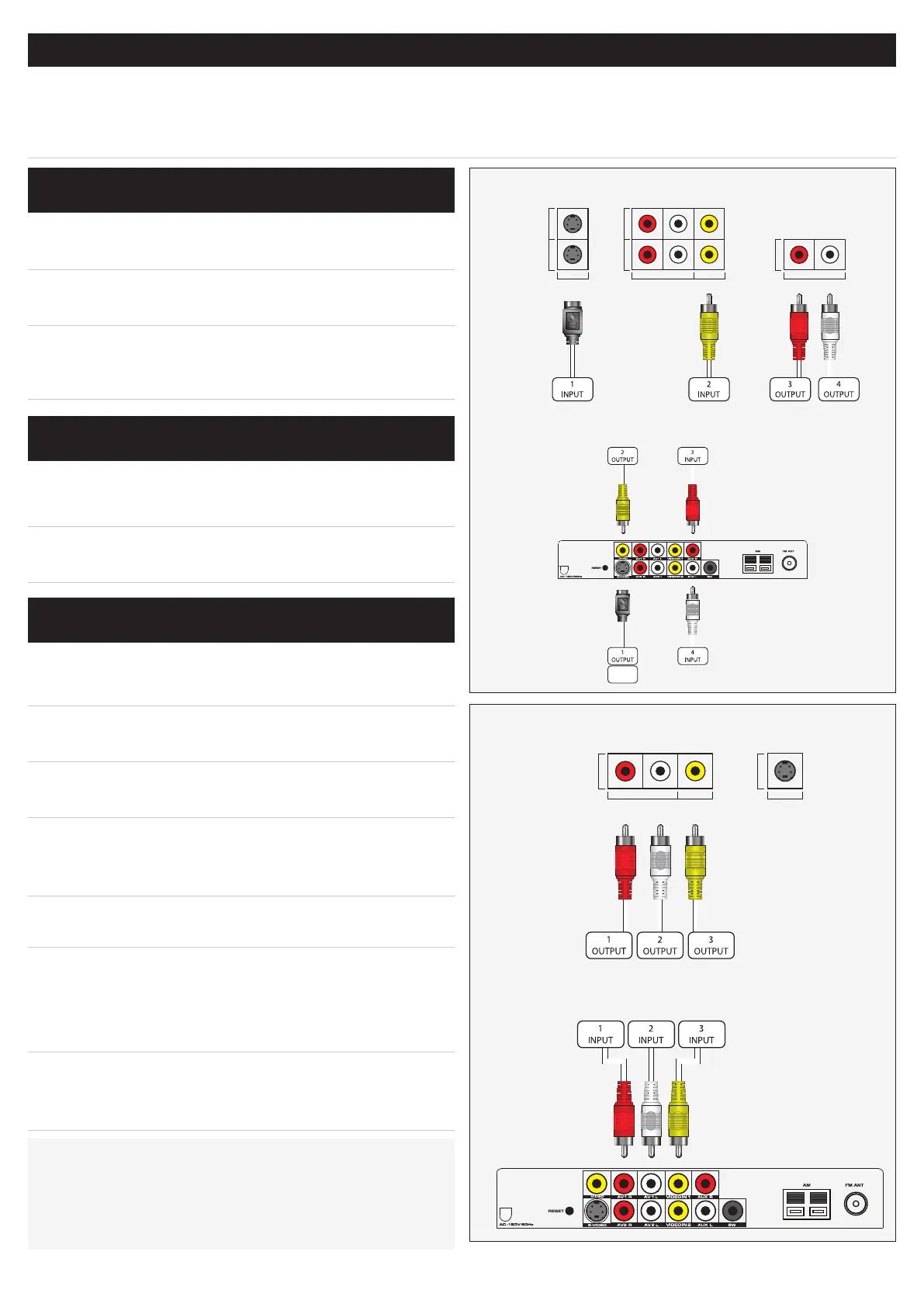
1. Connect a Stereo RCA Cable to the Audio Outputs on
the television.
2. Connect the other end of the Stereo RCA Cable to the
AuxiliaryStereoInputson the bar speaker.
The volume on your television may need to be
adjusted independently of the bar speaker, or
adjusted to a xed audio mode.
1. Connect an RCA Video Cable to the Video Input on
the television.
2. Connect the other end of the RCA Video Cable to the
VideoOutputon the bar speaker.
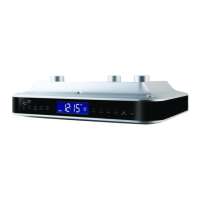
1. Connect a Stereo RCA Cable to the Audio Outputs on
the device.
2. Connect the other end of the Stereo RCA Cable to the
AV1R and AV1LStereoInputson the bar speaker.
3. Connect an RCA Video Cable to the Video Output on
the DVD Player.
4. Connect the other end of the RCA Video Cable to
the Video1Input or the Video2Inputon the bar
speaker.
The numbered Video Inputs need to correspond with
the connected Audio Inputs.
The bar speaker itself has no video display. In order
to view video from a connected DVD Player, the bar
speaker must be connected to a television by using
the CompositeVideoOutput.
The S-Video Output will not output video from a
connected DVD Player. The S-Video Output will only
output video from a docked iPod.
CONNECTINGAUDIOFROMATVTOTHE
BARSPEAKER
CONNECTINGVIDEOFROMTHEBAR
SPEAKERTOATV
CONNECTINGADVDPLAYERTOTHEBAR
SPEAKER
SVIDEO 1
SVIDEO 2
VIDEO INPUT
AV 1
AV 2
AUDIO INPUT VIDEO INPUT
R L
AUDIO OUT
AUDIO OUTPUT
R L
AV OUTPUT
AUDIO VIDEO
R L
SVIDEO 1
VIDEO
Diagram of the IT209’s Inputs & Outputs
Diagram of the IT209’s Inputs & Outputs
SPECIALNOTE:
A Digital Cable or Satellite Tuner, Set-Top Box, Gaming Console,
or VCR can be connected to the bar speaker in the same way that
a DVD Player is connected.
Example of DVD Player Outputs
Example of Television Inputs & Outputs


 To Next Page