11
ITP180B User GuideCustomer Helpline Number: 0844 481 5000
STANDBY
SOURCE
VOLUME
PLAY/PAUSE
S
iPod DRAWER
LINE IN
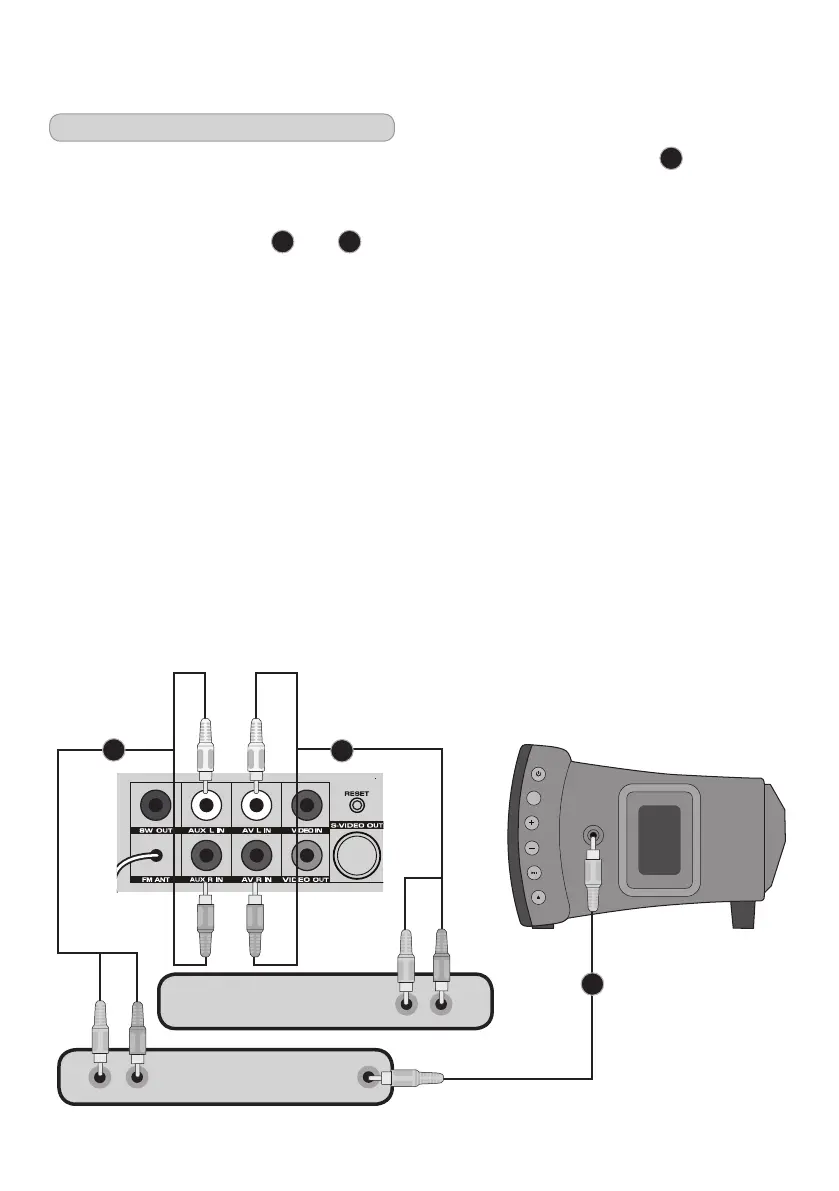
Connecting an external device
You can connect an external device
(MP3player,CDplayerTVetc)barspeaker
in several ways.
Using a RCA audio cable
A
and
B
Your bar speaker can connect to two devices
atthesametimeusingtheAUX
andAVsocketsasshownbelow.
To play the external device you will need to
selecteitherAVorAUXusingtheSOURCE
button(forAUXmakesurenothingis
connected to the LINE IN on the side of
theunit).
Using a 3.5mm line-in cable
C
You can also connect an external device to
your bar speaker using the LINE-IN socket
on the side of the unit as shown below.
To play the external device you will need
toselectAUXusingtheSOURCE button.
Once the device is connected you can
control playback as you would usually.
Inadditiontothissomeofthemusic
systemcontrolswillstillwork.
Press the VOLUME + and - buttons
onthemusicsystemorremotecontrol
toincreaseorreducethevolume.
Press the MUTE button to turn the
sound off, press it again to return to
thepreviousvolumelevel.
External device
External device
A
B
C


 To Next Page