12
ITP180B User Guide
Playing audio and video through another device
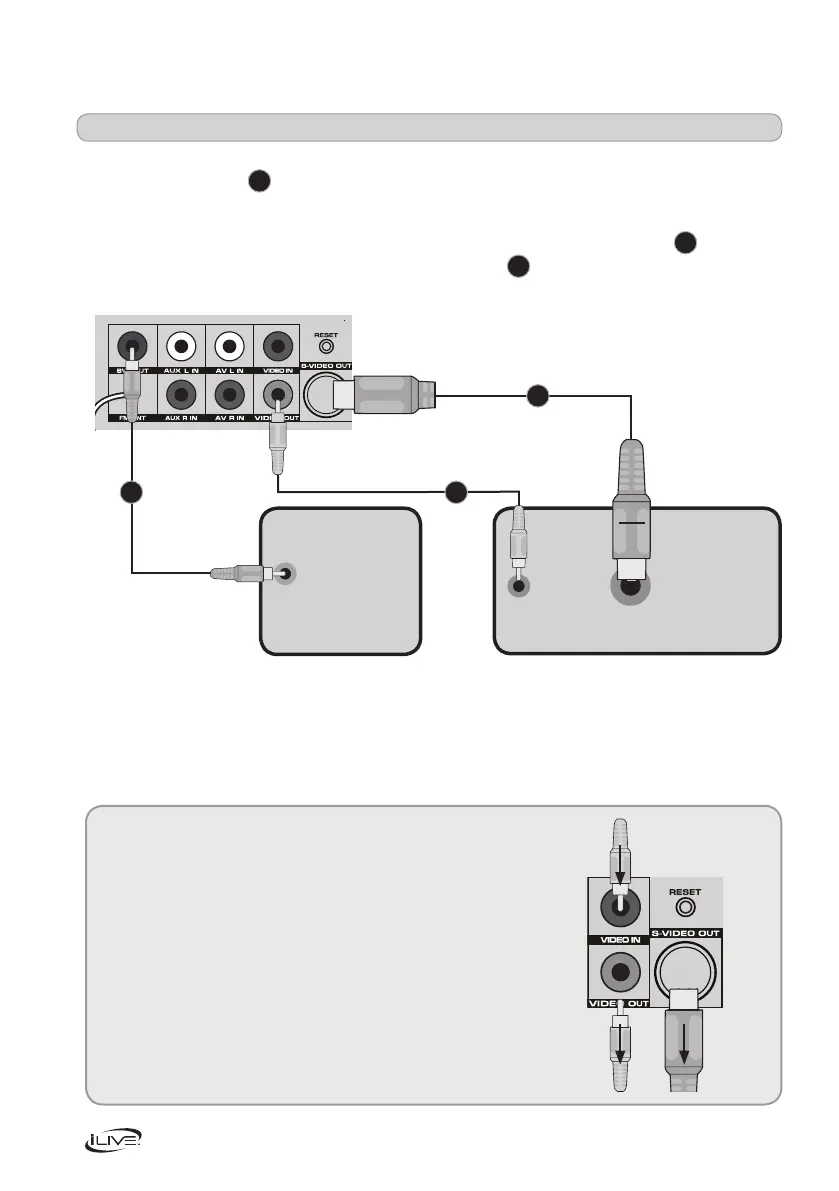
YoucanplayAudioorVideofromyouriPodthroughanattachedTV.Youwillneedtouse
anRCA(video)cable
A
as shown below. Make sure the yellow cable is connected to the
VIDEO OUT socket.
YoucanalsoplayyouriPhoneoriPodthroughyourTVusingaS-videocable
B
as shown
below. You can also attach a Sub using an audio cable
C
. Connect the cable to SW OUT
as shown below.
Note:
You can connect an external video source such
asaDVD,gamesconsoleordigitaldecoder
toyourbarspeakerusingtheVIDEOIN socket.
This will allow the video source to be played
troughaconnectedTVasdescribedasabove.
Connecting an external video source
Subwoofer Television
C
A
B
From video source
To TV


 To Next Page