Customer Support: 1-888-999-4215 7
DISPLAY
MENU
MEM
NEWS MOVIEMUSIC
EQ
REPEATSHUFFLESOURCE iPhone
ALARM
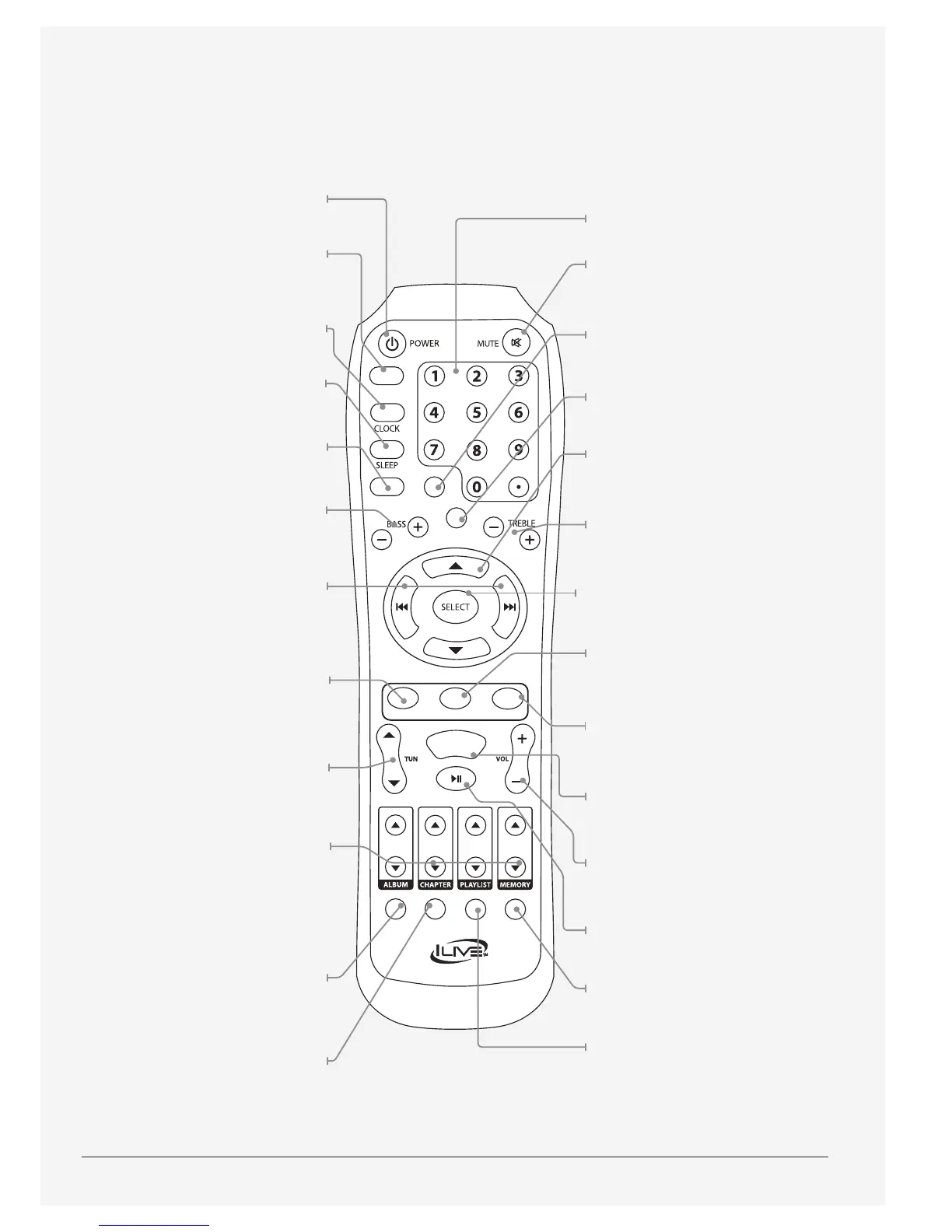
Power
Press to turn the sound bar o or on.
Alarm
With the power o, press to
set and activate the alarm.
Clock
With the power o, press
to set the clock.
Sleep
Press repeatedly to set the sleep timer.
Display
Press to switch between the clock
and current mode display.
Bass
Press to adjust the bass.
Rev/Fwd for iPod/Min/Hr
Press to rewind or fast forward
content from a docked iPhone or
iPod. Press to adjust the minute or
hour when setting the clock or timer.
News
Press to switch to the EQ
optimized for news.
Skip/Tune
Press to skip forwards or backwards
through content on a docked iPhone
or iPod. Press to tune the FM radio.
Album/Chapter/Playlist/Memory
Press to cycle through albums,
chapters, and playlists on a docked
iPhone or iPod.
Press to cycle through
preset radio stations.
Source
Press to switch between
iPod/iPhone, FM radio, Aux,
Optical, and Line modes.
Shue
Press to play music from a docked
iPhone or iPod in a random order.
Number Keypad
Mute
Press to mute the volume
of the sound bar.
Mem
Press to save the current FM
radio station as a preset.
Menu
Press to access the menu on
a docked iPod or iPhone.
Menu Up/Down for iPod
Press to navigate the menu on
a docked iPhone or iPod.
Treble
Press to adjust the treble.
Select
Press to make a selection on
a docked iPhone or iPod.
Music
Press to switch to the EQ
optimized for music.
Movie
Press to switch to the EQ
optimized for movies.
EQ
Press to cycle through FLAT, ROCK,
POP, CLASS, or JAZZ equalizer modes.
Volume
Press to adjust the volume.
Play/Pause
Press to play or pause a
docked iPhone or iPod.
iPhone
Press to switch to iPod/iPhone mode.
Repeat
Press to repeat the current
track or entire album.



 To Next Page