Customer Support: 1-888-999-4215 iLive 15
Mounting to a Wall
We recommend having this sound bar professionally
mounted.
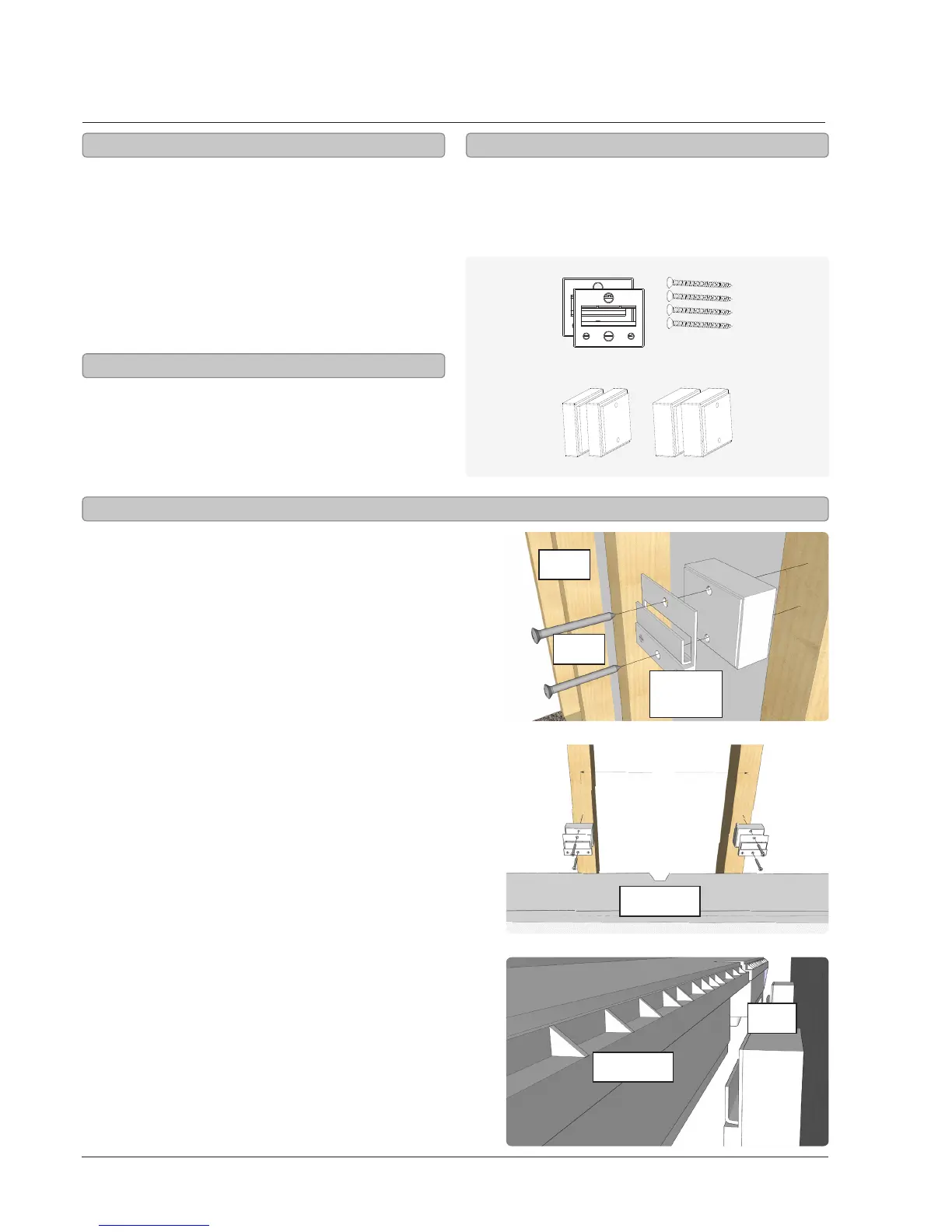
The included spacers should be used at your
discretion to extend the face of the sound bar
farther from the wall. These are typically used when
mounting the sound bar under a television, and the
face of the sound bar needs to be ush with the face
of the television.
1. Use the Tape Measure to decide how high
you’d like to hang the sound bar on the wall.
2. The sound bar must be hung within
6 feet of an AC power outlet for the
attached AC power cable to reach.
3. Use the Stud Finder to locate 2 parallel wooden
studs to screw the mounting brackets into.
4. Mark the wall at the center of the
studs using the Pencil.
5. Line the Level up on both of your marks to
make sure they are level. If they’re not, adjust
the marks as needed to make them level.
6. After you’ve double checked your markings, drill
through the top hole on both mounting brackets
directly into the marks you’ve made on the wall.
7. If you are using the brackets only and no
spacers, use the included short screws. If you
are using any of the spacers or combination
of the spacers, use the long screws.
8. Use the Level to level each of the hanging
brackets, then drill the second screw into the
bottom hole on both mounting brackets.
9. Slide the sound bar onto the mounting brackets,
and make sure there is a rm and stable
connection before letting go of the sound bar.
10. Finally, use the Level to conrm
that the sound bar is level.
• Manual or Power Screwdriver
• Stud Finder
• Pencil
• Tape Measure
• Level
• (2) Wall Mount Brackets
• (4) Long Screws
• (2) 1/2” Spacers
• (2) 3/4” Spacers
Important Notes
Getting Started
Required Tools
Included Hardware
16”
ITPW891B
ITPW891B
screws
studs
mounting
bracket
spacer


 To Next Page