iLive6
Introduction
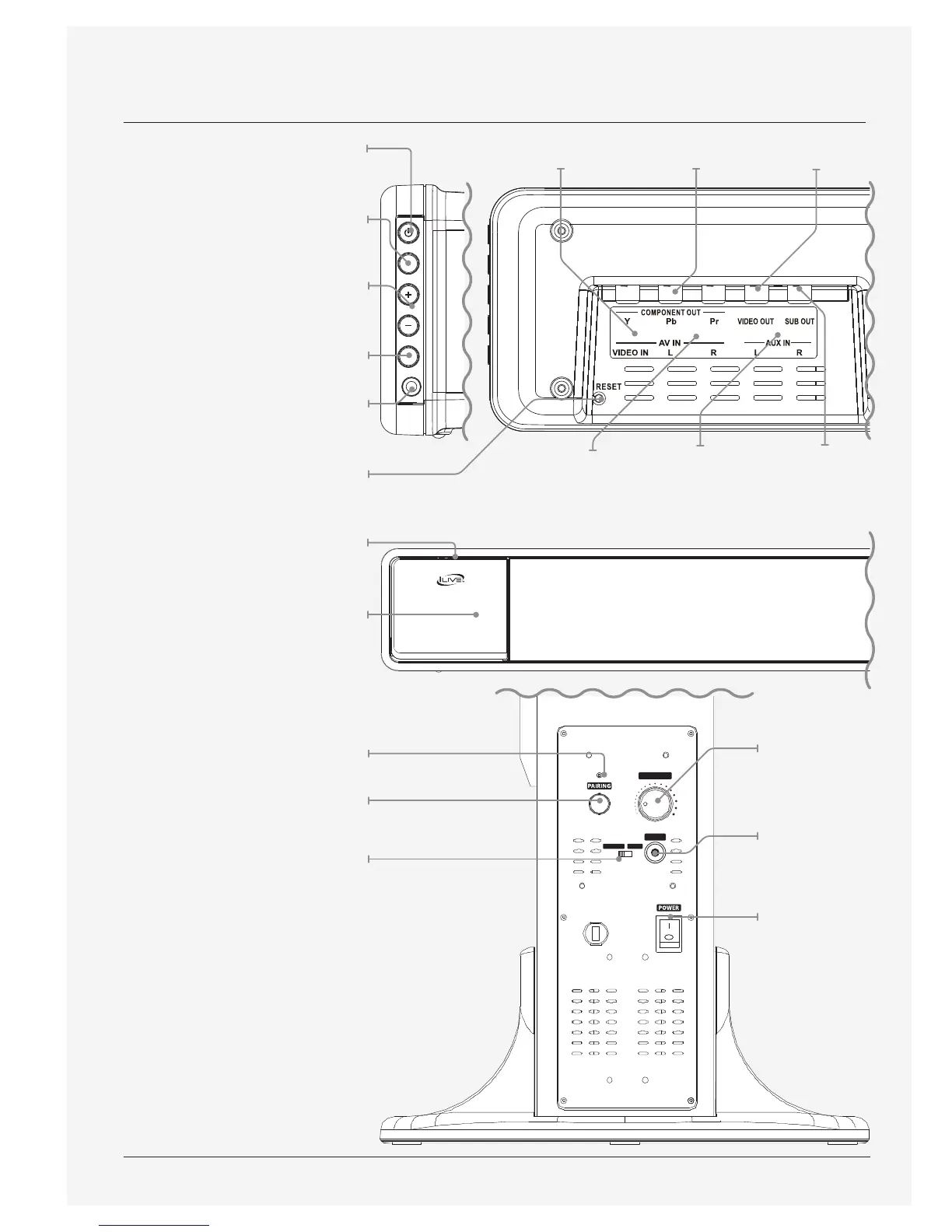
Power
Press to power the sound
bar o and on.
Source
Press to switch between FM,
iPod, Aux, AV, and Line modes.
Volume
Press to adjust the volume.
Pairing
Press to pair the sound bar
with a wireless subwoofer.
3.5mm Audio Input (Line)
Reset
Press using a paperclip or like
object to reset the sound bar
to it’s original settings.
Stability Lever
Soft Touch Dock for iPod and iPhone
Power/Pairing Indicator
Pairing
Press to pair the wireless
subwoofer to the sound bar.
Wireless/Sub-In
Adjust to switch between wireless
input and the Subwoofer Input.
POWER
SOURCE
VOLUME
PAIRING
LINE IN
THIS DEVICE COMPLIES WITH PART 15 OF THE FCC RULES AND DHHS
STANDARDS 21 CFR SUBCHAPTER J. AT DATE OF MANUFACTURED.
OPERATION IS SUBJECT TO THE FOLLOWING TWO CONDITIONS:
1) THIS DEVICE MAY NOT CAUSE HARMFUL INTERFERENCE, AND
2) THIS DEVICE MUST ACCEPT ANY INTERFERENCE RECEIVED,
INCLUDING INTERFERENCE THAT MAY CAUSE UNDESIRED OPERATION.


 To Next Page