8 9
Connecting the Speakers
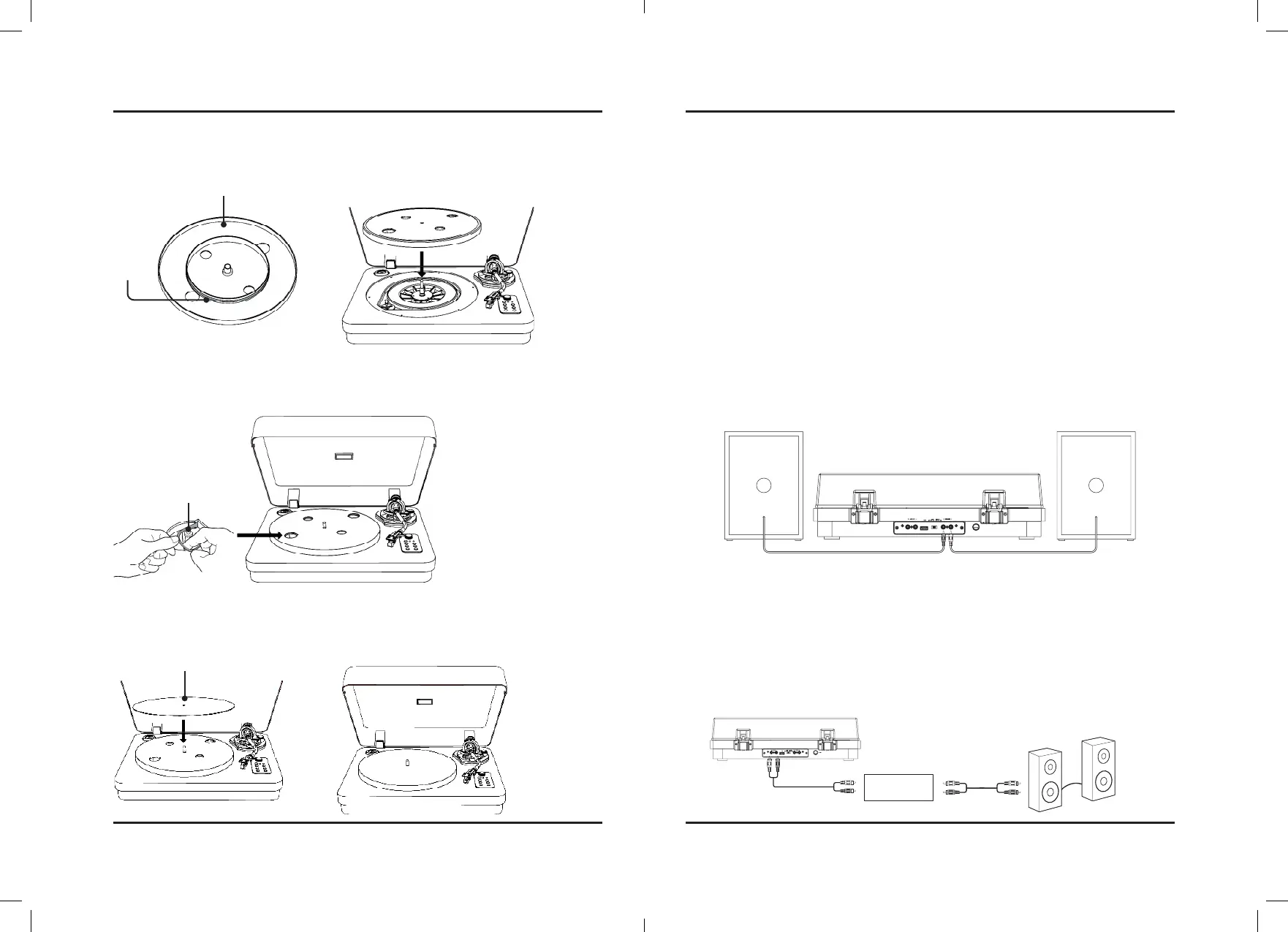
1. Connect each speaker to the speaker inputs on the back of the unit.
2. Set the Playback Switch to Line mode. The Line button will turn white.
3. Audio played through the turntable should now be heard through the connected speakers.
Connecting to Devices
Pairing Bluetooth and Playing Audio Wirelessly
1. Power on the unit. Enter into Bluetooth mode by pressing the Source button, the pair button will begin quickly
flashing blue. When pairing, remain within 3 feet of the unit.
2. Using the controls on your Bluetooth device, search for and select ITTB751 in your Bluetooth settings to pair.
If need be, refer to the user’s manual for your specific device for instructions on pairing and connecting Bluetooth
devices.
3. When successfully paired and connected, a voice prompt will sound and the Pair button will turn solid.
After initial pairing, the unit will stay paired unless unpaired manually by the user or erased due to a reset of the
device. If your device should become unpaired or you find it is unable to connect, repeat these steps.
4. Use the controls on your connected Bluetooth Device to select and begin playing audio. Play, pause or skip
a selected track using the controls on the connected Bluetooth Device. Change volume level using both
connected device and turntable.
After initial pairing, the unit will automatically connect to the last Bluetooth device used whenever it is powered on. If
you would like to connect to a different device, turn off Bluetooth on the unwanted device and use the above steps to
connect to a different device.
Using the Aux Out
Requires RCA audio cable (included).
1. Plug the included RCA audio cable into the Aux Out on the turntable and your amplifier.
2. Set the Playback Switch to Phono mode, the backlighting will turn white.
3. Audio from the record will now be heard through the connected amplifier/speakers.
Belt Plate
Belt
Step 1
Place the Belt plate onto the main
unit as seen below.
Step 2
Pull the Belt of the Belt Plate around the
Roller as shown below.
Step 3
Place the Plate Cover over the Belt Plate as shown
below. You may now load a record onto the turntable.
Roller
Plate Cover
Note: Select Phono on the Playback Switch if your stereo system (amplifier) has Phono inputs connect your
turntable to the phono inputs on your stereo system to play music out loud.
If your stereo system (amplifier) does not have Phono inputs set the Playback Switch to Line.
Assembly
Preamp
Speaker



 To Next Page