EasyManua.ls Logo

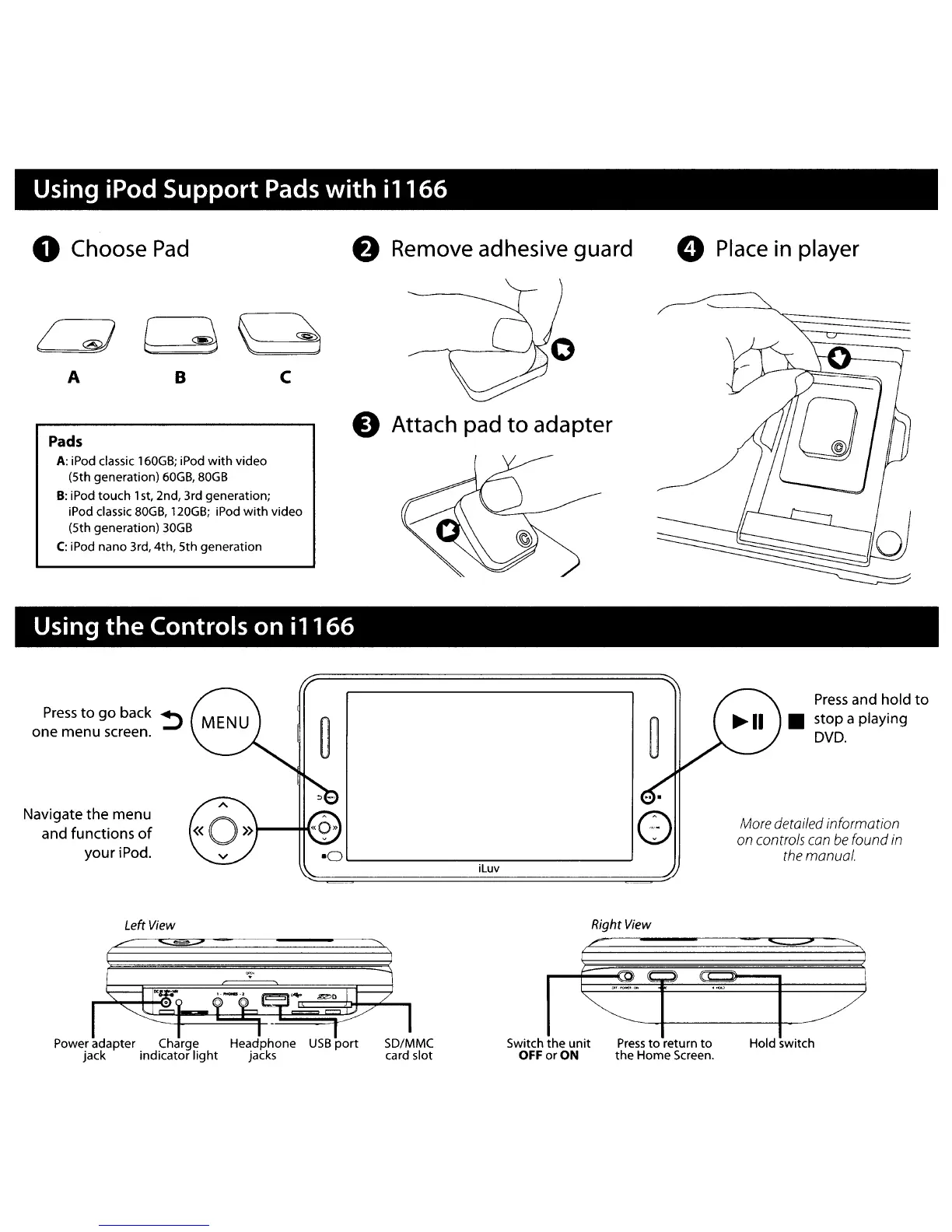
Iluv i1166 - Using iPod Support Pads with i1166; Choose Pad; Attach pad to adapter; Place in player

Iluv i1166
41 pages
Print Icon
To Next Page IconTo Next Page
To Previous Page IconTo Previous Page
Loading...
Using iPod Support
Pads
with
il166
o Choose
Pad
f)
Remove adhesive guard
o Place
in
player
Pads
A:
iPod classic
160GB;
iPod
with
video
(5th generation)
60GB,
80GB
B:
iPod touch 1
st,
2nd, 3rd generation;
iPod classic
80GB,
120GB;
iPod
with
video
(5th generation)
30GB
C:
iPod nano 3rd, 4th, 5th generation
e Attach pad
to
adapter
c
B
A
I;)
Using the Controls on i
1166
Navigate
the
menu
and functions
of
your iPod.
iluv
()
Press
and hold
to
stop a playing
DVD.
More
detailed information
on
controls
con
be
found
in
the
manual.
Left
View
Right
View
/'
Power adapter Charge
jack indicator
light
Switch the
unit
Press
to
return
to
OFF or ON the Home Screen.
Hold sWitch