27
IMER INTERNATIONAL S.p.A.
KOINE 35
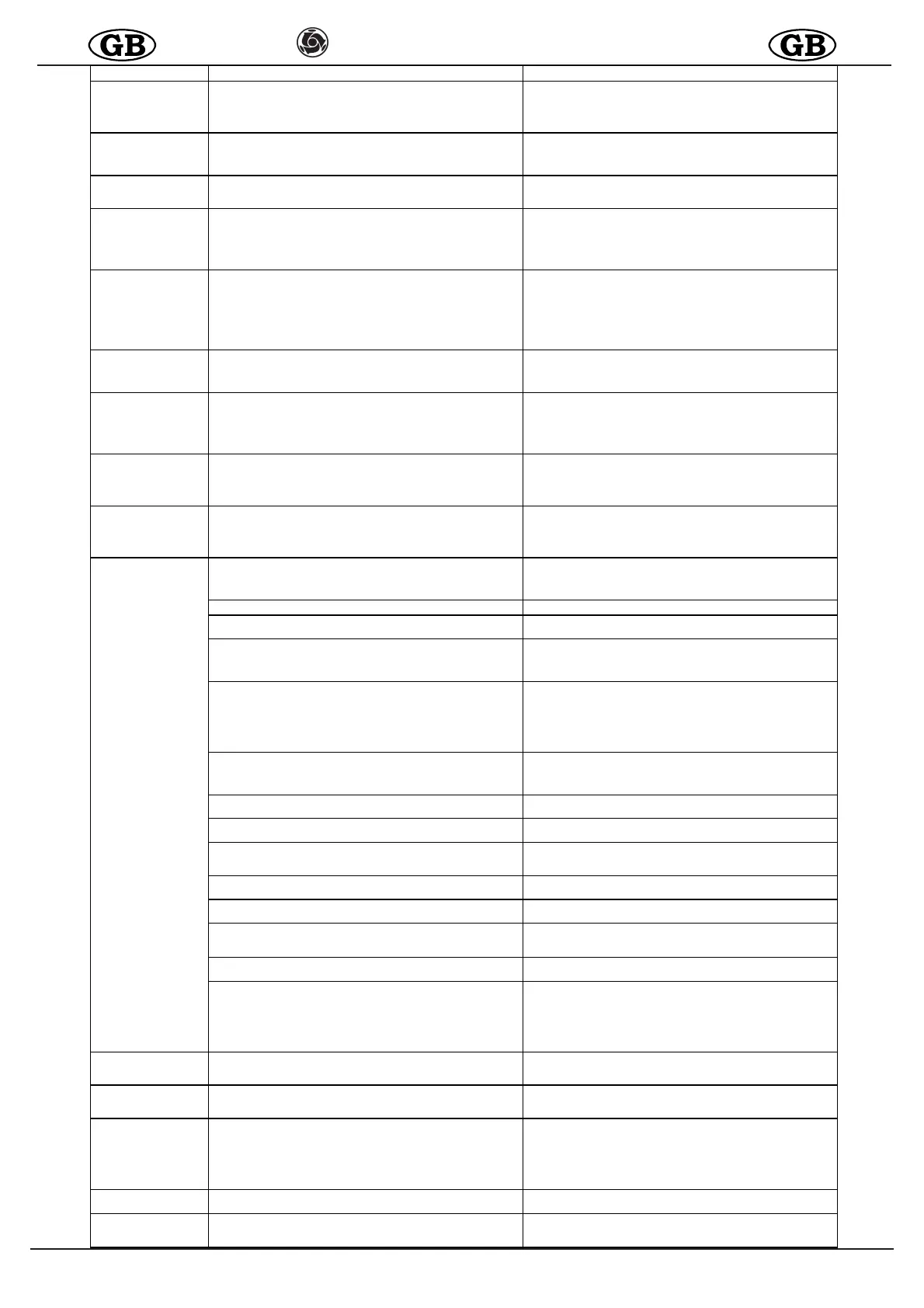
INCONVENIENTI
CAUSE RIMEDI
La macchina non parte Acqua
Water pressure too low: the gauge shows pressure below 2 bar (green lamp on?),
the display shows the text H
2
O
- Check that water is delivered from the supply hose
- Check that the water filter is clean
- Check that the water pump is switched on
- If the pump collects from a tank, check that it has been primed and there are
no leaks from couplings
Machine does not start Material
- Product too dry in mixing chamber
(mortar pump seized? red lamp on?)
- Initial start-up not performed correctly (see para.11)
- Water flow rate setting too low (see para.11)
- No water delivered to mixing chamber
(water inlet obstructed, water solenoid valve malfunction)
Machine does not start Air
- The air pressure, with jet valve completely open, does not fall below the minimum
pressure value on the machine pressure switch (table 1)
- Check that the air hose is not bent or obstructedo
- Check that the jet nozzle is perfectly clean
Machine does not start
and compressor does not
start and the blue light is
OFF
Electrical current
- No current delivered to connector of site panel
(fuses?)
- No power delivered to machine
(defective connector connection? loose cable?)
- Main switch not ON
- Check points listed alongside
Machine does not start but
compressor starts
Electrical current
- Start selector switch not in correct position
- Mixing chamber open
(start/stop pushbutton lamp on?)
- Mortar pump motor connector not inserted
(start/stop pushbutton lamp on?)
- Low water pressure switch trips on start-up
(water pump switched on ?see also "machine does not start due to water)
- Check points listed alongside
Cell wheel does not start Material
- Material hardened in hopper
- Material too compact in hopper
(machine moved with hopper full?)
- Check that water does not continue to enter the mixing chamber when the
machine is stationary
- Empty hopper (see para.11) and fill with fresh material
Mortar pump and/or cell
wheel does not start
Electric current
- Starting power voltage insufficient
(red lamp illuminates after a few seconds?)
- Motor faulty
- Faulty cable
- Faulty connector
- Ensure that the electric cable section is adequate (see para.10.1)
- Check the current line to the site panel and site panel connector
- Check motors, electric cables and connectors
Machine does not stop
and/or compressor does
not stop
Air
- Air hose defective
(hose cut? Air leaks from couplings?
- Compressor air supply low
- Jet air valve faulty (blocked in open position)
- Check the air hose and couplings in particular and replace if necessary
- Check air filter (see para. 12)
- Check compressor relief valve
Machine stops after
starting up
Water
- Intake filter clogged
- Pressure reducer filter clogged
- Water hose too long and/or too narrow
- Water supply insufficient
- Check points listed alongside: clean filters, check for adequate flow rate from the
water hose (at least 10-12 l/min if working with lime-cement based plaster, at least
15-20 l/min with gypsum based plasters) and replace hose if necessary or collect
water from an auxiliary tank
The machine stops during
operation
The following texts appear
on display
- ERR00 : Hopper grille open or incorrectly located.
- Screw pump motor thermal cutout (see Err02).
- Emergency button pressed.
- System malfunction.
- Ensure the grille is properly located
- Wait for it cool down, then restart.
- Reset the emergency button.
- Contact Assistance Service
- ERR01 : High circuit board temperature (Inverter). - Wait for it cool down, then restart.
- ERR02 : High screw pump motor temperature.
- The motor has been subjected to overloading for a long time.
- Wait for it cool down, then restart.
- Correct the mixture in use.
- ERR03 : To o m u c h p o w e r r e q u i r e d f r o m s c r e w p u m p m o t o r ( m o t o r ja m m e d ) . - A d d w a t e r t o m i x t u r e .
- Add binder to mixture.
- Use sand with optimized particle size curve.
- Remove blockage.
- ERR04 : S
crew pump motor overload warning. - Use sand with optimized particle size curve.
- Add water to mixture.
- Add binder to mixture.
- Reduce screw pump motor speed.
-Ensure that the power voltage is in the range 200V to 230V when the machine is
operating, that the power cables are properly rated and that no other equipment
(cranes, lifts, saws, concrete mixers, etc.) is connected to the same supply.
- ERR05 : The compressor turns on and off too frequently although the air tap put
on the spray jet is closed
-Air hose punctured.
-Leakage from unions.
-Replace the gaskets
-Seal the couplings
-Replace the air tap of the spray jet
- ERR06 : In s ta nta ne ous powe r vo lta g e o ve r 26 5 V . - Check the quality of the current delivered by the power supply (qualified
electrician).
- ERR07 : Current loss to ground or system malfunction. Contact Assistance Service.
Check for water in system.
- ERR 08 : Power voltage too low:
- Lower than 170V
Ensure that the power voltage is in the range 200V to 230V when the machine is
operating, that the power cables are properly rated and that no other equipment
(cranes, lifts, saws, concrete mixers, etc.) is connected to the same supply
- ERR09 : Wheel motor overload on loading cell. - Remove blockage and any encrustation
- Remove any foreign matter.
------------ : Input voltag e in excess of 265V
- Check power supply connection - Check power voltage at source, it must not exceed 240V
- BL OC : Inp ut vo lta g e i n exc e ss o f 2 6 5 V
- Check whether the stator and rotor are jammed together
- Foreign matter in hopper / mixing chamber
- Remove rotor and stator and unjam/replace them
- Remove foreign matter from hopper / mixing chamber
- STOP : Closed jet air warning.
- Jet nozzle / air hose blocked, machine does not stop after halt.
- The warning automatically disappears if the machine starts normally after the halt.
- Clean the air nozzle and unblock the air hose.
- H2O : Water pressure below 2.5 bar, insufficient flow/pressure for correct
operation.
- The machine turned off and on again by itself, "H2O" flashes on the display for a
few se conds.
-Air in hose/system.
- Switch on the machine's water pump.
- Check that the supply pressure does not drop below 2.5 bar while the machine is
pumping, if necessary take the water from a 200 litre tank (approximate size).
- Check that the water circuit filters are clean.
- Drain water from the purge cock to bleed all air from the hose/system.
Material flow stops
(air bu bbles)
Mixing
- Mixer not suited to product
- Material damp in hopper
- Clean the mixer and if necessary replace with one more suited to products used
- Clean the mixer and if necessary replace with one more suited to products used
Material flow stops Clogging
- Material hose clogged
- Spray jet clogged
- Remove obstruction
Material delivered to jet not
constant, too hard or too
liqu id
Pre-mixed material deteriorated
Screw-stator pair worn
Screw-stator pair worn
Water pressure reducer faulty (ref.)
Water solenoid valve faulty
Water system settings incorrect
Electric cable too long and too narrow
- Check points listed alongside
Water increases in mixing
chamber during operation
Screw-stator pair worn
Pipeline clogging
- Replace screw-stator
- Remove obstruction
Water increases in mixing
chamber with machine
stationary
Solenoid valve faulty - Check


 To Next Page
 Loading...