EasyManua.ls Logo

IMOU Cruiser - User Manual

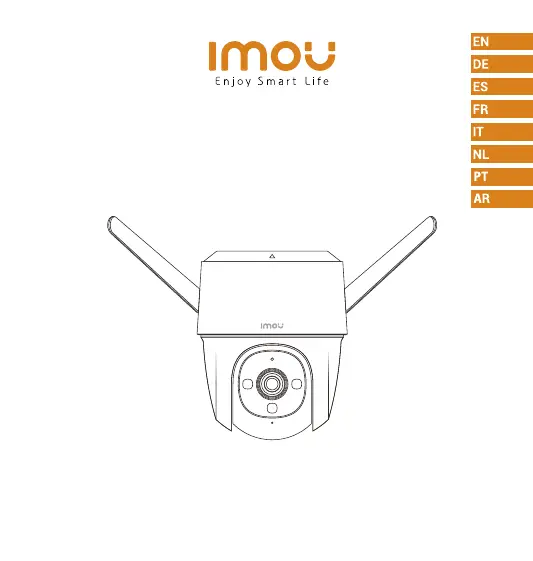
IMOU Cruiser
73 pages
Print Icon
To Next Page IconTo Next Page
Loading...
Quick Start Guide
www.imoulife.com
Cruiser

Questions and Answers

  • R
    Richard PhillipsAug 17, 2025
    How to connect IMOU Cruiser to a new Wi-Fi network?
    • D
      David WellsAug 17, 2025
      To connect your IMOU Security Camera to a new Wi-Fi network: * If the camera is online, go to Device Details > Network Config in the app to change the Wi-Fi connection. * If the camera is offline, reset the camera and then configure it again.
  • S
    Samantha SmithAug 20, 2025
    Why does connecting to my IMOU Security Camera take so long?
    • M
      marciahughesAug 20, 2025
      If connecting to your IMOU Security Camera takes too long, ensure that the distance between the camera and the router, and between the camera and your smartphone, is within 5 meters (16.4 feet) during the connection. Also, check the router's Wi-Fi configuration: set the channel to auto and the mode to 11bgn mixed.
  • K
    Kathleen JenkinsAug 22, 2025
    What to do if my IMOU Security Camera is offline?
    • H
      harrispatrickAug 22, 2025
      If your IMOU Security Camera is offline, verify that the distance between the camera and the router, and the camera and your smartphone, is within 5 meters during the connection. Also, check the router's Wi-Fi configuration, ensuring the channel is set to auto and the mode to 11bgn mixed. Finally, examine the indicator status. If it's solid green, check if the router can connect to the Internet and restart the camera if the network is connected.
  • H
    hahntimothyAug 26, 2025
    Why does my IMOU Security Camera take so long to connect?
    • M
      michelebakerAug 26, 2025
      If your IMOU Security Camera takes too long to connect, ensure that the distance between the camera and the router, and the camera and your smartphone are both within 5 m (16.4 ft) during the connection. Additionally, check the Wi-Fi configuration of the router: Select the channel to auto, and the mode to 11bgn mixed.
  • E
    Eric JonesAug 28, 2025
    Why is my IMOU Cruiser offline?
    • M
      Michael SantanaAug 28, 2025
      If your IMOU Security Camera is offline, first verify that your router has an active internet connection. If the network is connected, try restarting the camera.
  • R
    Richard MartinezAug 30, 2025
    Where are recorded videos saved from IMOU Security Camera?
    • S
      Sandra RileyAug 30, 2025
      The location of your recorded videos depends on your settings. If you have activated cloud storage and have a micro SD card installed, recordings are saved to both the card and the cloud. If cloud storage is deactivated, the recordings are saved to the SD card. Videos recorded during live view or playback are saved on your phone.
  • D
    Derrick SandersSep 2, 2025
    What to do if my IMOU Cruiser won't boot up?
    • P
      Pamela BrownSep 2, 2025
      If your IMOU Security Camera won't boot up or work as expected, check the LED indicator status. If the light is not green, press and hold the reset button for 10 seconds to reset the camera.
  • P
    Phillip WellsSep 5, 2025
    What happens when the micro SD card is full in my IMOU Security Camera?
    • A
      Aaron WilliamsSep 5, 2025
      When the micro SD card in your IMOU Security Camera is full, the system will overwrite the oldest recorded videos. Make sure you save any important information in time.
  • M
    mrangelSep 8, 2025
    What to do if IMOU Security Camera cannot boot up?
    • A
      Austin SchultzSep 8, 2025
      If your IMOU Security Camera won't boot up or isn't working as expected, check the LED indicator status. If the light is not green, press and hold the reset button for 10 seconds to reset the camera.
  • A
    ana02Sep 12, 2025
    Where are IMOU Security Camera recorded videos saved?
    • D
      Donald MartinSep 12, 2025
      If you have activated cloud storage and installed a micro SD card, the recordings will be saved to both the card and the cloud. If cloud storage is deactivated, the recordings are saved to the SD card. Videos recorded during live view or playback are saved on your phone.

Summary

Welcome

Package Content

Camera Introduction

Camera Components Overview

Details physical ports and key features like power, SD card slot, and spotlight.

Speaker and LED Indicator Status

Explains the speaker's location and the meaning of various LED indicator states.

Download the APP

Tips for Wireless Performance

Guidance on placement and environmental factors to ensure optimal Wi-Fi signal.

Add Device to the APP

Installing Camera

Ceiling Mount Installation

Step-by-step instructions for mounting the camera on a ceiling.

Wall Mount Installation

Detailed steps for securely mounting the camera to a wall.

Pole Mount Installation

Instructions for attaching the camera to a pole using hoops.

Power Requirements

Specifications for the camera's power adapter (DC 12V1A).

Troubleshooting

Device Not Booting or Working

Steps to resolve issues if the camera fails to power on or function.

Wi-Fi Connection Issues

Guidance on connecting the camera to a new Wi-Fi network or resolving connection problems.

Slow Connection and Storage

Troubleshooting tips for slow connection times and micro SD card full scenarios.

Device Offline Troubleshooting

Diagnosing and resolving situations where the camera appears offline.

IMOU Cruiser Specifications

General IconGeneral
TypeIP security camera
Antenna typeExternal
CertificationCE, FCC
Day/night modeYes
Antennas quantity2
Placement supportedOutdoor
Connectivity technologyWired & Wireless
Maximum operating distance120 m
Form factorDome
Mounting typeCeiling/Wall/Pole
Product colorBlack, White
Housing materialPlastic
Protection featuresDust resistant, Waterproof
International Protection (IP) codeIP66
Pan range0 - 355 °
Tilt angle range0 - 90 °
Sensor typeCMOS
Number of sensors1
Optical sensor size1/2.8 \
Digital zoom16 x
Number of lenses-
Fixed focal length3.6 mm
LED typeIR
Night vision distance30 m
Total megapixels2 MP
Maximum resolution1920 x 1080 pixels
Video compression formatsH.264, H.265
Supported graphics resolutions1920 x 1080 (HD 1080)
Audio system2-way
BluetoothNo
Frequency band2.4 GHz
Wi-Fi standards802.11b, 802.11g, Wi-Fi 4 (802.11n)
Ethernet interface typeFast Ethernet
Supported network protocolsONVIF
Compatible memory cardsMicroSD (TransFlash)
Maximum memory card size256 GB
DC output current1 A
DC output voltage12
Power source typeDC
Power consumption (typical)5.32 W
Operating temperature (T-T)-30 - 60 °C
Operating relative humidity (H-H)0 - 95 %
Alert notification typeText alert message
Intelligent Video Surveillance (IVS) system featuresMissing object
Mobile operating systems supportedAndroid, iOS
Harmonized System (HS) code85258900
Weight and Dimensions IconWeight and Dimensions
Depth121.7 mm
Width138.4 mm
Height257.5 mm
Weight565 g

Related product manuals