5
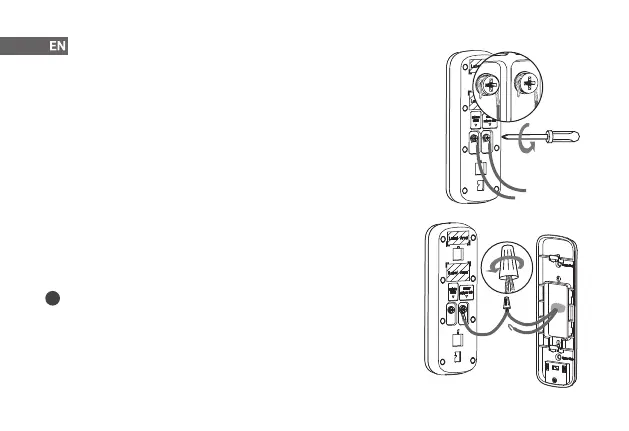
Step 5 Connect Wires
1. Loosen the power port screws of the doorbell.
2. Loop your existing wires underneath the screws. Either wire can connect to
either screw.
3. Tighten the screws to secure the power wires.
Step 6 (Optional) Apply Extension Wires
1. If your existing wires are too short, remove the power port screws completely,
and then thread the screws through the provided extension wires.
2. Align the ends of your existing wire and the extension wire.
3. Place the wire nut over the exposed wires and twist the wire nut clockwise to
tighten. Pull on the wires slightly to make sure that they are properly fastened
inside the wire nut.
i
Ensure there is enough space to t the wires and wire nuts into the hole in
your wall.



 To Next Page