Version 2.0 © 2021, Impinj, Inc. Version 2.0 © 2021, Impinj, Inc.
Connect RF Cables
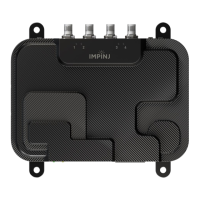
1. Power off the Impinj R700 Reader
2. Using an SMA to R-TNC cable, connect the SMA port on the Antenna Hub
nearest the Impinj Logo to a port on the R700 Reader
3. Connect Antennas to the other ports available on the Antenna Hub
4. Unused ports on the Antenna Hub can be left empty or terminated
Log into the reader and enable the Antenna Hub Feature
1. Make sure your Impinj R700 reader is powered and connected to the local
network via Ethernet.
2. Open a new browser tab. Connect to the Impinj R700 Reader by entering either
the reader hostname or IP address into the URL.
• Impinj R700 Hostname: http://impinj-XX-XX-XX where XX-XX-XX is the
last 3 octets of the reader MAC address.
• The MAC address is printed on labels affixed to the reader and shipping
box.
NOTE: If you are connecting your Impinj R700 reader to a network with static IP
addressing, refer to Impinj R700 Installation and Operations Guide on the
Support Portal for instructions.
3. Sign into the reader in the popup window
• The default credentials are username: root password: impinj
4. The reader web configuration page will open
5. Verify that the Impinj R700 Reader is running a 7.3 version of firmware or later, if
the Reader needs a newer version of firmware follow the instructions below
• Download the firmware upgrade file from the Impinj support portal or contact
an authorized Impinj partner
• Click the Browse button next to Select Upgrade File in the web configuration
page
• Navigate to the firmware upgrade file
• Click Upgrade (this may take several minutes)
• Click Reboot
6. In the web configuration page, click on the “Enable” button in the Antenna Hub
section to enable the the Hub. Reboot the reader by selecting the reboot button
for the changes to take effect
7. Once the reader has rebooted the lights on the enabled antenna hubs will cycle
sequentially to show they are connected
Verify Antenna Connection in the Web Configuration Page
1. Select ‘Check Connections’ in The Antenna Hub Section to troubleshoot any
issues with connecting Antennas
Mount the Antenna Hub
1. Using the ¼” mounting holes affix the Antenna Hub to a suitable surface
• It may be necessary to remove RF cables while mounting the Antenna Hub


 To Previous Page
 Loading...