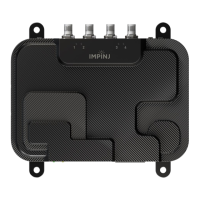
Need help?
Do you have a question about the impinj R705 and is the answer not in the manual?
Lists Impinj R705 Portal Gateway part numbers and their specifications.
Details FCC compliance, interference, and user corrective actions.
States device compliance with FCC rules, subject to two conditions.
Specifies required separation distance for FCC and IC RF exposure compliance.
Outlines Industry Canada (IC) compliance conditions for device operation.
Details transmit power limits for RFID devices in the EEA.
Specifies operating temperature and humidity ranges for the device.
Declares compliance with EU directives for specific radio equipment types.
Lists necessary TCP/IP network equipment and USB cable for connection.
Describes environments and tools for accessing the RShell console.
Explains the gateway's purpose and how it radiates RF energy.
Explains how to power and connect the gateway to a network via Ethernet.
Details default hostname and DHCP behavior for network connection.
Provides steps for connecting the reader to a LAN drop or network switch.
States that region setting must be done by a professional installer.
Guides on setting region via web interface using administrator credentials.
Explains how to set or change the operating region using RShell commands.
Lists the three main methods for upgrading the device firmware.
Provides detailed steps for upgrading firmware via RShell command line.
Details the process of upgrading firmware using a USB drive.
Instructions for creating directories and copying firmware to a USB drive.
Steps for inserting USB drive and initiating firmware upgrade.
Explains how to upgrade firmware via the management web page.
 General
| Brand | impinj |
|---|---|
| Model | R705 |
| Category | Rfid Systems |
| Language | English |


 To Next Page