First use
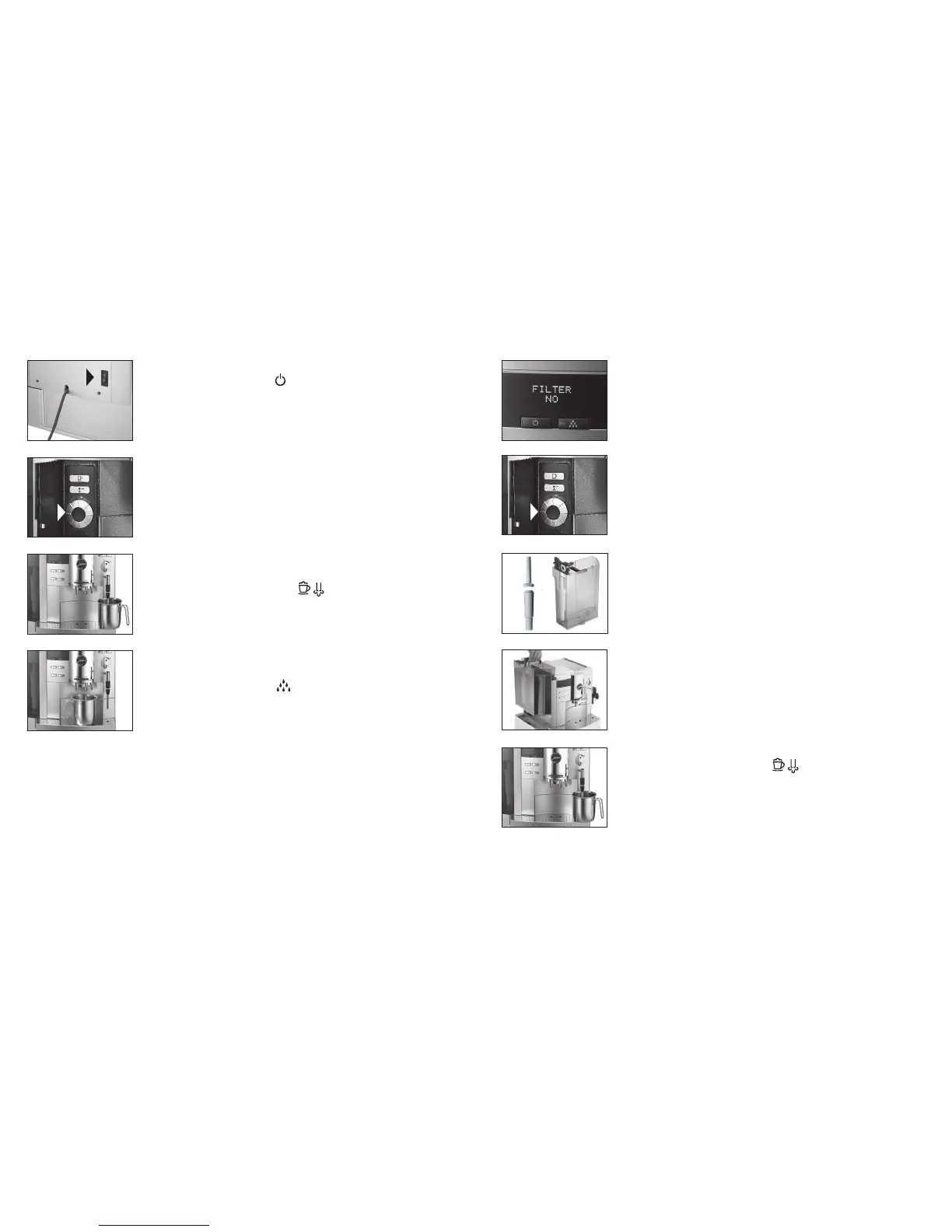
Switch on main switch (I)
Press operating button
Fill water tank
Fill bean tank
Display text:
SPRACHE DEUTSCH
Open the programming door
Turn Rotary Switch until desired language appears
Press Rotary Switch to confirm selection
Display text:
FILL SYSTEM
/
PRESS STEAM
Place container under 2-stage frothing jet
Press one of the steam keys
System fills automatically
Display text:
PRESS RINSE
Place container under coffee spout
Press maintenance key
The pipes are rinsed with fresh water
The machine is ready for use
(1)
(2)
Insert filter (first use)
Open the programming door
Press Rotary Switch until you hear an acoustic signal
Display text:
FILTER NO
Press Rotary Switch to start the maintenance menu
Turn Rotary Switch until
FILTER YES
appears
on the display
Press Rotary Switch to confirm setting
Remove water tank and empty it
Display text:
INSERT FILTER
/
PRESS STEAMn
Open cartridge holder
Fix extension (1) in position on top of CLARIS plus filter
cartridge (2)
Use gentle pressure to insert filter cartridge in water tank
Close cartridge holder (it clicks audibly into place)
Fill the water tank and reinsert
Position container (approx. 0.5 litre) under 2-stage frothing jet
Press one of the steam keys
Filter rinse stops automatically
The machine is ready for use



 To Next Page