ImpulseRadar PinPointR User Manual V1.5.1
Page 6 (36)
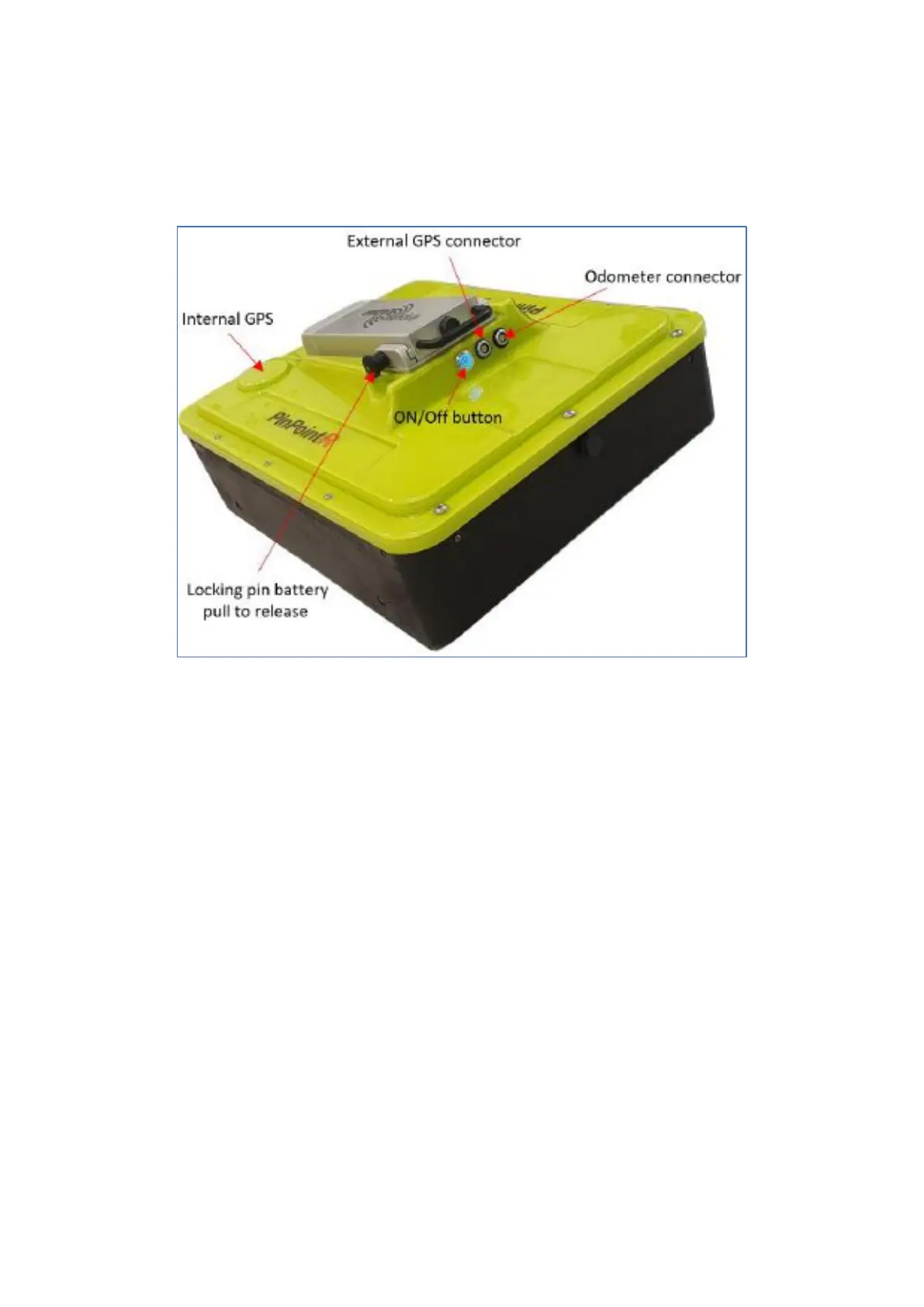
rechargeable Li-ion battery, which is conveniently located on the top of the unit. Figure 2 shows the
location of the on/off button and the connector sockets for odometer and external GPS.
The unit also includes a high-quality differential GPS receiver. There is no external connection to this
component, although markings on the housing indicate the approximate internal location.
Figure 2 PinPointR GPR unit with a battery attached
Connector panel
Refer to the arrangement shown in Figure 2:
• Silver – On/off button. Press and hold the button for approximately two seconds to switch on
the unit. Once on, the button glows blue. A subsequent press will switch off the GPR unit.
• Blue – External GPS. It allows the connection of an external GPS to provide higher precision
positioning. Communication is via a serial RS232 link using the NMEA 0183, V2 protocol, and
GGA data string.
• Black – Measuring Wheel. It allows the connection of the odometer cable (wheel encoder)
from the push-cart.
All cable connectors are of high-quality from Yamaichi. To insert or remove a cable connector, hold the
connector sleeve then gently push or pull the connector straight without turning. Each connector has
a key slot to prevent damage if incorrectly connected into the wrong socket.
Battery
The PinPointR is powered via a removable and rechargeable Li-ion battery, which is a nominal 8.7 Ah/
96.57 Wh, providing approximately 7-hours of continuous operation.
Note: ImpulseRadar Li-ion batteries are approved according to UN38.3 and can, therefore, be safely
hand-carried on passenger aircraft or shipped by air cargo.


 To Next Page