— 12 —
mode, the two black buttons increase or decrease the cadence
(speed) with each brief press. The cadence varies from 59 to
130 beats per minute over 15 increments.
The Sound Cueing only operates while the Laser Cueing is on.
When Sound Cueing is activated, both the sound and laser
remain on indefinitely. Turning the Sound Cueing off requires
shutting the entire module off, by pressing the red button.
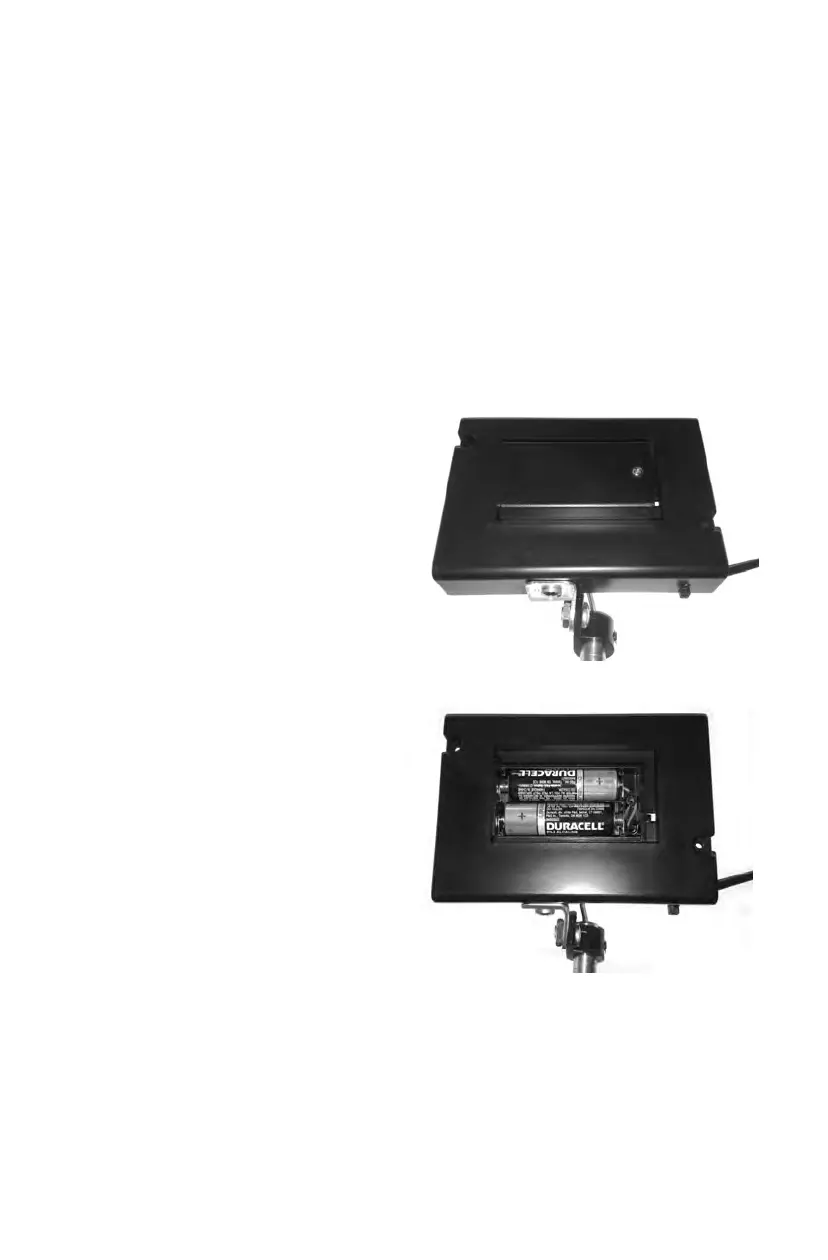
Use either alkaline or lithium
“AA” batteries. Remove the
small screw holding the bat-
tery cover on (Figure 1) and
slide the cover to the left to
remove it. Note the posi-
tion of the two batteries
(Figure 2), ensuring that the
the “+” and “–” sides are
installed in opposite direc-
tions. The unit will click
either three or five times
when the batteries are
installed correctly. If the
unit clicks three times, it is
shutting off. If the unit clicks
five times, it is turning on
and the power indicator will
blink.
Installing and Replacing the Cueing Module Batteries —
2) Alternative Brake Accessory – (Provided Upon Request)
This allows a person to operate the brakes from a Horizontal bar
that attaches at the handles. This feature is rarely used which is
why it is not included. However, if you would like one sent to
you, please call In-Step and we will be happy to send it to you.
F
i
g
u
r
e
1
F
i
g
u
r
e
2


 To Next Page