Please note: Before the removal of the data storage device, please stop all data access and
transfer to the device, so that the storage can be normally removed. Forced removal may
lead to damageor loss of crucial data. To prevent any data loss, please strictly follow the
steps for removal below!
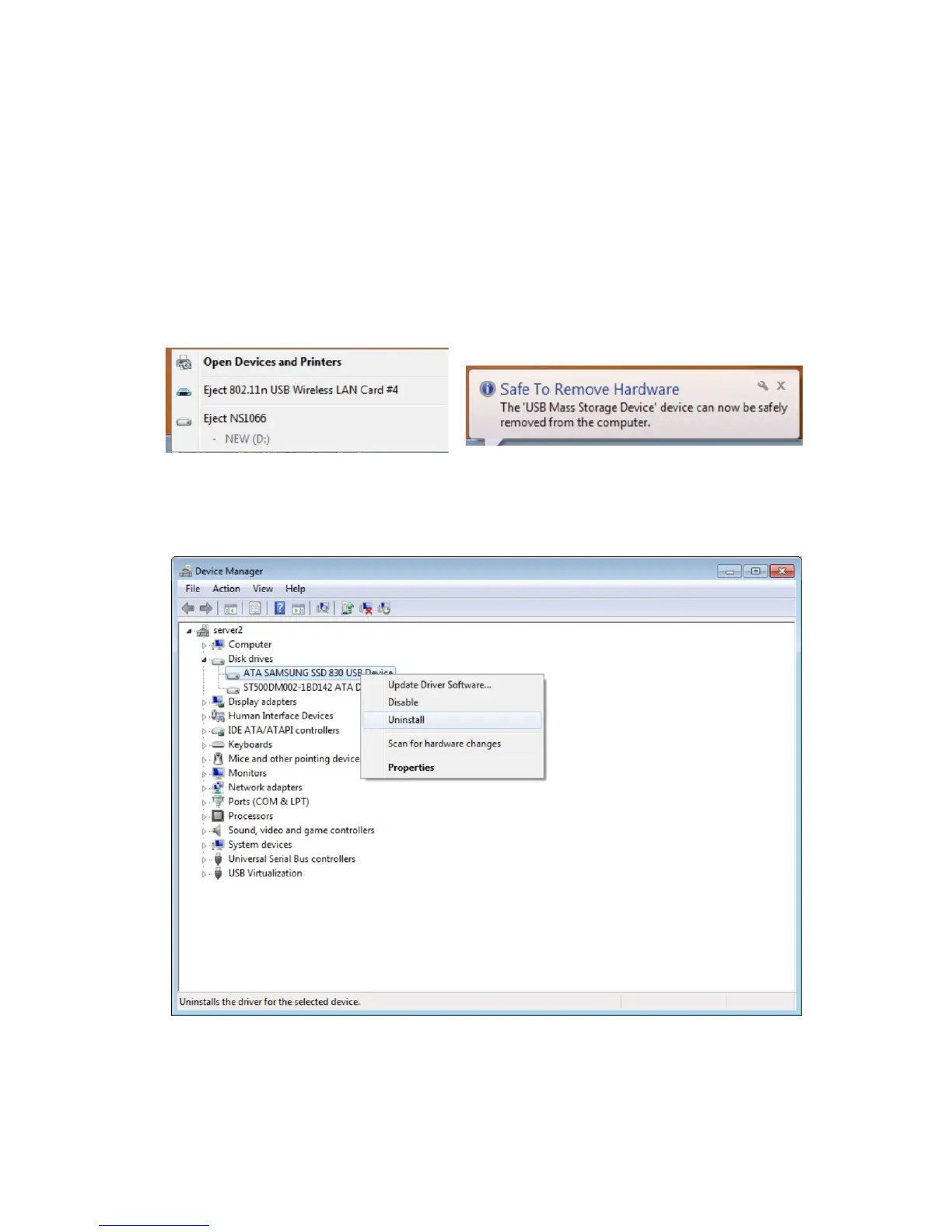
a. Removal from Windows systems: Right click on the hardware or USB device removal
symbol in the status bar, click on the periphery to be removed. When the system
notification reading “the device can now be safely removed.” shows up, you can remove
the data storage.
Another way to remove the data storage is through the device manager (“Computer” ->
“Device Manager” -> “Drives” -> Click on “Remove” for the drive to be removed, so that
the drive can be detached safely.
b. Removal from Macintosh systems: Please choose the symbol for “Portable drives /
devices”, choose the menu function “Remove” from the drop down menu by right
clicking onto the symbol. You may also drag the “Portable device” to the rubbish bin.
Now, the device can be safely removed.
Instruction for the removal of drives


 To Next Page