23 OFF IS A BRAND OF INDELB
EN
USAGE INSTRUCTIONS
The climate class is indicated on the data plate inside the unit itself.
TEMPERATURE REGULATION WITH DIGITAL DISPLAY
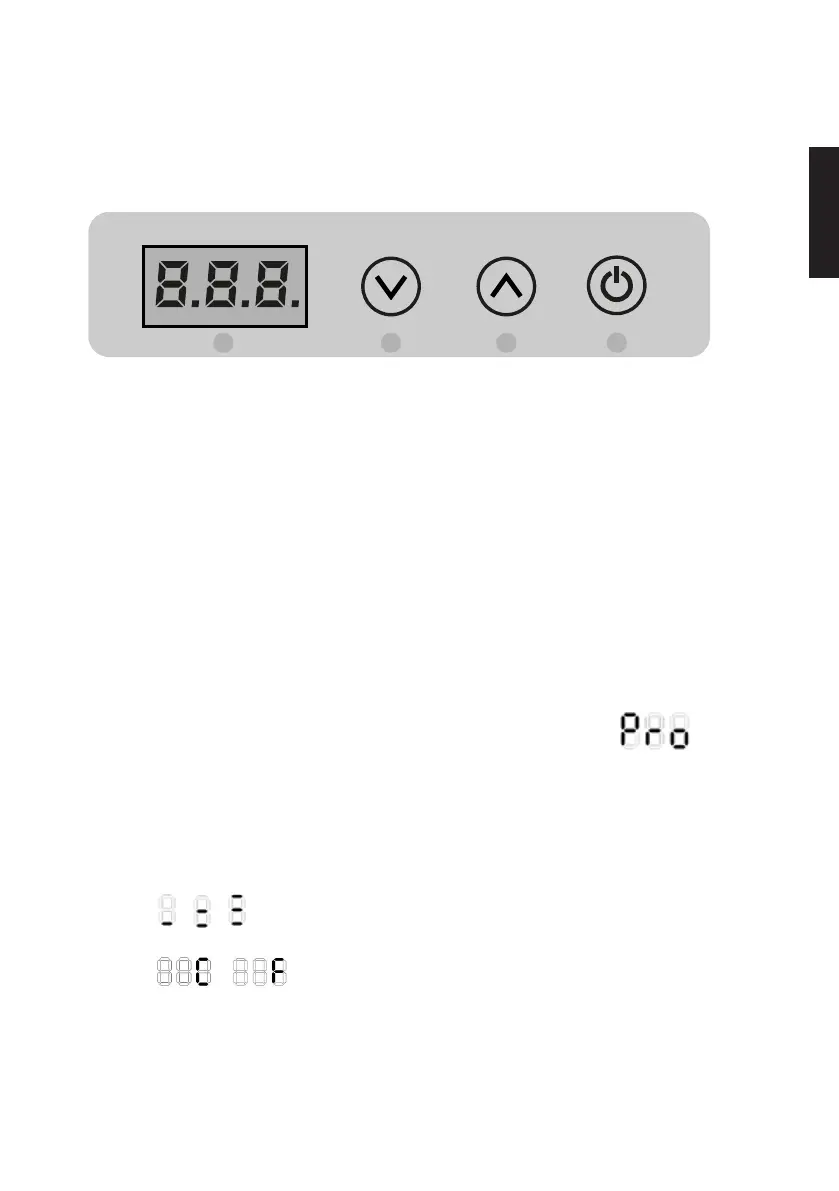
4 3 2 1
DISPLAY FUNCTIONS
- Switching on: Press and hold the 1 button for 4 seconds.
- Shut-down (Stand-By): Press and hold the 1 button for 4 seconds.
- Internal temperature adjustment buttons 2 and 3.
- Access to programming menu [Pro].
TEMPERATURE SETTING
Switch on the refrigerator, set the desired temperature using the 2 button to increase or 3 to decrease the temperature, which
will be saved automatically.
MENU FUNCTION PRO
The Pro menu allows for changes to the following data: offset 1, offset 2, offset 3, battery protection.
To access the Pro menu, press the 2 and 3 buttons simultaneously for 4 seconds. The message will then appear
on the digital display. Press the 1 button to confirm entry into the menu.
The offset1 value will appear. This value can be changed from +8 to -8 using buttons 2 and 3.
Press 1 to confirm the new data entered and go to setting for the next parameter.
The offset2 value will appear. This value can be changed from +8 to -8 using buttons 2 and 3.
Press 1 to confirm the new data entered and go to setting for the next parameter.
The offset3 value will appear. This value can be changed from +8 to -8 using buttons 2 and 3.
Press 1 to confirm the new data entered and go to setting for the next parameter.
The figure shown, or or refers to the level of battery saving set. The value can be modified using button 2 or 3.
Press 1 to confirm the new data entered and go to setting for the next parameter.
The figure shown or refers to the selection of the temperature scale, Celsius or Fahrenheit, the selection
of the factory setting is in Celsius, the value can be changed by pressing the button 2 or 3.
To exit from the Pro menu, wait a few seconds until the display shuts down. Data will be saved automatically.





 To Next Page