The Indel B TB 28 BT DT is a portable refrigerator designed for cooling and freezing food, particularly suitable for use in vehicles. It operates on a 12V or 24V DC power source and is equipped with a multi-level battery monitor to protect the vehicle's battery from excessive discharge.
Function Description:
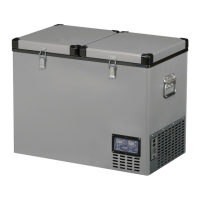
This appliance functions as a portable refrigerator/freezer, capable of cooling and freezing food items. It features two independent compartments (left and right bins) whose temperatures can be set individually. The device is intended for cooling and storing closed beverages and snacks. It is not designed for storing perishable food directly in contact with the interior or for the proper storage of medicines; for medicines, users should refer to the package leaflet. The refrigerator uses an electromagnetic valve control system to manage cooling in its compartments. In L/R mode, if both cabinets are warmer than their set temperatures, they are refrigerated sequentially for 10 minutes each, with the left cabinet cooling first. If one cabinet reaches its set temperature while the other has not, only the warmer cabinet will be refrigerated. The compressor stops when both cabinets reach their set temperatures. In L or R mode, only one cabinet is refrigerated at a time, and the compressor stops once that cabinet reaches its set temperature. There is a minimum 30-second interval between electromagnetic valve power-on and power-off cycles.
Important Technical Specifications:
- Model: TB28 BT DT
- Dimensions (HXLXP): 417 x 366 x 650 mm
- Net Weight: 15.5 kg
- Product Class: 28
- Voltage: DC 12/24V
- Refrigerant Gas and Charge: R134a 0.040 Kg (CO2 eq. 0.057 t). This appliance contains fluorinated greenhouse gas R134a within a hermetically sealed system, and its operation depends on the presence of this gas.
- Temperature Range: -18°C to +10°C
- Battery Protection Levels:
- LOW (1 Bar): Cut Off 9.4V (12V) / 21.1V (24V), Cut In 10.9V (12V) / 22.7V (24V)
- MIDDLE (2 Bars): Cut Off 10.9V (12V) / 22.2V (24V), Cut In 12.4V (12V) / 23.6V (24V)
- HIGH (3 Bars): Cut Off 11.2V (12V) / 24.2V (24V), Cut In 12.8V (12V) / 25.7V (24V)
- Note: These values are measured at the control unit input and/or on the DC socket.
- Cable Diameter Recommendations (for non-supplied power cable):
- 2.5 (AWG 13): 2.5m (8 FT) for 12V, 5m (16FT) for 24V
- 4 (AWG 11): 4m (13 FT) for 12V, 8m (26 FT) for 24V
- 6 (AWG 9): 6m (20 FT) for 12V, 12m (40 FT) for 24V
Usage Features:
- Installation: The refrigerator should be placed on a dry, sheltered, flat surface, away from edges, heat sources, and direct sunlight. It requires good ventilation, with at least a 15 cm gap around the sides, back, and top. If left in a vehicle under the sun, it must be protected to prevent plastic materials from warping. Metal brackets on the sides can be used to secure the fridge during transport. Avoid introducing liquids or ice not in containers, and do not place hot food items directly into the refrigerator.
- Power Connection: Connect the feeding cable to a direct current 12V or 24V DC power source, ensuring correct polarity. For system protection, a fuse (15A for 12V, 7.5A for 24V) must be installed in the positive wire as close to the battery as possible. If a main switch is used, it must withstand a minimum current of 20A. Avoid extra junctions in wiring to prevent voltage drops. When connecting to a cigarette lighter socket, verify sufficient power supply.
- Control Panel:
- Turning On/Off: When off, press the "L" button to turn on/off the left box, the "R" button to turn on/off the right box, or the "L/R" button to turn on/off both boxes. When on, press the lighted button to switch off.
- Temperature Setting: When on, press the "∧" or "v" buttons for the left or right bin to increase or decrease the temperature. Holding the button changes the temperature at 4°C/second. Default temperatures are -18°C for the left bin and 5°C for the right bin.
- Battery Protection & Celsius/Fahrenheit Setting: When off, press and hold both right-bin "∧" and "v" buttons for 3 seconds to enter this mode. Use the "R" button to switch between battery protection and Celsius/Fahrenheit settings. Use the lighted "∧" and "v" buttons to set parameters. The middle position is the default battery protection, and Celsius is the default temperature scale.
- Display: When switched on, LEDs, digital screen, and buttons flash for 2 seconds. When off, buttons are off. When on, buttons and display are on. The LED display shows temperatures from -20°C to 40°C, displaying -20°C for lower temperatures and 40°C for higher.
- Offset Value (Temperature Compensation): This feature allows aligning the displayed temperature with the actual internal temperature. After a few hours of operation, place a digital thermometer inside and adjust the offset if needed. The offset can be adjusted from -10 to +10.
- Setting Compensation: When off, press and hold both left-bin "∧" and "v" buttons for 3 seconds to enter temperature compensation mode. The display will show F1/F2/F3. Use the "L" button to cycle through offset values for the left bin, then the right bin. Use the lighted "∧" and "v" buttons to set the parameter. Default offsets are:
- F1 (≥0°C): Left Bin 2°C, Right Bin -5°C
- F2 (-1°C to -14°C): Left Bin 2°C, Right Bin -7°C
- F3 (≤-15°C): Left Bin 2°C, Right Bin -7°C
- Filling: Do not put hot food into the refrigerator. Arrange products to prevent them from hitting each other. Ensure the lid is always well closed and open it for the shortest possible time.
Maintenance Features:
- Safety: Before any maintenance, disconnect the power cable from the socket.
- Cleaning: Regularly clean the interior and exterior with warm water and a neutral detergent. Rinse with clean water and dry thoroughly with a soft cloth. Do not use special glass/mirror cleaning products, liquid/powder/spray detergents, alcohol, ammonia, or abrasive products. If not in use, clean thoroughly and leave the door half open for ventilation.
- Troubleshooting (Suggestions before contacting service):
- Check for feeding voltage.
- Verify voltage matches the plate.
- Ensure connections and polarities are correct.
- Check that airing grids are not covered.
- Confirm the refrigerator unit is not near a heat source.
- Check if the fuse of the feeding line is blown.
- Power Supply Cable: Must only be replaced by qualified technical personnel or an authorized after-sales service. Indel B is not liable for non-compliance with manual provisions.
- Defrosting: Defrost when the frost layer is thicker than 4 mm. Turn off the refrigerator. Do not use sharp or cutting tools to remove frost or ice. Wait for complete unfreezing before turning it on again.
- Error Codes (Displayed on the fridge):
- E1: Battery protection (voltage outside cut-out setting).
- E2: Fan over-current cut-out (fan loads electronic unit with >1A peak).
- E3: Motor start error (rotor blocked or differential pressure in refrigeration system >5 bar).
- E4: Minimum motor speed error (refrigeration system too heavily loaded, motor cannot maintain minimum speed 1,850 rpm).
- E5: Thermal cut-out of electronic unit (refrigeration system too heavily loaded, or high ambient temperature causes electronic unit to run too hot).
- E6: NTC temperature probe failure (NTC open circuit or short circuit).

 Need help?
 General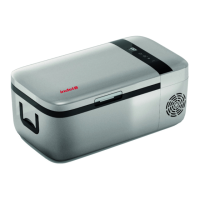





 To Next Page