11
Clock/Minute Minder
The minute minder can be cancelled before the bleeper sounds by pressing
the ‘+’ and ‘-’ buttons together until 0.00 appears in the display window.
To adjust the pitch of the bleeper, press the ‘-’ button while the bleeper is
sounding. For example:
(a) Press the ‘+’ button and set 10 seconds.
(b) When the bleeper sounds,press and release the ‘-’button, until the
preferred pitch is set.
(c) Press and release the ‘+’ button to cancel the bleeper.
If the sound of the bleeper appears to be different,it is most likely that the
pitch of the bleeper has inadvertently adjusted.
Bleeper sound
NOTE:
MINUTE MINDER OPERATION
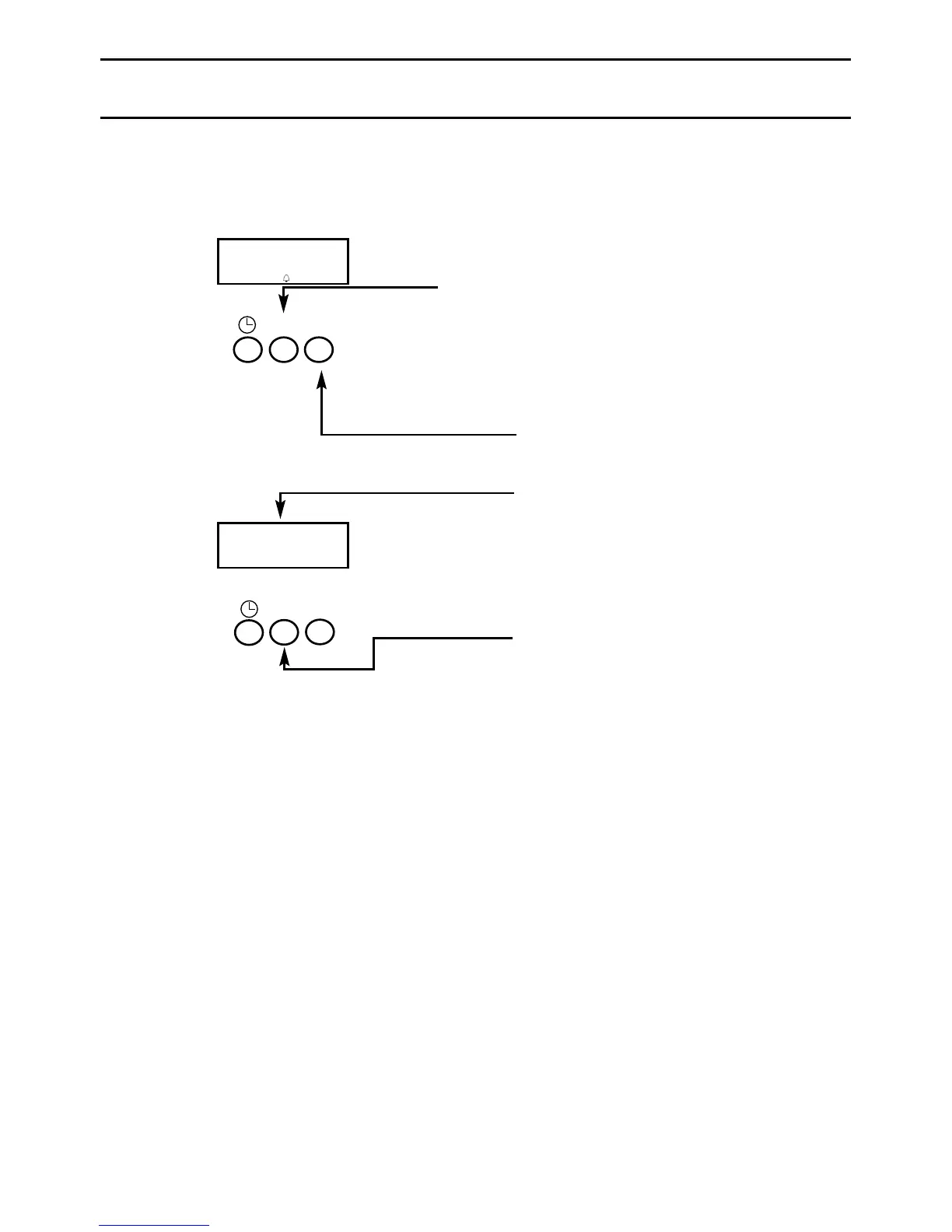
To set the Minute Minder:
Step 1 Press the ‘+’ button until
the required time is set.
A “Bell”symbol will light up.
Each press adjusts the
time in 10 second intervals,
up to a maximum of
99 minutes 50 seconds.
It can also be adjusted by
pressing the ‘-’ button.
At the end of the set
time, a bleeping sound
will be heard and the
“Bell” will disappear.
The bleeper can be
cancelled by pressing the
‘+’ button.
00.20
13.23
+
-
+
-



 To Next Page