对折基 准 线
对折基 准 线
4
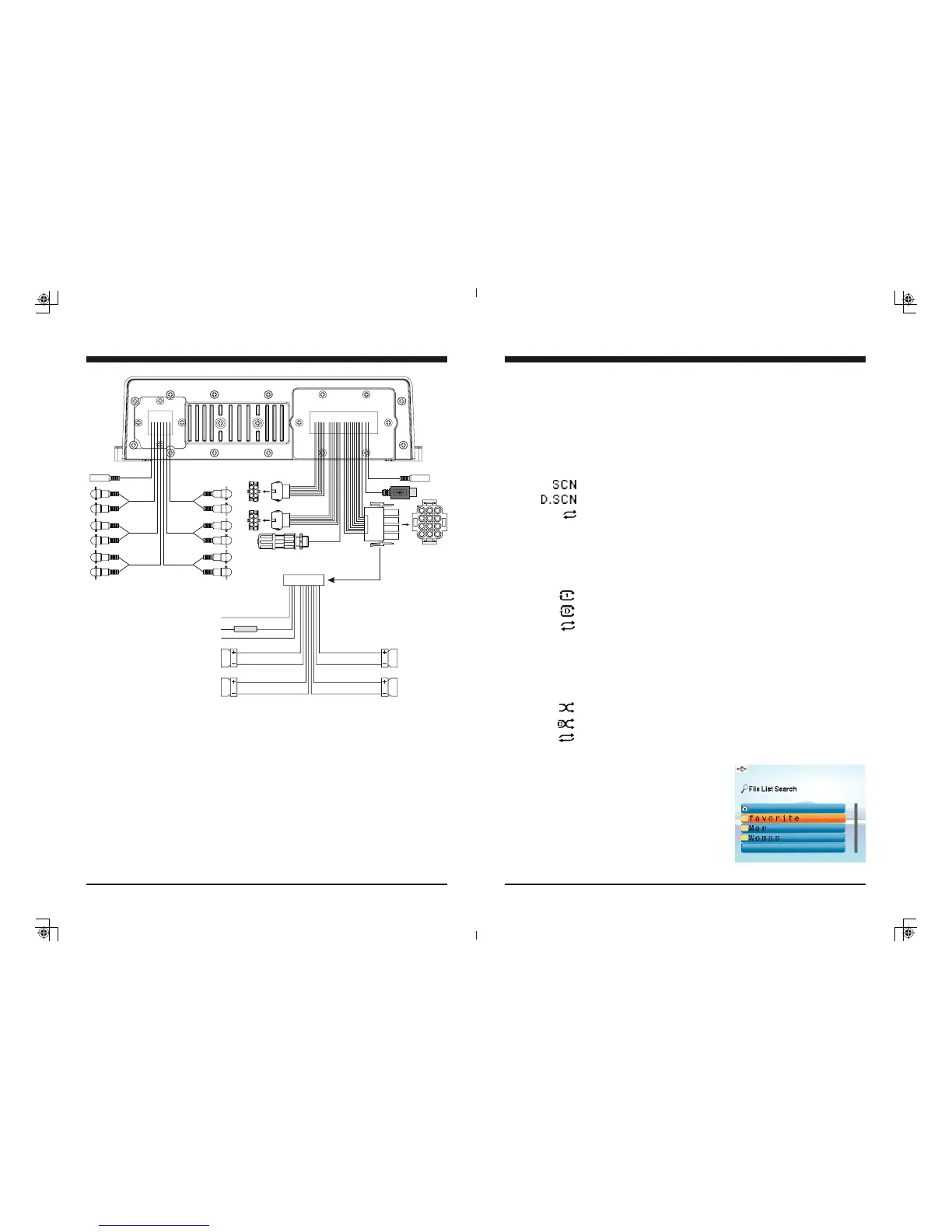
Wiring Configuration
(AUTO ANT)
(ACC )
( GROUND )
FUSE
BLUE
RED
BLACK
GRAY
GRAY/BLACK
VIOLET
VIOLET/BLACK
(FRONT RIGHT )
( REAR RIGHT )
GREEN
GREEN/BLACK
WHITE
WHITE/BLACK
( FRONT LEFT )
( REAR LEFT )
10 A
USB
ANT JACK
FRONT
LINE OUT
REAR
LINE OUT
AUX 2
AUX 1
6P REMOTE
CONTROL
12P CONNECTOR
6P REMOTE
CONTROL
NOTE:
1. When wiring, the red lead is recommended to be wired to ACC/ignition power lead.
2. Make sure that the black wire on the wiring harness is connected to a good ground point
on the boat. If the chassis of the boat is used as a ground point, make sure that the surface
is scraped clean of paint before attaching the wire to it. It is recommended to connect the
black ground wire directly to negative terminal (-) of the boat battery.
3. Before wiring your system, disconnect your boat battery’s positive (+) cable. This helps
prevent damage in case of a short.
SiriusXM
CONTROL
ZONE
LINE OUT
SUB
WOOFER
CAN BUS
21
4. Track Up/Down
While USB is playing, press TUNE Up or Down button to select the next or previous
track. To go fast forward or rewind, press and hold TUNE button.
Note: The Track No. would change simultaneously.
5. Scan Play
While USB is playing, press MENU button to activate navigation, it will highlight at
SCAN and blink, now repeat press MENU button to toggle select Track Scan, Directory
Scan, or SCAN OFF. (Note: The play mode icon would change simultaneously.)
6. Repeat play
While USB is playing, press MENU button to activate navigation, then press TUNE
Down button to move highlight to RPT, repeat press MENU button to toggle select Track
Repeat, Directory Repeat, or RPT OFF. (Note: The play mode icon would change
simultaneously.)
7. Random play
While USB is playing, press MENU button to activate navigation, then press TUNE
Down button to move highlight to RDM, repeat press MENU button while RDM blink
to toggle select Track Random, Directory Random, or RDM OFF. (Note: The play mode
icon would change simultaneously.)
8. F.LIST (Folder / File Search)
While USB is playing, press MENU button to
activate navigation, then press TUNE Down button
to move highlight to F.LIST, press ENTER button
to go inside the F.List.
In F.List, press TUNE Up or Down button to choose
desired Folder, press ENTER to display sub-directory
or files inside, press TUNE Up or Down button to
choose desired file and press ENTER button to play it.
Refers to play of current track repeatedly.
Refers to play of the tracks in current Directory repeatedly.
Refers to play of all the tracks in normal sequence.
Refers to play of all the tracks in a random sequence.
Refers to play of the tracks in current Directory in a random sequence.
Refers to play of all the tracks in normal sequence.
USB Section Operation
Refers to play of the first 10s of all the tracks in the USB device.
Refers to play of the first 10s of all the tracks in current Directory.
Refers to play of all the tracks in normal sequence.


 To Next Page