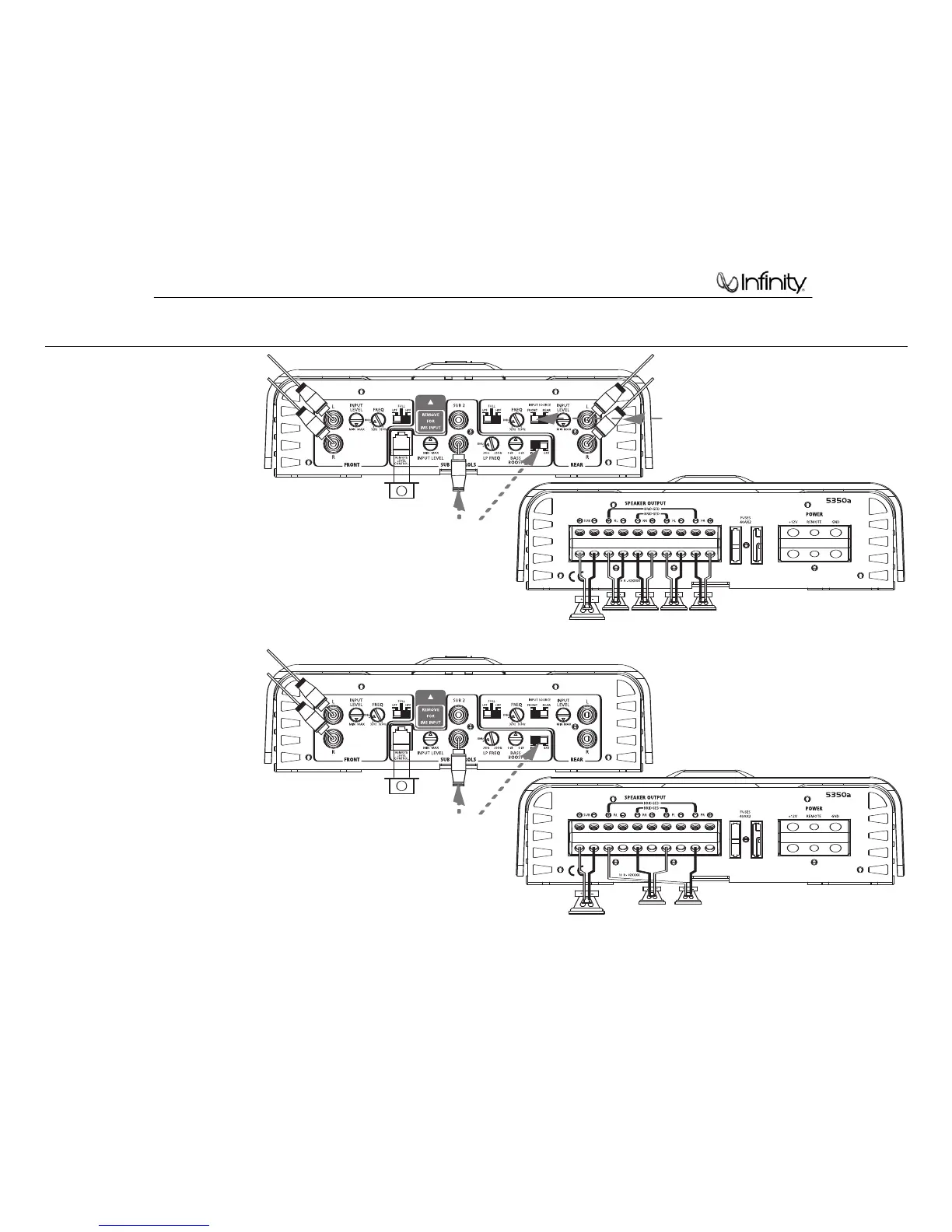
The 5350a can be configured for 5-channel or
3-channel operation, as shown in Figures 9
and 10.
INPUT MODE SWITCH:
• Use INT (internal mode) to send a signal from
the front and rear inputs to the subwoofer.
• Use EXT (external mode) when sending a
dedicated signal to the subwoofer inputs; e.g.,
if your source unit has a subwoofer output.
NOTE: Minimum speaker impedance for
stereo operation is 2 ohms. Minimum speaker
impedance for bridged operation is 4 ohms.
Minimum impedance of any subwoofer or
combination of subwoofers is 2 ohms.
APPLICATIONS – 5350a
Figure 9. 5350a connected to four satellite
speakers and a single subwoofer. Note
crossover and channel assignment settings.
Figure 10. 5350a connected in bridge
(3-channel) mode to a pair of satellite
speakers and a subwoofer. Note crossover
and channel assignment settings.
NOTE: If head unit includes
a separate subwoofer output,
connect it here and place
switch in EXT position.
NOTE: If head unit includes
a separate subwoofer output,
connect it here and place
switch in EXT position.
NOTE: If head unit has only two preamp outputs,
do not connect to rear, and place rear input
source switch in the FRONT position.




 To Next Page