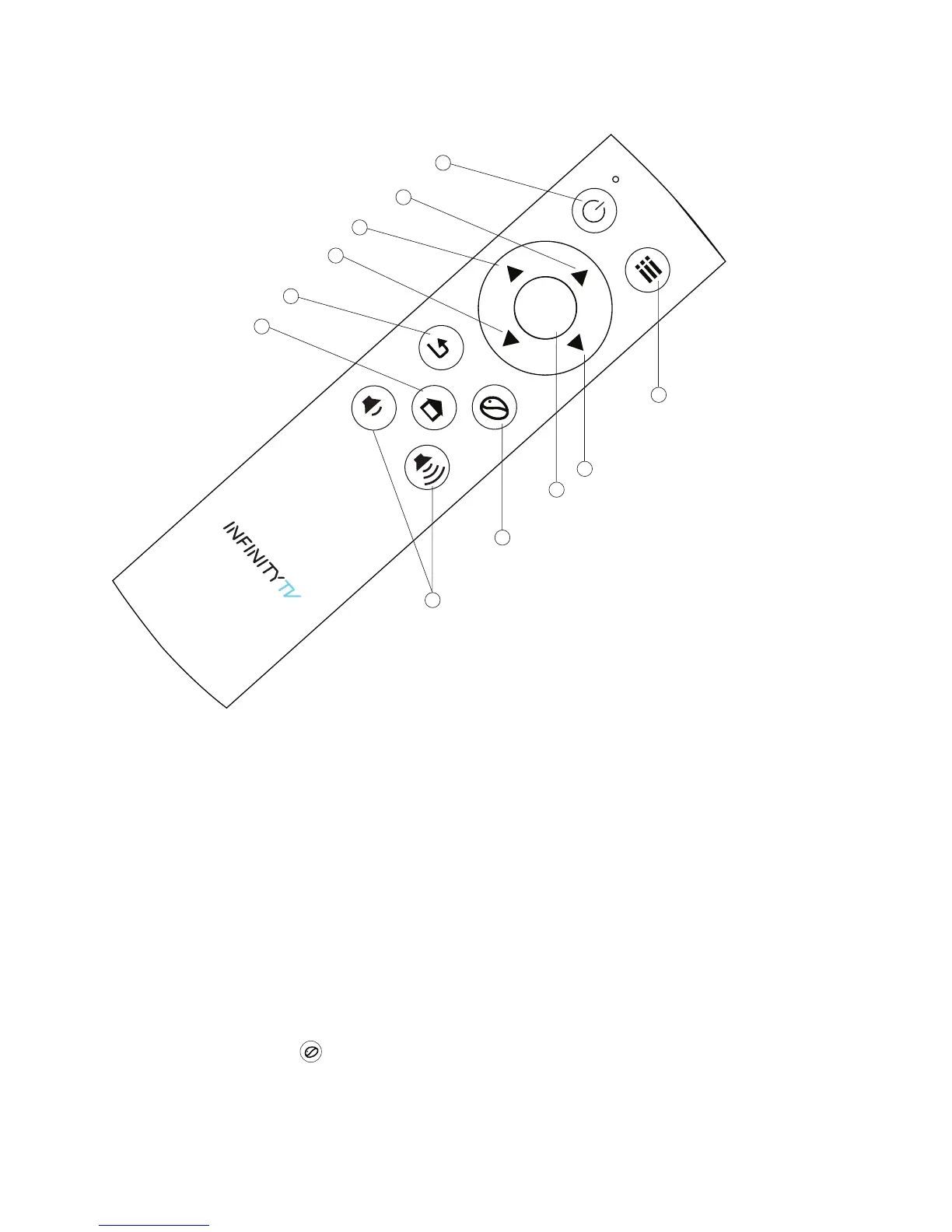
Infinity TV Remote
How do I set it up?
That’s the best part! It’s as easy as 1—2—3!
1. Connect your Infinity TV Box to your TV or computer monitor, using the HDMI cable
2. Plug the Infinity TV Box into a power outlet
3. Connect your Internet (WiFi or Ethernet — both work!)
and BOOM: you're ready to start enjoying Infinity TV's endless supply of
entertainment! If you choose to connect via WiFi, simply go to settings and select
WiFi. From there, enter your password and follow the prompts like you would with
your laptop or other mobile devices. Your Infinity TV Box remote has a button
labelled “Mouse” that you can press and hold that will allow you to manoeuvre
through these steps.
OK
1
2
10
9
11
8
7
3
5
6
4
1. Power
2. Menu
3. Scroll right or Forward (30 seconds)
4. OK/Select
5. Mouse
6. Volume (down and up)
7. Home
8. Back (previous page/screen)
9. Scroll Down or Jump back (10 minutes)
10. Scroll left or Back (30 seconds)
11. Scroll Down or Jump ahead (10 minutes)



 To Next Page