Need help?
Do you have a question about the Infinium OMNI Express and is the answer not in the manual?
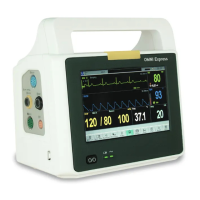
Describes the intended use and parameters monitored by the OMNI Express Patient Monitor.
Explains the manual's content and advises reading all safety information.
Details controls and indicators located on the front panel of the OMNI Express Patient Monitor.
Details sockets and connectors on the left side panel of the OMNI Express Patient Monitor.
Details the printer connection on the right side panel of the OMNI Express Patient Monitor.
Details connectors and interfaces on the rear panel of the OMNI Express Patient Monitor.
Explains common symbols used on the monitor and its packaging.
Describes the screen layout for displaying two waveforms on the OMNI Express Patient Monitor.
Describes the screen layout for displaying three waveforms on the OMNI Express Patient Monitor.
Details setup options intended for servicing engineers only for system configuration.
Explains how to set alarm priorities and limits for patient monitoring.
Provides instructions for proper placement of ECG electrodes on the patient.
Details the connection procedure for ECG cables and leadwires to the monitor.
Outlines the various settings and parameters available for ECG monitoring setup.
Explains the ST-segment analysis function for monitoring ST elevation and depression.
Describes the arrhythmia detection and analysis capabilities of the ECG monitoring.
Lists and explains potential error messages that may occur during ECG monitoring.
Provides guidance on how to clean and maintain the ECG monitoring components.
Details the correct placement of electrodes for accurate respiration monitoring.
Explains how to configure and set up the respiration monitoring parameters.
Provides instructions for cleaning and maintaining the respiration monitoring sensors.
Explains the basic principles and method of SpO2 measurement using pulse oximetry.
Provides instructions for correctly installing the SpO2 sensor on the patient.
Outlines the settings and parameters available for configuring SpO2 monitoring.
Discusses factors that can affect the accuracy and limitations of SpO2 measurements.
Lists and explains common error messages related to SpO2 monitoring.
Information regarding Masimo patents and licensing for SpO2 sensors.
Information regarding Nellcor patents and trademarks for SpO2 sensors.
Explains the oscillometric method used by the NIBP module for blood pressure measurement.
Provides guidance on selecting and fitting the NIBP cuff for accurate measurements.
Describes the initial self-check procedure for the NIBP module before use.
Details the various settings and options available for NIBP monitoring setup.
Explains how to view and manage recorded NIBP measurements.
Discusses limitations and conditions that may affect NIBP measurement accuracy.
Lists and explains common error messages that may appear during NIBP monitoring.
Provides instructions for cleaning and maintaining NIBP components.
Explains how the monitor measures temperature using a thermistor probe.
Provides instructions for inserting and connecting the temperature sensor.
Outlines the available settings and parameters for temperature monitoring.
Lists and explains error messages related to temperature monitoring.
Provides instructions for cleaning and maintaining temperature probes and the unit.
Explains the principle of infrared light absorption for measuring carbon dioxide.
Lists important safety precautions and warnings related to EtCO2 monitoring.
Defines key terms and abbreviations used in EtCO2 monitoring.
Details the procedure for zeroing the CO2 module for accurate readings.
Instructions for preparing the patient and connecting tubing for EtCO2 monitoring.
Introduction and setup for the Phasein IRMA mainstream multi-gas probe.
Introduction and setup for the Phasein ISA sidestream gas analyzer.
Details the safety classifications and standards for the ISA sidestream gas analyzer.
Lists critical safety warnings and precautions for using the ISA sidestream gas analyzer.
Guides users through setting up essential patient demographic information.
Provides methods for inputting new patient case data into the monitor.
Explains how to remove existing patient data records from the monitor.
Details how the system saves and traces trends for various patient parameters.
Guides on setting the monitor's time for accurate data logging and trend review.
Explains how to mark significant events during monitoring for later analysis.
Setting the interval for data display in graphical or tabular trend views.
How to interpret graphical representations of patient data trends.
How to view and analyze patient data trends in a tabular format.
Recalling and reviewing information about past alarm events.
Accessing and reviewing the most recently captured waveforms.
Overview of the OMNI Express's battery operation and design.
Explains the procedure for conditioning a new battery to maintain its lifespan.
Guidance on proper recycling of used batteries.
Instructions for disposing of device components, including batteries, according to regulations.
Summarizes safety standards and requirements met by the monitor.
Describes the intended patient population and physical characteristics of the monitor.
Details the technical performance metrics of the monitor's display and waveforms.
Technical specifications for the ECG monitoring module, including input, standards, and accuracy.
Technical specifications for the Respiration monitoring module, including measurement method and accuracy.
Technical specifications for the Non-Invasive Blood Pressure (NIBP) monitoring.
Technical specifications for the SpO2 monitoring, including standards, ranges, and accuracy.
Technical specifications for the Temperature monitoring, including standards and accuracy.
Technical specifications for the optional CO2 monitoring module.
 General
| Brand | Infinium |
|---|---|
| Model | OMNI Express |
| Category | Medical Equipment |
| Language | English |

 To Next Page