EasyManua.ls Logo

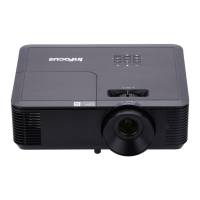
InFocus Genesis P132 - User Manual

InFocus Genesis P132
82 pages
Print Icon
To Next Page IconTo Next Page
Loading...
Introduction Guide - DLP Multimedia Projector
Marketing Name: Genesis
Regulatory Models: P130 P131 P132
Part-Numbers IN112AA, IN113AA IN112BB, IN113BB
IN114AA, IN115AA IN114BB, IN115BB IN114BBST, IN115BBST
IN116AA, IN117AA IN116BB, IN117BB IN116BBST, IN117BBST
IN118AA, IN188AA
IN118BB, IN188BB IN118BBST, IN188BBST
IN119AA, IN199AA
IN119BB, IN199BB
12.2020 | Rev. A03 | Document No. 10000001 | EN
InFocus Corporation
Question and Answer IconNeed help?

Do you have a question about the InFocus Genesis P132 and is the answer not in the manual?

Summary

Safety information

Notes, cautions and warnings

Explains the meaning of NOTE, CAUTION, and WARNING symbols.

Information symbols and descriptions

Explains symbols for required actions and prohibited actions.

Safety precautions

Provides precautions for projector usage, installation, and handling.

Set up your InFocus

Turning the projector on and off

Steps to power the projector on/off and its cooling cycle.

Installing batteries in remote control

Instructions for inserting AAA batteries into the projector's remote control.

Projector placement and distance

Guidance on optimal projector positioning and distance from the screen for image projection.

Projection distance considerations

Explains how projector distance affects image size and provides relevant notes.

Mounting modes

Details various installation methods for the projector, including front, rear, and ceiling mounts.

Using the projector on-screen display (OSD)

Explains the OSD menu structure and various image settings available.

Parts and functions

Getting help and contacting InFocus

Self-help resources for troubleshooting

Guides users through built-in help topics to resolve common projector issues.

Summary

Safety information

Notes, cautions and warnings

Explains the meaning of NOTE, CAUTION, and WARNING symbols.

Information symbols and descriptions

Explains symbols for required actions and prohibited actions.

Safety precautions

Provides precautions for projector usage, installation, and handling.

Set up your InFocus

Turning the projector on and off

Steps to power the projector on/off and its cooling cycle.

Installing batteries in remote control

Instructions for inserting AAA batteries into the projector's remote control.

Projector placement and distance

Guidance on optimal projector positioning and distance from the screen for image projection.

Projection distance considerations

Explains how projector distance affects image size and provides relevant notes.

Mounting modes

Details various installation methods for the projector, including front, rear, and ceiling mounts.

Using the projector on-screen display (OSD)

Explains the OSD menu structure and various image settings available.

Parts and functions

Getting help and contacting InFocus

Self-help resources for troubleshooting

Guides users through built-in help topics to resolve common projector issues.

InFocus Genesis P132 Specifications

General IconGeneral
BrandInFocus
ModelGenesis P132
CategoryProjector
LanguageEnglish

Related product manuals