12
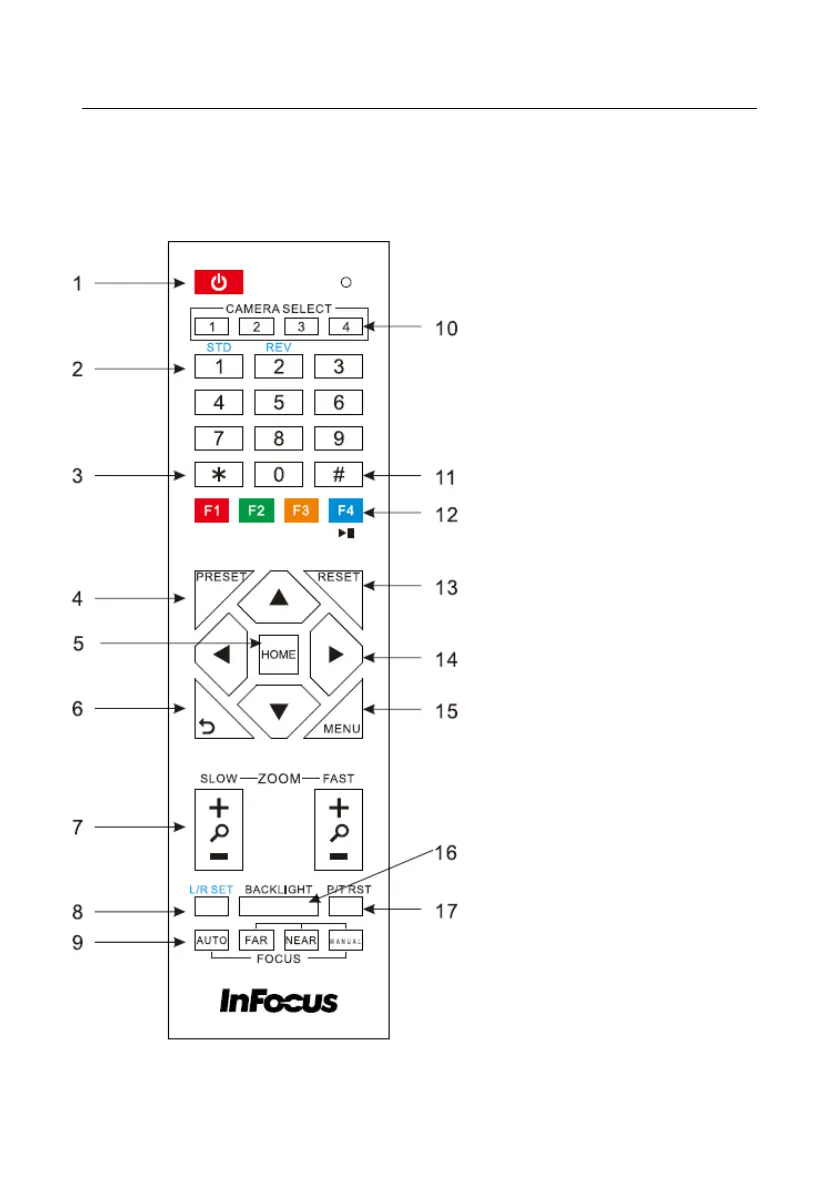
IR Remote Controller Explanation
1. Standby Button
Press this button to enter standby mode.
Press it again to enter normal mode. (Note:
Power consumption in standby mode is
approximately half of the normal mode)
2. Position Buttons
To set preset or call preset
3. *Button
Used with other buttons
4. Set/Preset Buttons
Set preset: Store a preset position
[SET PRESET] + Numeric button (0-9):
Setting a corresponding numeric key preset
position
5. Pan-Tilt control Buttons
Pressing the Pan-Tilt back to the middle
position
6. MENU
MENU: enter or exit OSD MENU
7. Zoom Buttons
Slow Zoom: Zoom In [+] or Zoom Out [-]
slowly
Fast Zoom: Zoom In [+] or Zoom Out [-]
fast
8. Pan-Tilt L/R set
Press with 1 buttons and 2 buttons setting the
direction of the Pan-Tilt
L/R Set +1[STD]: set the Pan-Tilt turn the
same direction as the L/R Set
L/R Set +2[REV]: set the Pan-Tilt turn the
opposite direction as the L/R Set



 To Next Page