INFOCUS
25
Parameter setup: with function buttons
A. Video viewing window
Video viewing window must be same as video
resolution, the bigger the resolution is, the bigger
the playing area is. Double click viewing window,
will show full-screen, double click again, will
return to initialized size.
Status bar in viewing window shown as
below
1) Video playback pause button: control
real-time video pause, stop the last picture, click
recoverable video again.
2) Audio control buttons: can set silent mode.
3) Full screen switch button.
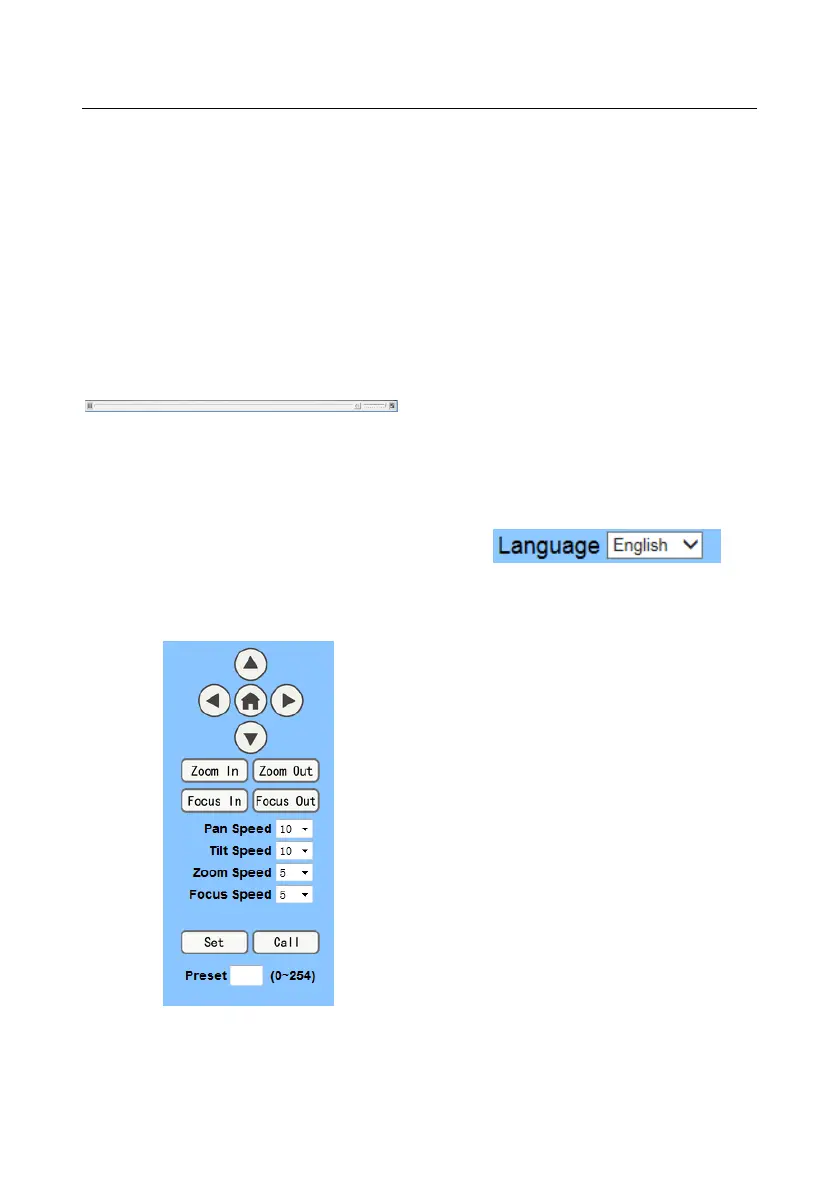
B. PTZ Setup
1) PTZ direction control box: Up, down,
left, right, home oblique button as above
2) Rate: Vertical speed can be chosen as
1 ~ 24, horizontal direction at the rate of 1 ~ 20.
3) select corresponding speed and click
direction button to realize PTZ speed up or speed
down.
4) Zoom In/Zoom out: for zooming in or
zooming out, Focus In/ Focus Out: Focusing on
distant objects or Focusing on close objects.
5) Set/Call: When PTZ turn to expected
position, can set up a number of preset that user
want. click "Set" button, when PTZ turn to other
position, click "Call" button, PTZ turn back to
preset position.
C. Language selection
Chinese/English/Russian
6.2 Media
Video Setup, please click "Video"


 To Next Page