EasyManua.ls Logo

Inkel MX 991 - Gnd Terminal; Line Inputs; Phono Inputs

Default Icon
8 pages
Print Icon
To Next Page IconTo Next Page
To Previous Page IconTo Previous Page
Loading...
Rear
Panel
Connections
(continued)
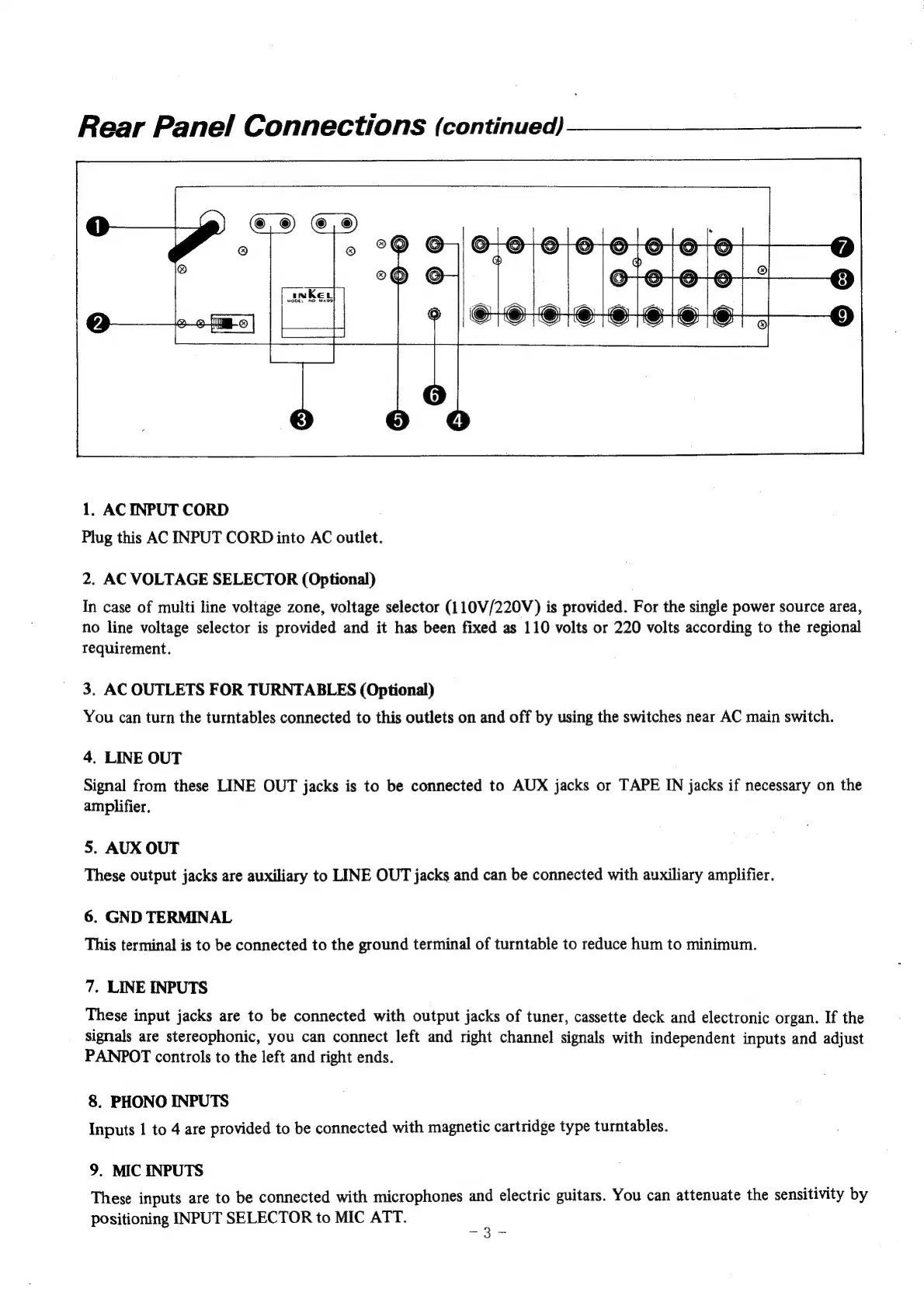
1.
AC
INPUT
CORD
Plug
this
AC
INPUT
CORD
into
AC
outlet.
2.
AC
VOLTAGE
SELECTOR
(Optional)
In
case
of
multi
line
voltage
zone,
voltage
selector
(110V/220V)
is
provided.
For
the
single
power
source
area,
no
line
voltage
selector
is
provided
and
it
has
been
fixed
as
110
volts
or
220
volts
according
to
the
regional
requirement.
3.
AC
OUTLETS
FOR
TURNTABLES
(Optional)
You
can
turn
the
turntables
connected
to
this
outlets
on
and
off
by
using
the
switches
near
AC
main
switch.
4.
LINE
OUT
Signal
from
these
LINE
OUT
jacks
is
to
be
connected
to
AUX
jacks
or
TAPE
IN
jacks
if
necessary
on
the
amplifier.
5.
AUX
OUT
These
output
jacks
are
auxiliary
to
LINE
OUT
jacks
and
can
be
connected
with
auxiliary
amplifier.
6.
GND
TERMINAL
This
terminal
is
to
be
connected
to
the
ground
terminal
of
turntable
to
reduce
hum
to
minimum.
7.
LINE
INPUTS
These
input
jacks
are
to
be
connected
with
output
jacks
of
tuner,
cassette
deck
and
electronic
organ.
If
the
signals
are
stereophonic,
you
can
connect
left
and
right
channel
signals
with
independent
inputs
and
adjust
PANPOT
controls
to
the
left
and
right
ends.
8.
PHONO
INPUTS
Inputs
1
to
4
are
provided
to
be
connected
with
magnetic
cartridge
type
turntables.
9.
MIC
INPUTS
These
inputs
are
to
be
connected
with
microphones
and
electric
guitars.
You
can
attenuate
the
sensitivity
by
positioning
INPUT
SELECTOR
to
MIC
ATT.
: