EasyManua.ls Logo

Inkel SYSTEM 800 - Page 5

Inkel SYSTEM 800
7 pages
Print Icon
To Next Page IconTo Next Page
To Previous Page IconTo Previous Page
Loading...
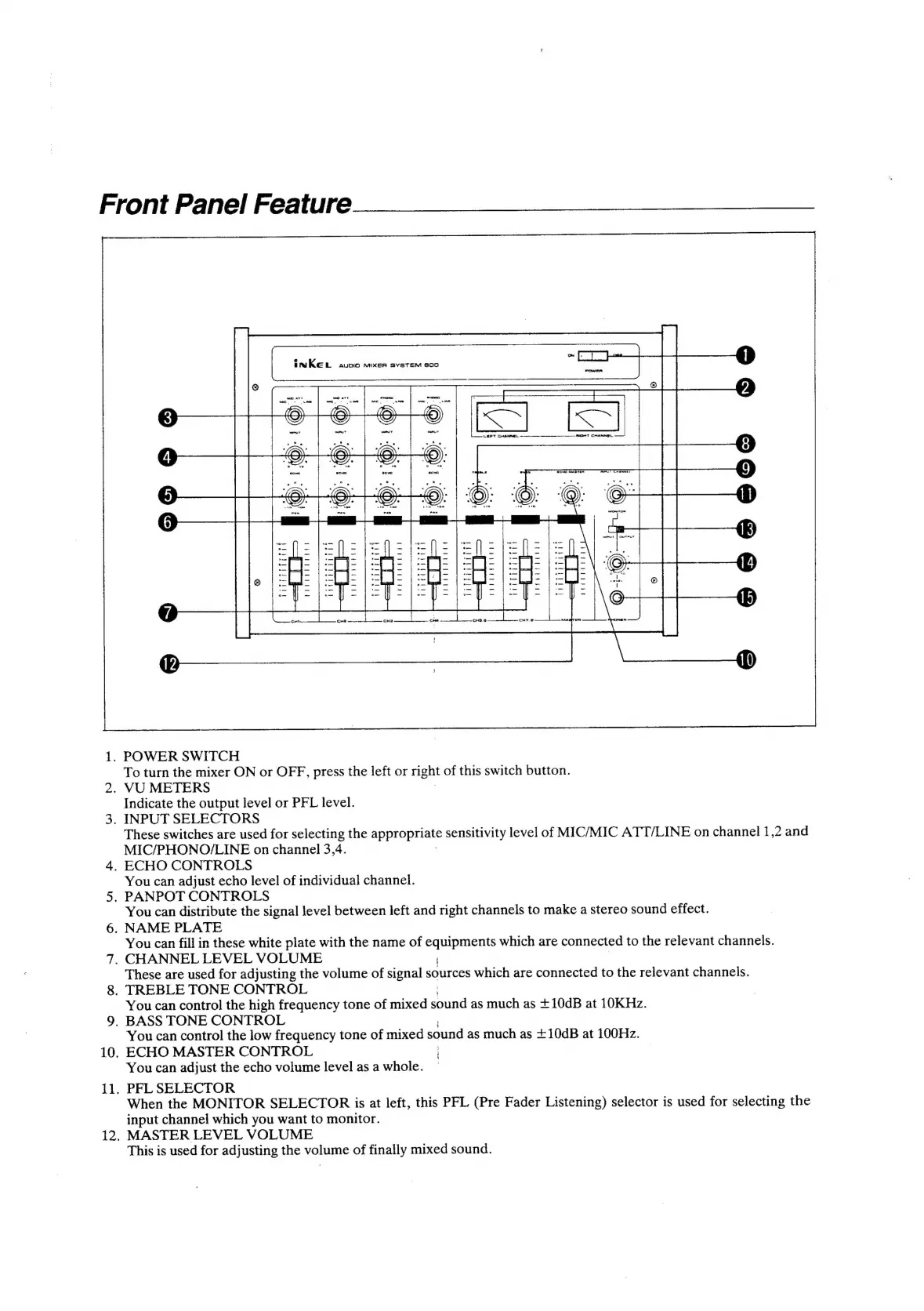
Front
Panel
Feature
10,
ii.
2.
K
aa
(aed
Ba
INREL
avuoio
mixeER
SYSTEM
800
POWER
carr
»
-
.
oe
PT
peel
or
La&e|t
c.
T
CHANNEL
o's
>
?
.
a
.
.
.
.
*
°
a0
o
14
es
10
°
ac
ec ec
En
ee
ee
See
te
ritsiitaiie
bpbetyuddea
beeriuguial
rigddiiita
itiiiiiith
3
Jf
:
©:
©:
:
:
ea
(RASA
SAR:
a
ee
es
ee
mae
(<o)
.
POWER
SWITCH
To
turn
the
mixer
ON
or
OFF,
press
the
left
or
rignt
of
this
switch
button.
.
VU
METERS
Indicate
the
output
level
or
PFL
level.
.
INPUT
SELECTORS
These
switches
are
used
for
selecting
the
ap
TOnaae
sensitivity
level
of
MIC/MIC
ATT/LINE
on
channel
1,2
and
MIC/PHONO/LINE
on
channel
3,4.
.
ECHO
CONTROLS
You
can
adjust
echo
level
of
individual
channel.
.
PANPOT
CONTROLS
You
can
distribute
the
signal
level
between
left
and
right
channels
to
make
a
stereo
sound
effect.
.
NAME
PLATE
You
can
fill
in
these
white
plate
with
the
name
of
a
which
are
connected
to
the
relevant
channels.
.
CHANNEL
LEVEL
VOLUME
These
are
used
for
adjusting
the
volume
of
signal
sources
which
are
connected
to
the
relevant
channels.
.
TREBLE
TONE
CONTROL
You
can
control
the
high
frequency
tone
of
mixed
aun
as
much
as
+10dB
at
10KHz.
.
BASS
TONE
CONTROL
You
can
control
the
low
frequency
tone
of
mixed
sound
as
much
as
+10dB
at
100Hz.
ECHO
MASTER
CONTROL
|
You
can
adjust
the
echo
volume
level
as
a
whole.
PFL
SELECTOR
When
the
MONITOR
SELECTOR
is
at
left,
this
PFL
(Pre
Fader
Listening)
selector
is
used
for
selecting
the
input
channel
which
you
want
to
monitor.
MASTER
LEVEL
VOLUME
This
is
used
for
adjusting
the
volume
of
finally
mixed
sound.