Ͱ/Ͳ Innbox GͳͰ Quick Start Guide
© Copyright ͵ Iskratel. All rights reserved.
Description of the Innbox GͳͰ
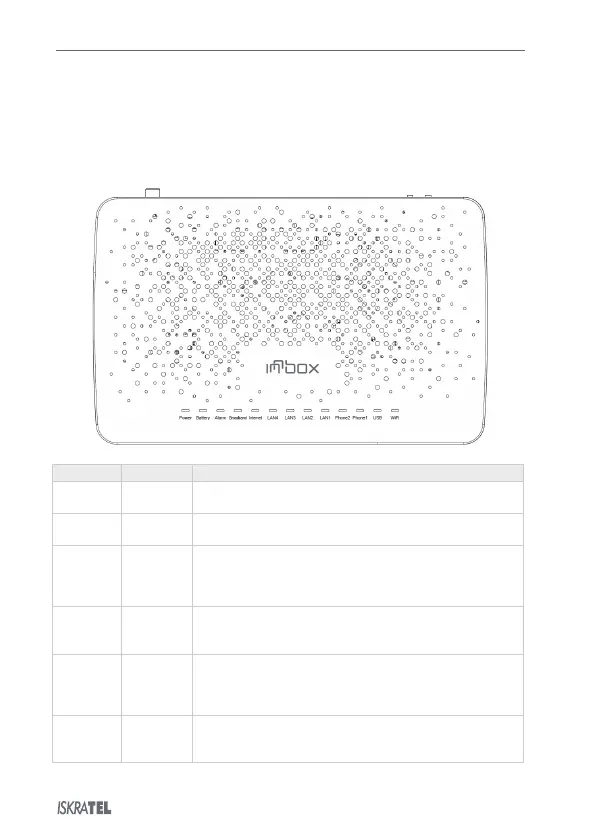
. Top View
The top of the Innbox GͳͰ home gateway is equipped with several light indicators that provide you with
the status of the device.
On – The device is powered on and operational.
Off – The device is powered off or the power supply is defected.
On – The device is running on battery power.
Off – The device is running on AC power.
On – The device failed to receive any optical signal or the signal
strength is too low to detect.
Blinking – The received power of the received optical signal is low.
Off – The connection is established and working properly.
On – Broadband line is connected, physical connectivity is established.
Blinking
- Data are transmitted normally.
Off – Broadband line is disconnected.
On – GPON connection is established and working properly.
Blinking
– GPON connection failed to establish.
– The device failed to receive any optical signal or the signal
strength is too low to detect.
On – The connected device is switched on and ready to communicate.
Blinking
– Data are transferred between the devices.
Off – No devices are connected, or they are switched off.


 To Next Page