Innbox GͳͰ Quick Start Guide ͱ/Ͳ
© Copyright ͵ Iskratel. All rights reserved.
On – External phone is connected and the service is ready for use.
Blinking
– Phone service is in use.
Off – External phone is not connected or the service is disabled.
On – The USB device is connected and recognised.
Blinking
– Data transfer activity is in progress.
Off – No USB device is connected.
On – Wireless connectivity on the home gateway is enabled.
Blinking
– Wireless connectivity is in use.
Off – Wireless connectivity on the home gateway is disabled.
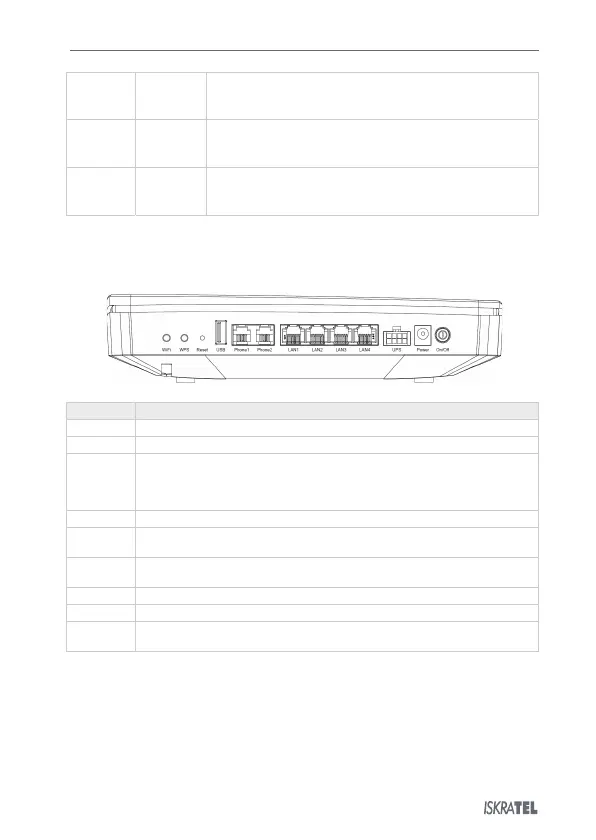
. Back View
The back of the Innbox GͳͰ home gateway is equipped with connectors and switches that allow you to
connect your device.
Button to enable or disable the Wi-Fi.
Button to enable or disable the WPS.
Button to reset the configuration to factory defaults. When pressed, the light
indicators briefly go off and on again and the home gateway
is reset. Factory defaults
only valid for the time the device is running; if you want to preserve them,
USB port to connect USB devices.
Two ports to connect analogue phones.
Four Ethernet ports to connect data devices (such as a computer) or video devices
(such as a set-top box).
Connector for external uninterruptible power supply (UPS), i.e. an external battery.
Connector for power supply via the provided power-supply adapter.
Button to switch the home gateway on or off. The home gateway is switched on when
the button is pressed in.


 To Next Page