4 OBD2
About the Code Reader
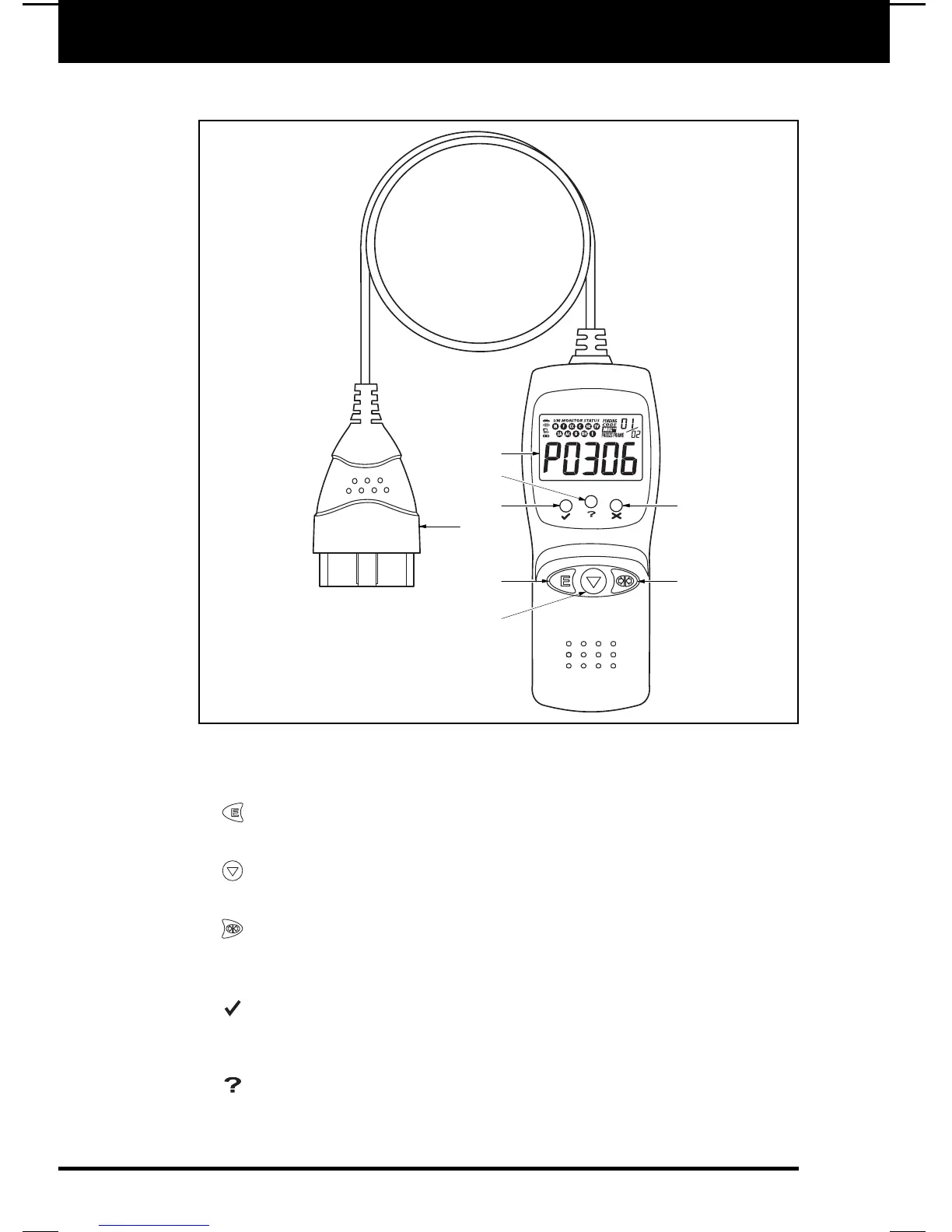
CONTROLS AND INDICATORS
CONTROLS AND INDICATORS
See Figure 1 for the locations of items 1 through 9, below.
1. ERASE button - Erases Diagnostic Trouble Codes (DTCs) and "Freeze
Frame" data from your vehicle's computer, and resets Monitor status.
2. SCROLL button - Scrolls the LCD display to view DTCs when more than
one DTC is present.
3. LINK button - Links the Code Reader with the vehicle's PCM to retrieve
DTCs from the computer's memory, and to view I/M Readiness Monitor
status.
4. GREEN LED - Indicates that all engine systems are running normally (all
Monitors on the vehicle are active and performing their diagnostic testing, and
no DTCs are present).
5. YELLOW LED - Indicates there is a possible problem. A “Pending” DTC
is present and/or some of the vehicle's emission monitors have not run their
diagnostic testing.
E6
7
4
1
5
2
3
6
8
Figure 1. Controls and Indicators


 To Next Page