OBD2 5
About the Code Reader
DISPLAY FUNCTIONS
6. RED LED - Indicates there is a problem in one or more of the vehicle's
systems. The red LED is also used to show that DTC(s) are present. DTCs
are shown on the Code Reader’s LCD display. In this case, the Multifunction
Indicator (“Check Engine”) lamp on the vehicle's instrument panel will light
steady on.
7. LCD Display - Displays test results, Code Reader functions and Monitor
status information. See DISPLAY FUNCTIONS, below, for details.
8. CABLE - Connects the Code Reader to the vehicle's Data Link Connector
(DLC).
DISPLAY FUNCTIONS
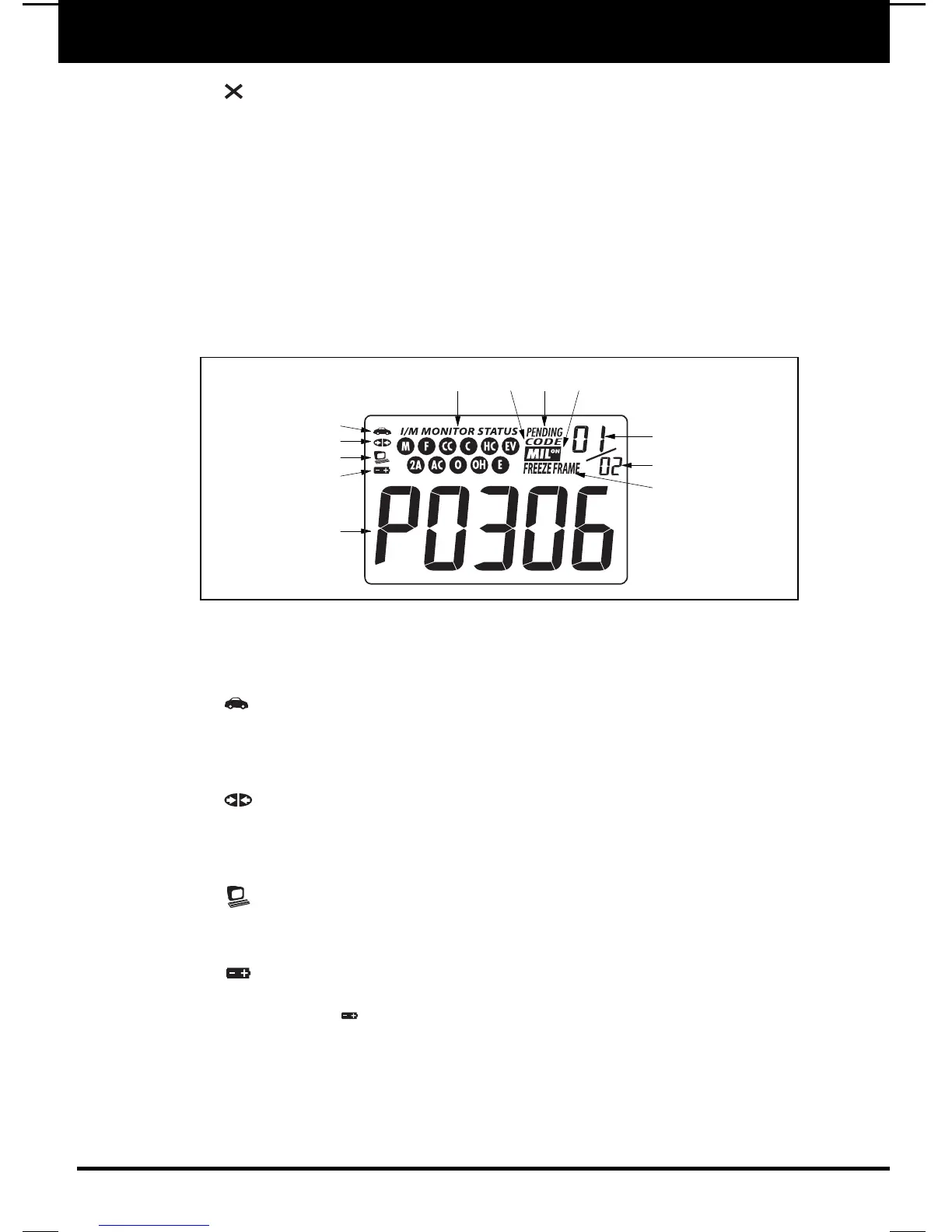
See Figure 2 for the locations of items 1 through 13, below.
1. Vehicle icon - Indicates whether or not the Code Reader is being
properly powered through the vehicle's Data Link Connector (DLC). A visible
icon indicates that the Code Reader is being powered through the vehicle's
DLC connector.
2. Link icon - Indicates whether or not the Code Reader is communicating
(linked) with the vehicle's on-board computer. When visible, the Code Reader
is communicating with the computer. If the Link icon is not visible, the Code
Reader is not communicating with the computer.
3. Computer icon - When this icon is visible it indicates that the Scan Tool
is linked to a personal computer. An optional “PC Link Kit” is available that
makes it possible to upload retrieved data to a personal computer.
4. Internal Battery icon - When visible, indicates the Scan Tool batteries
are “low” and should be replaced. If the batteries are not replaced when the
battery symbol is "on", all 3 LEDs will light up as a last resort indicator to
warn you that the batteries need replacement. No data will be displayed on
screen when all 3 LEDs are lit.
5. DTC Display Area - Displays the Diagnostic Trouble Code (DTC) number.
Each fault is assigned a code number that is specific to that fault.
6. Pending icon - Indicates the currently displayed DTC is a "Pending" code.
E7
2
3
4
5
9
11
10
12
687
1
Figure 2. Display Functions


 To Next Page