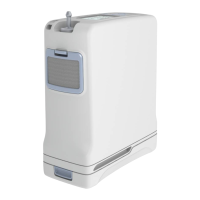
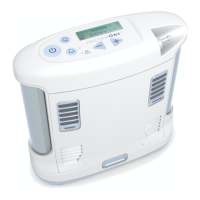
12 Inogen One® G3 portable concentrator
Alarms and warnings.
Important: The Inogen One® G3 display is divided into three areas.
The upper left corner shows the breath activation mode status; the
lower left corner indicates power source and battery charge level;
and the right hand side of the display contains text information such
asowsetting,batterytimeremaininganderrornotications.
Power status icons – operating on battery
The below icons are displayed in the power status
window when the Inogen One® G3 is operating on
battery power:
Power status icons – plugged in to AC
power and charging battery
The below icons are shown when the Inogen One®
G3 is operating from an external power supply and
is charging the battery (a lightning bolt indicates
external power supply).
Mode
Power
Text
Meaning
21
Mode
Power
Text
Display Icons
The Inogen One® G3 display is divided into three areas. The upper left corner of the
display shows the breath detection alert status. The lower left corner indicates power
source and battery charge level. The right side of the display contains text information,
such as flow setting, battery time remaining and error notifications.
Power Status Icons
These icons are examples of those shown in the display’s power status window when the
Inogen One® G3 is operating on battery power.
Inogen One® G3 Oxygen
Concentrator Audible
and Visible Signals
Audible and Visible Signals Chapter 4
Meaning
Battery is empty.
Battery has less than 10% charge remaining. This icon flashes.
Battery has approximately 40% to 50% charge remaining.
Battery is full.
Icon
4
English
Battery is empty.
21
Mode
Power
Text
Display Icons
The Inogen One® G3 display is divided into three areas. The upper left corner of the
display shows the breath detection alert status. The lower left corner indicates power
source and battery charge level. The right side of the display contains text information,
such as flow setting, battery time remaining and error notifications.
Power Status Icons
These icons are examples of those shown in the display’s power status window when the
Inogen One® G3 is operating on battery power.
Inogen One® G3 Oxygen
Concentrator Audible
and Visible Signals
Audible and Visible Signals Chapter 4
Meaning
Battery is empty.
Battery has less than 10% charge remaining. This icon flashes.
Battery has approximately 40% to 50% charge remaining.
Battery is full.
Icon
4
English
Battery has less than 10% charge
remaining. This icon ashes.
21
Mode
Power
Text
Display Icons
The Inogen One® G3 display is divided into three areas. The upper left corner of the
display shows the breath detection alert status. The lower left corner indicates power
source and battery charge level. The right side of the display contains text information,
such as flow setting, battery time remaining and error notifications.
Power Status Icons
These icons are examples of those shown in the display’s power status window when the
Inogen One® G3 is operating on battery power.
Inogen One® G3 Oxygen
Concentrator Audible
and Visible Signals
Audible and Visible Signals Chapter 4
Meaning
Battery is empty.
Battery has less than 10% charge remaining. This icon flashes.
Battery has approximately 40% to 50% charge remaining.
Battery is full.
Icon
4
English
Battery has approximately 40% to
50% charge remaining.
21
Mode
Power
Text
Display Icons
The Inogen One® G3 display is divided into three areas. The upper left corner of the
display shows the breath detection alert status. The lower left corner indicates power
source and battery charge level. The right side of the display contains text information,
such as flow setting, battery time remaining and error notifications.
Power Status Icons
These icons are examples of those shown in the display’s power status window when the
Inogen One® G3 is operating on battery power.
Inogen One® G3 Oxygen
Concentrator Audible
and Visible Signals
Audible and Visible Signals Chapter 4
Meaning
Battery is empty.
Battery has less than 10% charge remaining. This icon flashes.
Battery has approximately 40% to 50% charge remaining.
Battery is full.
Icon
4
English
Battery is full.
Meaning
22
Power Status Icons (continued)
The icons below are examples of those shown when the Inogen One® G3 is operating
from an external power supply and charging the battery. The lightning bolt indicates
that an external power supply is connected.
Meaning
Battery is charging with charge level between 60% and 70%.
The battery is fully charged and is charging as necessary to
maintain its charge.
Battery is charging with charge level less than 10%.
The Inogen One® G3 is operating from an external power source with
no battery present.
Icon
Mode Icons
These are the icons shown in the display’s mode window.
Display Text
NOTE When two conditions occur simultaneously, the condition with the
higher priority will be displayed.
Meaning
The breath detection audible alarm has been enabled.
The breath detection audible alarm is disabled. This is the default condition.
Icon
Battery is charging with charge
level between 60% and 70%.
22
Power Status Icons (continued)
The icons below are examples of those shown when the Inogen One® G3 is operating
from an external power supply and charging the battery. The lightning bolt indicates
that an external power supply is connected.
Meaning
Battery is charging with charge level between 60% and 70%.
The battery is fully charged and is charging as necessary to
maintain its charge.
Battery is charging with charge level less than 10%.
The Inogen One® G3 is operating from an external power source with
no battery present.
Icon
Mode Icons
These are the icons shown in the display’s mode window.
Display Text
NOTE When two conditions occur simultaneously, the condition with the
higher priority will be displayed.
Meaning
The breath detection audible alarm has been enabled.
The breath detection audible alarm is disabled. This is the default condition.
Icon
The battery is fully charged and is
charging as necessary to maintain
its charge.
22
Power Status Icons (continued)
The icons below are examples of those shown when the Inogen One® G3 is operating
from an external power supply and charging the battery. The lightning bolt indicates
that an external power supply is connected.
Meaning
Battery is charging with charge level between 60% and 70%.
The battery is fully charged and is charging as necessary to
maintain its charge.
Battery is charging with charge level less than 10%.
The Inogen One® G3 is operating from an external power source with
no battery present.
Icon
Mode Icons
These are the icons shown in the display’s mode window.
Display Text
NOTE When two conditions occur simultaneously, the condition with the
higher priority will be displayed.
Meaning
The breath detection audible alarm has been enabled.
The breath detection audible alarm is disabled. This is the default condition.
Icon
Battery is charging with charge
level less than 10%.
22
Power Status Icons (continued)
The icons below are examples of those shown when the Inogen One® G3 is operating
from an external power supply and charging the battery. The lightning bolt indicates
that an external power supply is connected.
Meaning
Battery is charging with charge level between 60% and 70%.
The battery is fully charged and is charging as necessary to
maintain its charge.
Battery is charging with charge level less than 10%.
The Inogen One® G3 is operating from an external power source with
no battery present.
Icon
Mode Icons
These are the icons shown in the display’s mode window.
Display Text
NOTE When two conditions occur simultaneously, the condition with the
higher priority will be displayed.
Meaning
The breath detection audible alarm has been enabled.
The breath detection audible alarm is disabled. This is the default condition.
Icon
The Inogen One® G3
is operating
from an external power source
with no battery present.
605360-HC Inogen One G3 POC Brochure NHS-03.indd 12 09/06/2017 08:31


 To Next Page
 Loading...