13 14
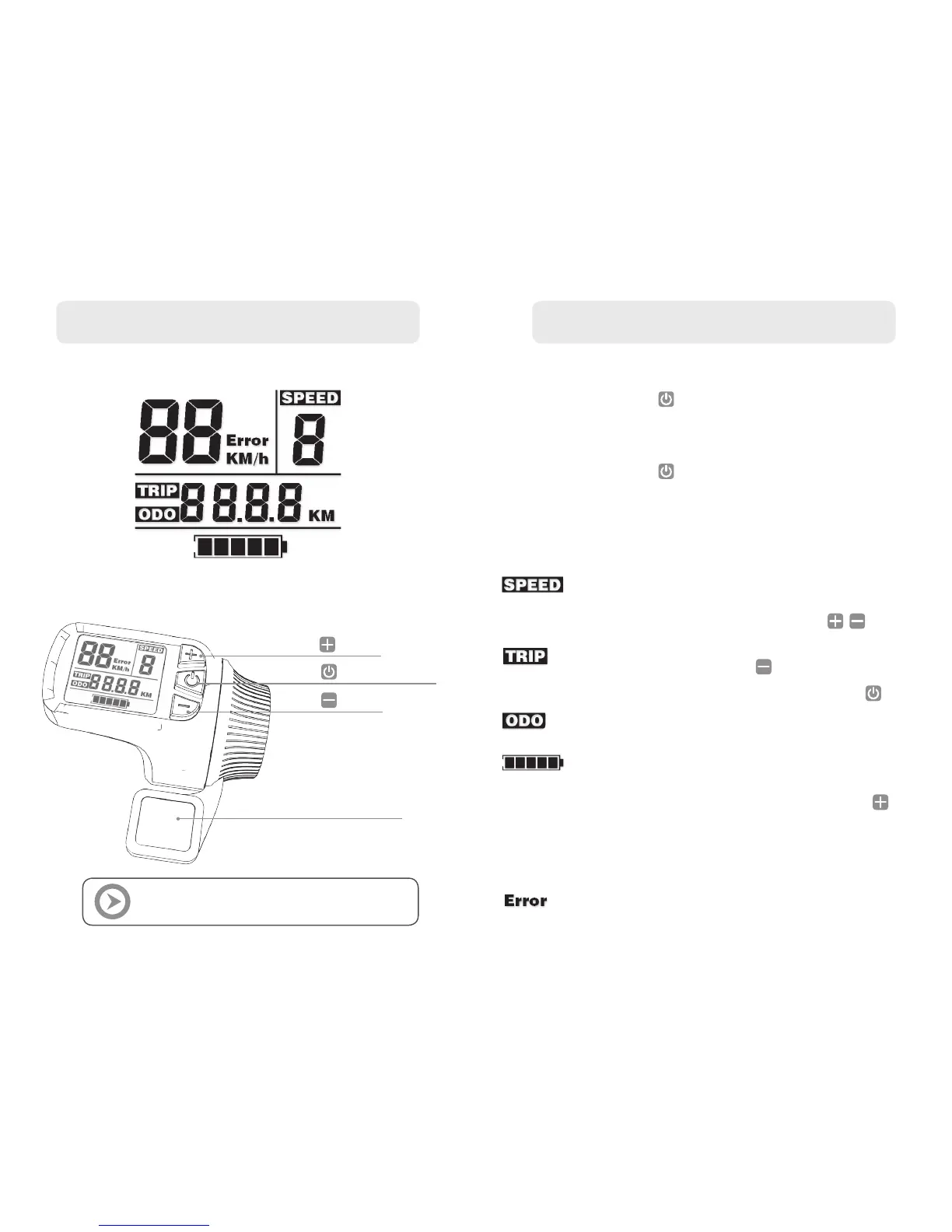
LCD DISPLAY
THROTTLE BUTTONS INTRODUCTION
THROTTLE OPERATION
ON/OFF button
Button
Button
ACCELERATE thumb lever
THROTTLE OPERATION
POWER ON
POWER OFF
AUTO OFF
ACCELERATION
LIGHTS FUNCTION
To power on the scooter:
press
Wait until LCD display stops flashing
before you start riding
To shut down the system:
press
for three seconds
After 10 minutes of not using any function,
the scooter will automatically shut down
To accelerate: gently press the thumb lever.
The OXO is powerful so be careful!
This function is to limit the full speed of the scooter
for beginners or for more accurate riding in a
crowded surrounding.
The mode can be changed with the buttons
Your TRIP distance since your last trip reset.
Reset TRIP by long press
To swap to ODO and battery voltage: press
Your scooters total distance since its factory assembly
Your current battery voltage status
To turn the front and rear lights on: long press
The LCD back-light indicates that the lights are on.
The lights will turn on automatically if the ambient
photographic coefcient is lower than the set value
(You can set it in mode 5, p.15)
Your system has encountered an error,
please contact your local dealer to nd out what it is
WAIT UNTIL LCD DISPLAY STOPS FLASHING
BEFORE YOU START RIDING


 To Next Page