AMTEK Version 7.4 2019-01 Page 29 ©Inomatic 2017-2019
5.3. Hardware Synchronization (No HW Sync for V 7.4)
Synchronization can be done via software or hardware. The necessary settings for
hardware synchronization are described below. A description of the software-based
synchronization is included in the infoNet Manual.
Hardware synchronization allows a number of AMTEK Processor antennas to be
synchronized with another AM system/Processor antenna nearby by synchronizing only
the AMTEK “Master antenna”. The “Slave antennas” will automatically follow the
“Master” synchronization.
The LAN ports (LAN1 and LAN2) can be used for connection to the shop LAN and at the
same time for hardware synchronization.
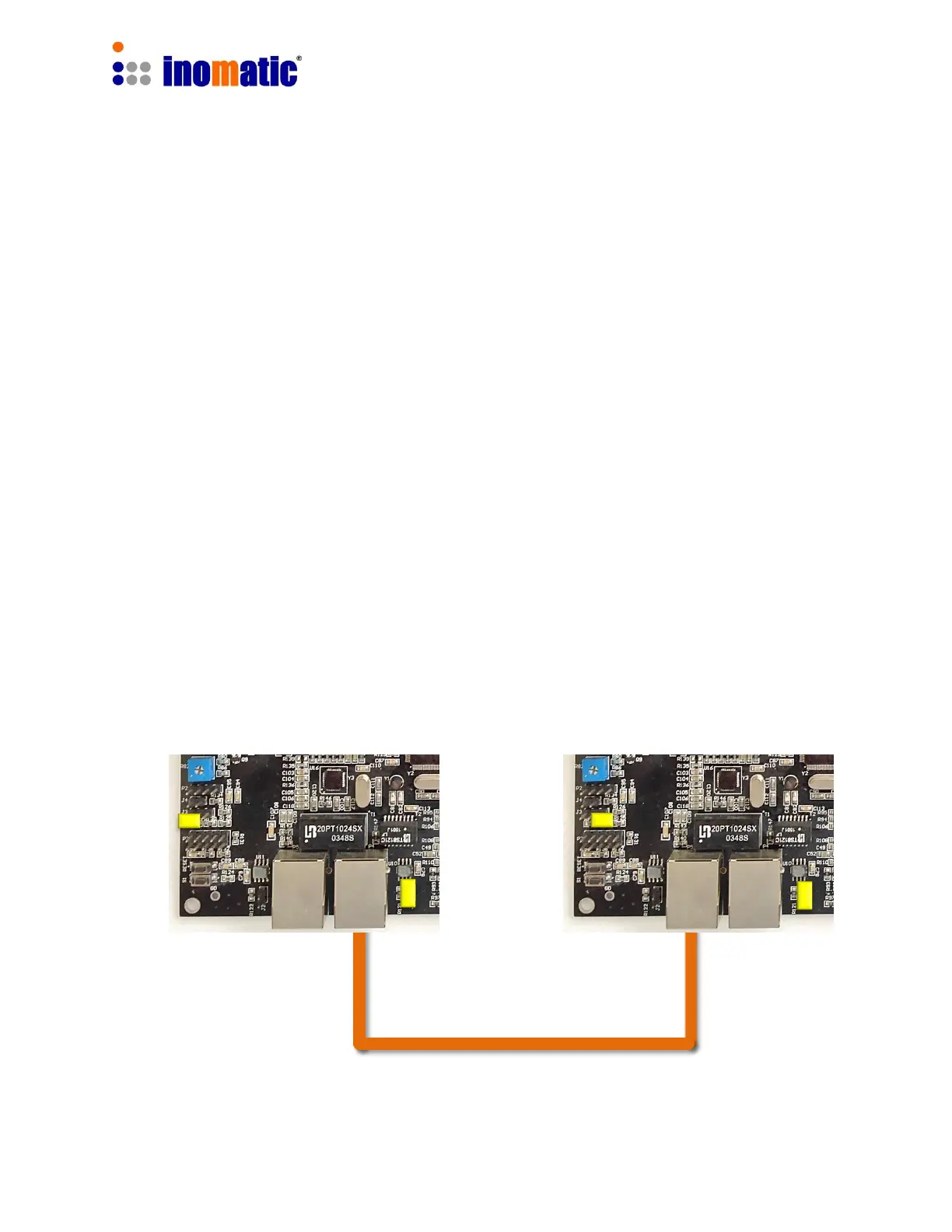
1.) One Processor board has to be set as Master and the other(s) as Slave.
2.) The hardware synchronization ports (LAN 1 or LAN 2) must be connected with a
shielded LAN cable.
The picture below illustrates the connection and the necessary settings for Master or
Slave operation.
Master Processor antenna Slave Processor antenna
Shielded LAN cable


 To Next Page
 Loading...