
 Need help?
Do you have a question about the Insignia NS-AC3000 and is the answer not in the manual?
Lists key features of the adapter including interchangeable tips, manual voltage selection, current capacity, cord length, LEDs, and protection.
Guide on selecting the correct DC tip by gently inserting it into the device and comparing with old adapters.
Instructions for connecting the adapter, including checking device input, voltage, and polarity settings.
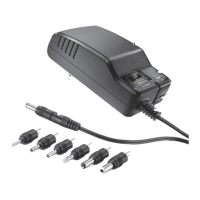
Lists the items included in the package: Universal AC adapter, adapter tips, and quick setup guide.
Details compatibility criteria including tip availability, voltage range (3-24V DC), current limits, and positive polarity.
Steps for connecting and using the adapter, emphasizing immediate unplugging if the device does not work.
Provides solutions for common issues like device not working or adapter overheating.
Outlines technical details such as cable length, input voltage, and output voltage/current ratings.
Includes FCC and Canadian compliance statements regarding radio frequency energy and interference.
Highlights critical safety instructions, user responsibility for settings, and potential device damage.
Provides details on the one-year limited warranty and customer service contact information.
This document describes the Insignia High-Output Universal AC Adapter (NS-AC3000), a versatile power solution designed to provide direct current (DC) power to a wide range of electronic devices.
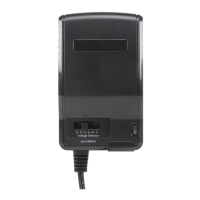
The Insignia High-Output Universal AC Adapter serves as an external power supply, converting alternating current (AC) from a wall outlet into direct current (DC) suitable for various portable electronic devices. It is specifically engineered to power devices that require a DC input voltage between 3 and 24 volts and have a positive polarity. The adapter is equipped with seven interchangeable tips, ensuring compatibility with devices that utilize round-pin connectors of different sizes. This broad compatibility makes it an ideal replacement or secondary power source for numerous gadgets, eliminating the need for multiple dedicated adapters. The adapter features a manual voltage selector knob, allowing users to precisely adjust the output voltage to match their device's requirements. Available voltage settings include 3 V, 4.5 V, 5 V, 6 V, 7.5 V, 9 V, 12 V, 13.5 V, 15 V, 19.5 V, and 24 V. This granular control over voltage output is crucial for preventing damage to sensitive electronics. An illuminated LED display indicates the currently selected voltage, providing clear visual confirmation of the setting. Additionally, the adapter incorporates overcurrent protection, a vital safety feature that safeguards both the adapter and the connected device from excessive current draw. A fault indicator LED is present to alert the user in case of an overcurrent event. The adapter is designed for international use, accepting an input voltage range of 100-240 V AC at 50/60 Hz, making it suitable for travel across different regions with varying power standards. Its primary function is to provide a stable and reliable power source for compatible devices, ensuring their proper operation and charging.
Using the Insignia High-Output Universal AC Adapter involves a few critical steps to ensure safe and effective operation. First, users must carefully identify their device's power requirements, specifically its input voltage, polarity, and current draw. This information is typically found on the device itself, its original adapter, or in its user manual. It is paramount to select the correct voltage and ensure the device has a positive polarity, as using incorrect settings can lead to device damage. The adapter is compatible with devices requiring between 3 and 24 V DC. For current, it supports up to 3,000 mA (3 A) for outputs under 15 V and up to 2,000 mA (2 A) for outputs between 19.5 V and 24 V. Once the device's requirements are known, the user must choose one of the seven interchangeable tips that snugly fits the device's DC jack. The tips are color-coded and have specific outer diameter (OD), inner diameter (ID), and length (L) dimensions, which are provided in the documentation to aid in selection. It is important to test the tips gently and avoid forcing any tip that does not fit correctly. After selecting the appropriate tip, it is connected to the adapter's output connector. Next, the voltage selector knob on the adapter is turned to the desired voltage setting that matches the device's input voltage. The knob's design helps prevent accidental changes to the setting. The illuminated LEDs will confirm the selected voltage. Finally, the adapter is plugged into a standard AC power outlet, and the device is connected to the adapter. The 5-foot (1.5 m) cord provides flexibility in device placement. If the device does not power on or charge, the user should immediately unplug the adapter and re-verify all settings, including voltage, polarity, and tip selection. The adapter is designed exclusively for positive polarity devices; it must not be used with devices that have negative polarity. The adapter is not compatible with certain high-current devices like some computers, monitors, or home theater systems, and users should consult the manufacturer for appropriate power supplies for such devices.
The Insignia High-Output Universal AC Adapter is designed for straightforward use with minimal maintenance, but certain considerations ensure its longevity and safe operation. Users should always ensure the adapter is placed in a well-ventilated area during use. It is normal for the adapter to feel warm to the touch, especially during prolonged operation or when powering devices drawing significant current. However, if the adapter becomes abnormally hot, it is crucial to immediately unplug it and re-check all settings to confirm compatibility with the connected device. Extreme heat could indicate an issue with the adapter or an incompatibility with the device's power requirements. The voltage selector knob is designed to protect against accidental setting changes, but users should still handle it with care to avoid damage. The adapter's robust construction and overcurrent protection feature contribute to its reliability, automatically safeguarding against potential electrical issues. In the event of a fault indicated by the fault LED, the user should disconnect the adapter and investigate the cause, which typically relates to an overcurrent condition. For cleaning, the adapter should be unplugged from both the wall outlet and the device, and then wiped with a dry, soft cloth. Avoid using liquid cleaners or abrasive materials that could damage the casing or internal components. The interchangeable tips should also be kept clean and free of debris to ensure good electrical contact. If any tip becomes damaged or bent, it should be replaced to prevent poor connection or potential short circuits. The 5-foot cord should be inspected periodically for any signs of wear, fraying, or damage. If the cord is damaged, the adapter should not be used. The adapter is not intended for repair by the user; any issues beyond basic troubleshooting should be addressed by contacting customer service. Adhering to these simple maintenance practices will help ensure the adapter continues to function safely and effectively over time.
 General
| Type | AC power adapter |
|---|---|
| Input Voltage | 100-240V AC |
| Output Voltage | 12V |
| Connector Type | Barrel |
| Connector Size | 5.5mm x 2.5mm |
| Cable Length | 6 feet |



 To Next Page