
 Need help?
Do you have a question about the Insignia NS-AF10DSS2 and is the answer not in the manual?
Details on the display screen and indicator lights.
Explains the function of temperature, time, mode, light, preheat, rotate, and power buttons.
Steps to prepare the air fryer oven before cooking.
How to select a cooking mode and start the process.
How to use and clean the cooking racks.
Instructions for cleaning the air fryer oven and accessories.
Steps for proper storage of the appliance.
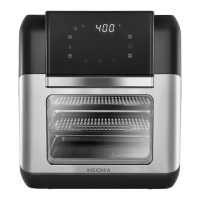
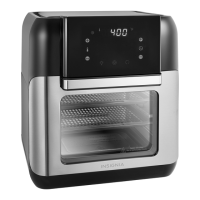
This document describes the Insignia 10 Qt. Digital Air Fryer Oven, models NS-AF10DSS2, NS-AF10DBK2, and NS-AF10DSS2-C. This appliance is designed for reliable and trouble-free performance, offering a versatile cooking experience with its 10-quart capacity, suitable for a wide assortment of foods.
The Insignia Digital Air Fryer Oven utilizes Circular Heat technology to cook food quickly and evenly. It features a digital-touch-screen control panel for easy operation, allowing users to select various cooking modes and adjust settings. An integrated timer helps ensure tasty results by allowing precise control over cooking duration. The oven also includes a clear window, enabling users to view food as it cooks without opening the door.
The control panel features a display that shows cook time, delay time, temperature, and other messages. Dedicated indicators light up to show when the display is showing temperature or time, and a cooking indicator flashes during the cooking process. Temperature and time +/- buttons allow for increasing or decreasing these settings. Mode buttons, each with an associated indicator, enable the selection of specific cooking modes. Additional buttons include a light button to turn on the interior light, a preheat button to initiate preheating, a rotate button for rotisserie functions, and a power button to turn the unit on or off.
The air fryer oven comes with an overheating protection system that automatically shuts off the unit if the internal temperature control system fails. It also has a built-in automatic shut-off device that turns off the unit when the preset time is reached. Even after cooking stops, the fan continues to run for 20 seconds to cool down the unit.
Before initial use, it is crucial to read all instructions and important safeguards. All packaging materials should be removed, and accessories thoroughly washed with hot water and mild detergent using a non-abrasive sponge. The appliance itself should be wiped clean with a damp cloth.
To begin cooking, plug in the power cord; a beep will sound, and the air fryer oven will enter standby mode with all control panel indicators flashing once. Pressing the power button again will cause another beep and all indicators to flash once more. The preheat feature can be used if needed, especially for recipes requiring a preheated oven or for searing meats. To use preheat, place an empty pan and cooking rack into the oven, press the power button, then the preheat button. Once the oven beeps, food can be placed on the rack, and cooking time and temperature can be programmed.
Users can choose a cooking mode by pressing the appropriate mode button, which will illuminate. The display will then show the cooking temperature and time, with the latter counting down. Cooking starts automatically after five seconds or by pressing the power button. The cooking indicator will flash during operation. If the oven door is opened during cooking, the process pauses and resumes when the door is closed. For more even results, the rotate button can be pressed to activate the rotisserie.
The air fryer oven includes several accessories to enhance the cooking experience:
When using the rotisserie spit, the shaft lock switch must be moved to the right to unlock it, then the spit placed into position in the rotisserie shaft rotator. Moving the switch to the left locks the spit in place. After cooking, the shaft lock switch is moved to the right to release the spit, and the removal tool is used to lift it out of the oven.
Regular cleaning is essential for maintaining the air fryer oven. After each use, the appliance should be unplugged and allowed to cool thoroughly before cleaning. The accessories are dishwasher safe, but abrasive cleaning materials or utensils should be avoided to prevent scratches. Caked-on food can be soaked in warm, soapy water for easier removal.
The exterior of the appliance can be wiped with a warm cloth slightly wet with mild detergent. The interior should be cleaned with a warm, non-abrasive sponge, also slightly wet with mild detergent. Any unwanted food residue on the control panel can be removed with a soft cleaning brush.
For storage, ensure the appliance is unplugged and thoroughly cooled, and all components are clean and dry. It should then be placed in a clean, dry location.
The air fryer oven is designed for household use only and should not be used outdoors. It is important to keep the power cord away from hot surfaces and to use the appliance only on a level, dry, and heat-resistant surface. Adequate free space (at least 3.9 inches or 10 cm) should be maintained around the back, sides, and above the appliance to ensure proper ventilation. The appliance should not be placed against a wall or other appliances, nor should anything be placed on top of it.
In case of dark smoke coming from the appliance, it should be immediately unplugged, and users should wait for the smoke to stop before removing cooking racks or trays. During hot air frying, hot steam is released from the air outlet openings, so hands and face should be kept at a safe distance. Extreme caution is also advised when opening the door due to hot steam. The appliance will not operate unless the door is fully closed.
 General
| Brand | Insignia |
|---|---|
| Model Number | NS-AF10DSS2 |
| Type | Air Fryer |
| Color | Stainless Steel |
| Capacity | 10 Quarts |
| Temperature Range | 180°F to 400°F |
| Control Type | Digital |
| Dishwasher-Safe Parts | Yes |
| Timer | Up to 60 minutes |
| Non-Stick Interior | Yes |
| Power | 1700 W |
| Cooking Functions | Air Fry, Roast, Bake, Reheat, Dehydrate |


 To Next Page